
You’re usually not building an upload feature for “files.” You’re building it for a workflow.
A product marketer records a feature release walkthrough. Support adds a screenshot pack. Enablement attaches a logo, a script, and a second take for the intro. Then they hit Upload and your app still behaves like it’s 2008, one file chooser, one spinner, no progress per asset, no retry path, no clue what failed.
That’s where most upload multi file implementations go wrong. Teams treat it as a form control problem when it’s really a system design problem. The browser has to collect and validate files, the API has to stream them safely, storage has to scale, and the product has to preserve a clean state when users cancel halfway through.
Beyond the Single File Upload Input
The old upload model breaks as soon as a user works with a real project instead of a single attachment. A SaaS team producing a demo or support video rarely has just one asset. They have screen recordings, brand files, supporting documents, alternate takes, and sometimes segmented clips that need to stay grouped.
Modern browsers solved the first part of that problem a long time ago. HTML5 introduced <input type="file" multiple> in 2010, and it now powers 90% of modern multi-file upload interfaces according to the HistoryPin reference material at HistoryPin bulk uploader. That shift also matches what larger SaaS systems need operationally. The same source notes that HubSpot, used by over 150,000 customers as of 2025, supports single and multiple file imports across CRM objects.
The practical lesson is simple. If your product still starts with a single-file mental model, users will work around you. They’ll zip folders that shouldn’t be zipped, upload files in the wrong order, or abandon the workflow entirely.
What users actually expect
A decent upload multi file experience should do four things before your back-end ever sees a byte:
- Let users add files in batches: File picker, drag-and-drop, and repeat additions should all land in one queue.
- Show each file as its own item: Name, type, size, state, and errors need to be visible per file.
- Allow removal before upload starts: People always pick the wrong file once.
- Preserve context: The upload belongs to a project, article, tutorial, or workspace. Not a random bucket.
Practical rule: If users need to create a spreadsheet to remember what they uploaded, the UI is already failing.
Why this matters to engineering
Single-file upload code often hides serious product debt. It usually means:
- One request equals one asset, which makes batch workflows clumsy.
- One global spinner replaces useful state.
- Error handling is vague, so users can’t tell whether file three failed or the whole batch failed.
- Back-end assumptions leak upward, because the UI mirrors server limitations instead of user intent.
A strong uploader starts from the project model, not the HTML control. The input field is just the opening move.
Building an Interactive Front-End Uploader
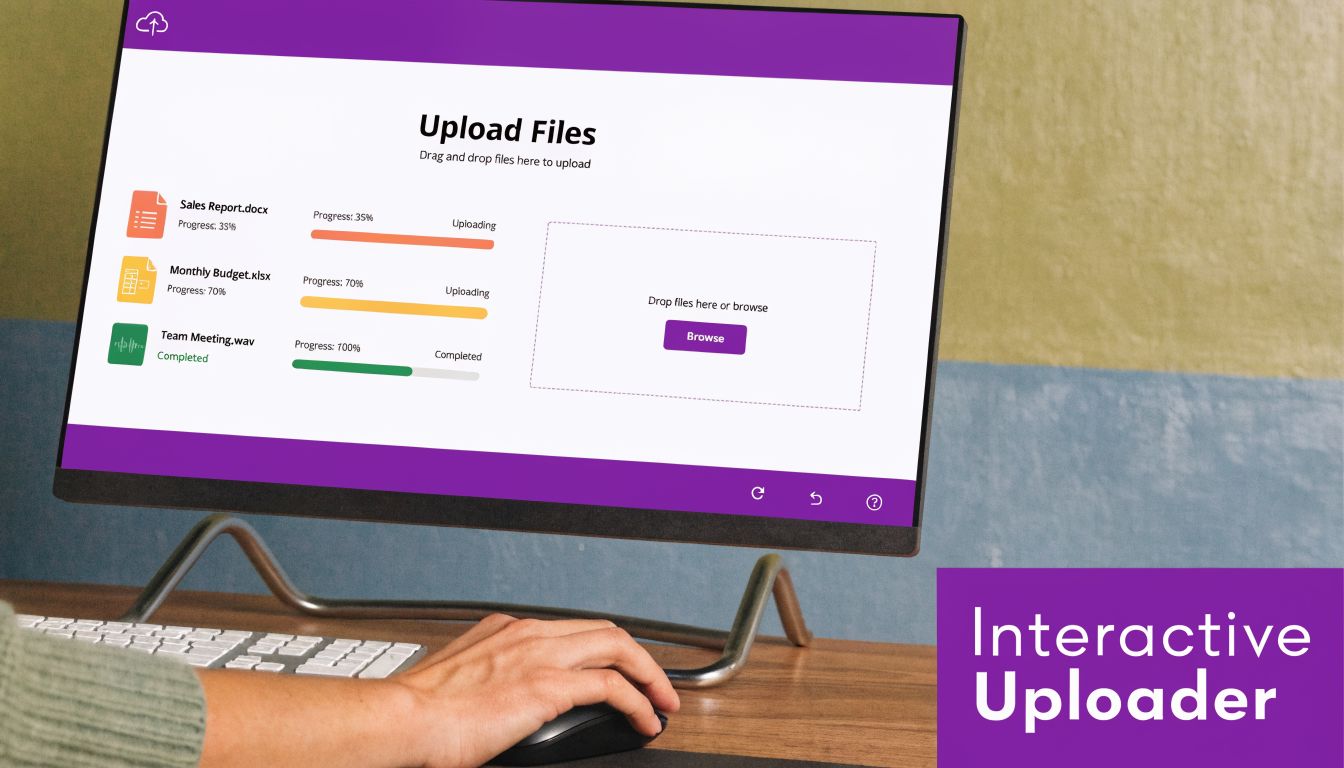
The front end should feel like a queue manager, not a plain form field. Users need to add files, inspect them, remove them, and watch progress without guessing what’s happening.
Start with the native file input
Use the browser’s native capability first. It’s reliable, accessible, and already supports multiple selection.
<inputid="uploader"type="file"multipleaccept="video/*,image/*,.srt,.txt,.docx"/>Then hide it behind a better interface if you want. The key is that your custom UI still feeds a real FileList into your app state.
In JavaScript, normalize the selected files immediately:
const input = document.getElementById('uploader');const queue = [];input.addEventListener('change', (event) => {const files = Array.from(event.target.files);for (const file of files) {queue.push({id: crypto.randomUUID(),file,status: 'queued',progress: 0,error: null});}renderQueue();});That extra wrapper object matters. Don’t keep raw File objects as your entire state model. You’ll want a stable ID, status transitions, and a place to store upload metadata.
Add drag and drop without replacing the picker
Drag and drop is great for power users, but it shouldn’t be the only path. Keep both.
const dropZone = document.getElementById('dropzone');dropZone.addEventListener('dragover', (e) => {e.preventDefault();dropZone.classList.add('drag-over');});dropZone.addEventListener('dragleave', () => {dropZone.classList.remove('drag-over');});dropZone.addEventListener('drop', (e) => {e.preventDefault();dropZone.classList.remove('drag-over');const files = Array.from(e.dataTransfer.files);for (const file of files) {queue.push({id: crypto.randomUUID(),file,status: 'queued',progress: 0,error: null});}renderQueue();});The visual feedback during dragover and dragleave isn’t cosmetic. It tells users the browser understood their action.
Validate early, but don’t trust it completely
Client-side validation reduces junk before it hits your API. It also makes the interface feel responsive.
For a content workflow, check things like:
- MIME type: Useful for catching obvious mismatches.
- File extension: Not authoritative, but still helpful for UX.
- Duplicate names in the same batch: Usually a user mistake.
- Project-level rules: Maybe a tutorial needs one primary recording and optional brand assets.
For teams handling video, format choices also matter downstream. If you need a simple refresher on browser-friendly export decisions, this guide on best video format choices for web delivery is a practical reference to share with non-technical teammates.
Front-end validation is for speed and clarity. Server-side validation is for trust.
Show progress per file, not just per batch
A single progress bar for ten files is almost useless. Upload each file with progress events and update its row.
XMLHttpRequest is still a straightforward option because upload progress is well supported:
function uploadItem(item) {return new Promise((resolve, reject) => {const xhr = new XMLHttpRequest();const formData = new FormData();formData.append('files', item.file);xhr.open('POST', '/api/uploads');xhr.upload.addEventListener('progress', (event) => {if (event.lengthComputable) {item.progress = Math.round((event.loaded / event.total) * 100);item.status = 'uploading';renderQueue();}});xhr.onload = () => {if (xhr.status >= 200 && xhr.status < 300) {item.status = 'done';item.progress = 100;renderQueue();resolve(JSON.parse(xhr.responseText));} else {item.status = 'failed';item.error = 'Upload failed';renderQueue();reject(new Error('Upload failed'));}};xhr.onerror = () => {item.status = 'failed';item.error = 'Network error';renderQueue();reject(new Error('Network error'));};xhr.send(formData);});}Keep the UI state honest
The most common front-end mistake is optimistic state with no reconciliation. If a user removes a queued file, that’s easy. If they cancel an in-flight upload, your UI needs to mark it canceled and the back-end needs a cleanup path.
Use a clear state machine:
| State | Meaning |
|---|---|
| queued | Selected, not started |
| uploading | In flight |
| done | Fully accepted and stored |
| failed | Rejected or interrupted |
| canceled | User aborted before completion |
That model will save you trouble later when you move from local uploads to cloud storage and retries.
Handling File Streams on the Back-End
Back-end upload handling is where “works on my machine” usually stops. The browser can happily POST a large batch, but if your server buffers too much in memory or trusts the filename, you’ll get slow requests, crashes, and security problems.

Receive multipart data as streams
For Node.js and Express, multer is a common starting point because it parses multipart/form-data cleanly. Use disk or streamed storage for anything beyond small files.
import express from 'express';import multer from 'multer';import path from 'path';import crypto from 'crypto';const app = express();const storage = multer.diskStorage({destination: 'uploads/tmp',filename: (req, file, cb) => {const ext = path.extname(file.originalname);cb(null, `${crypto.randomUUID()}${ext}`);}});const upload = multer({storage,fileFilter: (req, file, cb) => {const allowed = ['video/mp4', 'image/png', 'image/jpeg', 'text/plain'];cb(null, allowed.includes(file.mimetype));}});app.post('/api/uploads', upload.array('files'), (req, res) => {res.json({files: req.files.map(file => ({originalName: file.originalname,storedName: file.filename,mimeType: file.mimetype}))});});The important part isn’t the exact middleware. It’s the operating model. Accept the stream, validate it, assign a safe storage name, and move metadata into your application database only after the file is present.
Don’t let the app process become a file warehouse
If your API stores everything permanently on local disk, you’ll regret it once uploads become a product feature instead of a dev convenience. Local storage is fine for temporary staging, testing, or a small internal tool. It’s weak for scale, durability, and cleanup.
Use the API layer for:
- Authentication and authorization
- MIME and policy validation
- Temporary staging when needed
- Metadata writes
- Dispatch to durable storage
If your users are sending video assets, you’ll also need operational guardrails around file sizes and compression. For non-engineers who hand you huge exports, a practical guide on how to reduce video file size before upload can cut support friction.
If your server has to fully buffer every upload before deciding whether it’s allowed, the design is already under stress.
Carry the same principles into other stacks
PHP, Go, Python, .NET, and Java all solve multipart parsing differently, but the principles don’t change:
- Read the request as a stream where possible.
- Validate server-side against an allowlist.
- Replace user filenames.
- Store uploads outside executable paths.
- Commit database records only after storage succeeds.
A junior team often focuses on “how do I save the file.” The senior concern is “how do I avoid a broken state when save step two fails after save step one succeeded.”
Advanced Strategies for Large and Concurrent Uploads
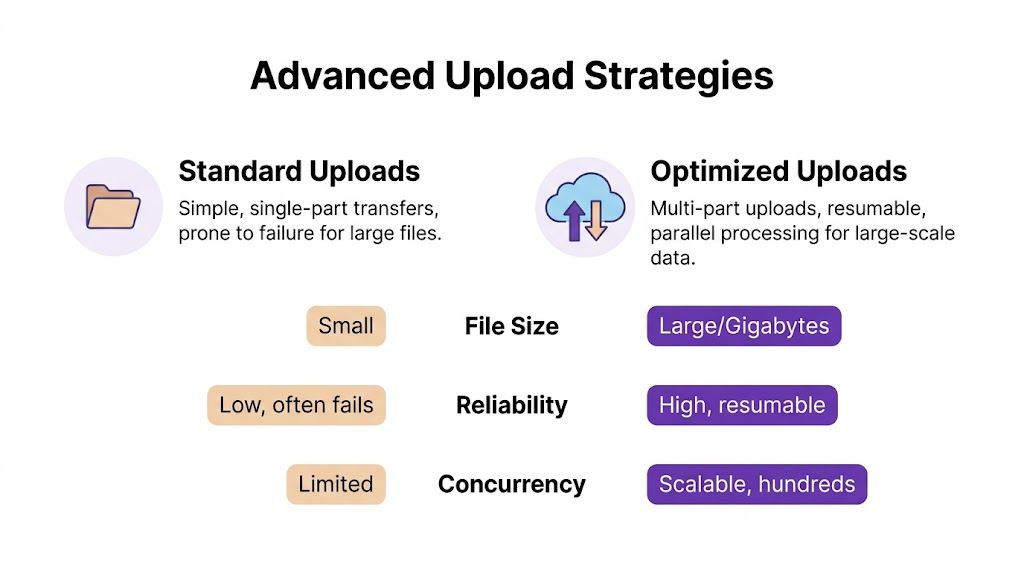
A basic multipart endpoint is enough for documents and small media. It’s not enough for batches of recordings, image sets, and long demo videos moving across unpredictable networks. Once files get larger or teams upload many assets at the same time, architecture choices start to matter more than controller code.
Three strategies that actually matter
The three patterns I’d want a junior developer to understand are:
| Strategy | Best For | Pros | Cons |
|---|---|---|---|
| Server-proxied multipart upload | Small to medium files, simple apps, tight back-end control | Straightforward auth model, easy validation, one place to handle logic | API bandwidth becomes a bottleneck, app servers carry the upload load, retries are clumsy |
| Presigned S3 direct upload | Large media, distributed users, cloud-native apps | Offloads bandwidth from the app, keeps API thinner, scales better | More moving parts, orphan cleanup required, state reconciliation matters |
| Chunked resumable upload | Very large files, unstable networks, mobile-heavy usage | Better recovery after failure, more reliable for long transfers, supports resume | Highest implementation complexity, chunk assembly and finalization add work |
Server-proxied uploads are fine until they aren’t
For an internal dashboard or a small admin flow, posting FormData directly to your API is the fastest path. The browser sends the request, your server validates, then stores the file.
That simplicity disappears once your team starts handling multiple long recordings. Every upload flows through your app layer, so memory pressure, timeouts, and worker saturation all rise together. You also pay the full network cost twice if your server then forwards the same file to cloud storage.
Presigned S3 uploads are usually the right next step
The flow for presigned S3 URL uploads is clean when implemented correctly:
- Client sends file metadata to your back-end.
- Back-end creates a signed PUT URL for each file.
- Client uploads each file directly to S3.
- Client tells the back-end which object keys finished.
- Back-end verifies before indexing in the database.
According to STRV’s benchmark summary at common file upload strategies and their pros and cons, success rates can reach 98-99% on stable networks, but drop to 75% on unstable connections. The same source notes a common failure pattern around the extra request choreography and highlights that chunked multipart uploads using 5 MB parts can yield a 99.5% completion rate.
That trade-off is real. Presigned uploads reduce pressure on your app servers, but they introduce object lifecycle problems. If the browser uploads to S3 and crashes before notifying your API, you now have an orphaned object. If the API indexes a file before storage verification, your database points to something that doesn’t exist.
The direct-to-cloud pattern scales well only when your state machine is stricter than your happy path.
Chunking helps when networks are messy
Chunking is what saves you when users upload long recordings from home Wi-Fi, hotel internet, or mobile hotspots. Instead of restarting the entire file after a dropped connection, the client only retries the missing chunk.
That’s why resumable protocols such as tus are worth serious consideration for media-heavy apps. They add setup complexity, but they stop the worst user experience in uploads, getting to the end of a long transfer and losing everything because the last mile failed.
A few implementation habits help here:
- Limit concurrent uploads: Don’t blast the network with every file at once.
- Retry selectively: Retry failed chunks or files with backoff, not the whole batch immediately.
- Separate transfer completion from application completion: A file existing in storage doesn’t mean the project is ready.
- Surface progress clearly: “Uploaded 4 of 7 files” is more useful than one giant spinner.
For teams working with recordings, transfer speed still matters to planning. If you need a non-code reference for stakeholders who ask why a webinar source file is taking so long, this explainer on good upload speeds for webinar production gives useful context.
A practical decision rule
If I were advising a team from scratch:
- Use server-proxied multipart for simple document workflows.
- Move to presigned S3 when cloud storage is the destination and files are routinely large.
- Add chunked resumable uploads when you support long videos, unstable networks, or frequent retries.
And if your product needs to hand off large tutorial exports or source recordings after upload, it’s worth standardizing the downstream sharing workflow too. This guide on how to share large video files via email alternatives is useful for support and enablement teams that still try to email giant attachments.
Securing Your File Upload Endpoints
The initial version of upload security is often underbuilt because it looks harmless. It’s just media, just screenshots, just a few recordings. Then someone uploads a file with misleading metadata, embedded sensitive information, or content your pipeline wasn’t designed to process.

The risk is not theoretical. A 2025 Verizon DBIR report noted a 25% increase in supply-chain attacks via uploaded media files, and less than 10% of online developer solutions for uploads address basics like client-side validation and metadata stripping, as summarized in this file upload security analysis.
Security controls that should be non-negotiable
You need layered checks, not one big gate.
- Validate on the server: Never trust the browser’s
acceptattribute or the MIME type sent by the client alone. - Rename every file: User-provided filenames are display data, not storage identifiers.
- Store outside executable paths: Uploaded content should never land somewhere the server could interpret as code.
- Apply size limits in more than one place: Your app and your reverse proxy should both reject abusive payloads.
- Scan asynchronously when risk is higher: If files move between users or into downstream processing, virus scanning is worth the extra step.
- Strip or review metadata: Screen recordings and images can carry more information than the uploader realizes.
Media workflows create their own security problems
Multi-file upload in SaaS content tools has a subtle failure mode. The file itself may be valid, but the content inside it is not safe to share. A screen recording can expose API keys, customer records, internal URLs, or personal information.
That means your upload security model should include content handling rules, not just transport rules:
| Risk | Better response |
|---|---|
| User uploads a valid video with sensitive content visible | Route to review, blur pipeline, or restricted visibility |
| User uploads a misleading file type | Inspect file signature and reject mismatches |
| User retries repeatedly after partial failure | Use idempotent upload records and rate limits |
| User cancels after cloud upload but before DB confirmation | Run cleanup jobs for orphaned objects |
Security for uploads starts before storage and continues after storage. Acceptance is not the end of validation.
What junior teams usually miss
The biggest blind spot isn’t malware. It’s state leakage.
A file can be technically uploaded, indexed, and even previewable while still being the wrong thing to expose. That’s especially true in systems that accept batches and then trigger post-processing. Make files private by default, promote them only after checks pass, and log every transition that changes visibility.
If your app handles internal knowledge content or customer-facing media, that discipline matters more than any one middleware package.
A Real-World Use Case Creating On-Brand Tutorial Videos
A multi-file uploader becomes much more valuable when the business workflow needs more than raw transfer. Tutorial production is a good example because the asset set is rarely clean on the first try.
A subject matter expert might record a product demo, then add a second clip for the intro, a corrected narration take, a company logo, and brand assets for final polish. Easy recording tools are useful for getting content out quickly, but the first take is often 50-100% longer than necessary. At the other extreme, professional editors like Camtasia or Adobe Premiere Pro produce polished output but expect real editing skill. There’s a large gap between “record something fast” and “ship something polished.”
Why batch upload matters in this workflow
The uploader has to support grouped inputs because the final output depends on relationships between files, not just the files themselves.
That means the application needs to understand ideas like:
- Primary source clip
- Supplemental screen segments
- Separate narration
- Brand assets such as logos and fonts
- Project-level ordering and timing
For this kind of workflow, the primary engineering task isn’t only upload multi file. It’s preserving enough structure so later processing can make the assets useful.
Alignment is the hidden problem
One of the most frustrating gaps in video workflows is syncing multiple source files before assembly. Coach Logic’s support documentation explicitly says video angles should be aligned before uploading, and a related trend summary notes that 40% of searches for “screen record multiple files” also include “auto-sync” in 2025-2026 at Coach Logic’s multi-angle upload guidance.
That lines up with what engineers see in practice. Uploading several recordings is easy compared with making them line up correctly afterward. If your product accepts split recordings or alternate takes, define whether alignment happens before upload, after upload, or during processing. Don’t leave that ambiguous.
A robust uploader doesn’t stop at “all files received.” It keeps enough context to make post-processing possible.
The broader content stack
This is also where video tooling starts to connect across teams. A support team may need tutorial videos, while growth wants short campaign cuts from the same source material. In that environment, it helps to understand adjacent tools such as the ShortGenius AI ad generator, which focuses on AI-generated video variations for promotional use cases rather than documentation workflows.
The practical takeaway is that upload architecture should reflect the output you plan to generate. If the same batch of source assets might become onboarding videos, explainer videos, release videos, or support article videos, your metadata model needs to preserve that flexibility from the moment the files enter the system.
Building Modern Upload Experiences
A solid upload experience is layered. The browser needs a queue users can understand. The API needs to stream safely and reject bad input decisively. Storage needs to scale without leaving your database in a confused state.
That’s why the best upload multi file implementations feel boring in the right way. Users can add batches naturally, watch progress per file, recover from failure, and trust that a finished upload is usable. Under the hood, that usually means stronger state modeling, stricter validation, and a storage strategy that matches the size and reliability demands of the files you accept.
If a junior developer asked where to focus first, I’d say this. Build the queue carefully. Define file states clearly. Make the back-end idempotent. Then choose the transfer strategy that fits the media you handle, not the easiest demo.
If you’re building tutorial, demo, onboarding, or support video workflows and want the recording and editing side to move as smoothly as the upload side, Tutorial AI is worth a look. It turns raw screen captures into polished, on-brand videos with AI-assisted editing, narration, branding, and collaboration, so subject matter experts can speak naturally and still produce professional results without learning complex timeline-based video software.



