Instead of deciding to “build a video operation,” organizations often wake up one quarter and realize support wants tutorial clips, product wants feature release walkthroughs, customer success needs onboarding videos, and L&D is still waiting on a polished training asset that someone recorded in a hurry three weeks ago.
That’s when the mess shows up. One expert records in Loom with no plan. Another talks too fast, skips key steps, and sends a link that’s too long for anyone to finish. Then a manager asks for “something more professional,” which usually means handing the work to a video specialist who now has a queue, a script rewrite, and a pile of edits nobody scoped correctly.
A training video producer solves that. Not just by editing footage, but by turning raw knowledge into repeatable learning assets that people can use.
The Growing Need for Effective Training Videos
I see the same pattern in growing teams. Training demand rises faster than production capacity. The business doesn’t need one perfect flagship course. It needs a steady stream of demos, onboarding walkthroughs, explainers, release videos, and support content that stays accurate.
That pressure exists for a reason. The corporate e-learning market is predicted to grow by $37.8 billion from 2020 to 2025, and video-based e-learning can raise learner retention to as high as 82% according to Powtoon’s training video statistics roundup. The same source also notes that videos under three minutes see the highest engagement. That tracks with what most L&D teams already know from practice. Learners want fast answers, not long introductions.
What teams usually get wrong
The first mistake is treating every training request like a one-off production.
The second is assuming any screen recording counts as training. It doesn’t. A rough walkthrough may capture the right clicks, but it often misses sequence, framing, and learning intent. If the viewer can’t tell what matters, the content won’t hold up.
A lot of product and enablement leaders already understand this when they work on technical storytelling. The same clarity principles behind achieving clarity with tech explainers apply to internal training too. Good training videos reduce ambiguity before they add polish.
- Scattered recordings create inconsistency: different narration styles, different terminology, different visual quality.
- Backlogs slow the business down: every update depends on the same editor or agency.
- Long videos lose people: even useful information gets skipped when it isn’t structured for attention.
Practical rule: If a team is producing the same explanation more than once, it needs a reusable training video workflow, not another ad hoc recording.
If you’re designing content for adults, it also helps to align format and pacing with how people absorb information in real work settings. This guide to adult learning styles is a useful reminder that training content succeeds when it respects context, relevance, and immediacy.
Defining the Modern Training Video Producer
A modern training video producer isn’t just a videographer who happens to work on learning content. The role sits between instructional design, media production, and operational enablement.
That distinction matters. A general video producer may optimize for visual impact. A training video producer optimizes for comprehension, task completion, and update speed.
What the role actually owns
At a strong level, this person does four jobs at once:
-
Translates expertise into teachable structure — They take what a subject matter expert knows and turn it into a sequence a learner can follow.
-
Protects production quality — They make sure screen recordings, voiceover, framing, and pacing are clear enough to survive compression, embedding, and repeat viewing.
-
Manages workflow and reviews — They keep SMEs, reviewers, and stakeholders from derailing the asset with endless late-stage changes.
-
Designs for reuse — They think in modules, versions, captions, and future updates, not just a single export.
The labor market also supports this as a real career path. The U.S. Bureau of Labor Statistics projects employment for film and video editors and camera operators will grow 3% from 2024 to 2034, with about 6,400 openings each year on average, and reports a median annual wage of $70,570 for the occupation in its occupational outlook page. Those numbers don’t describe training video producers exclusively, but they do validate that the core production skills behind the role are established, professional, and durable.
How this role differs from a standard videographer
A training video producer asks different questions:
| Focus area | Standard video mindset | Training video producer mindset |
|---|---|---|
| Success measure | Looks polished | Teaches clearly |
| Script quality | Sounds good | Helps someone do a task |
| Editing choice | Adds energy | Removes confusion |
| Stakeholder review | Approves brand and visuals | Verifies accuracy and usability |
| Update strategy | Finish final cut | Keep modules easy to revise |
The best people in this role are bilingual. They speak both expert and learner.
That’s why I usually hire for judgment first, software second. Tools can be learned. Clear instructional thinking is harder to teach under deadline.
Core Responsibilities and Key Deliverables
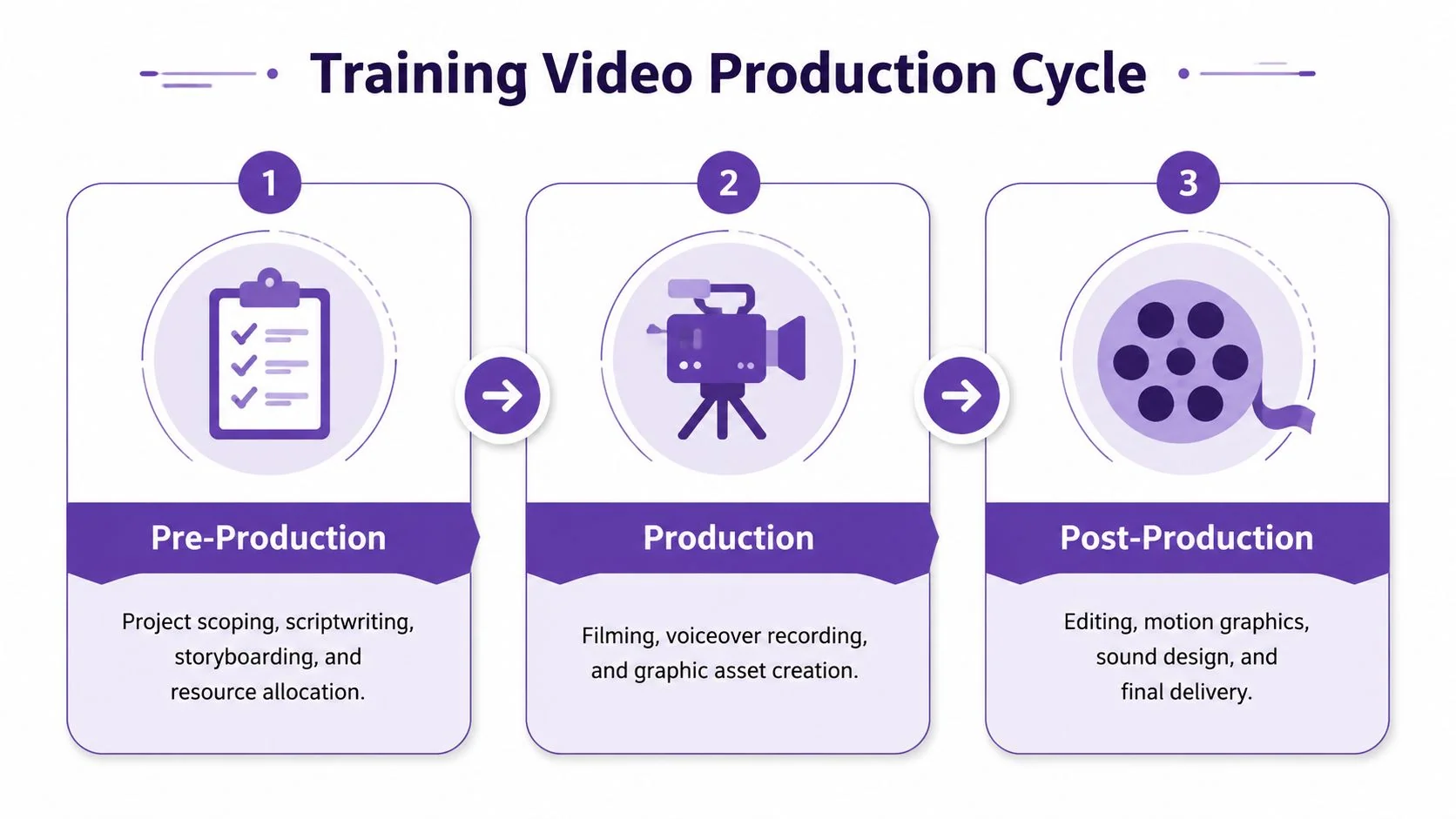
A training video producer’s work becomes easier to manage when you divide it into three phases. Most failure happens when teams over-focus on recording and under-manage everything before and after it.
Pre-production work
Skilled producers save everyone time at this stage.
They scope the audience, define the objective, decide whether the piece is a demo, microlearning clip, onboarding asset, or support article companion, and then shape a script or outline that reflects the actual workflow. They also choose what not to include. That discipline matters more than is often expected.
Typical pre-production responsibilities include:
- Project scoping: identifying who the video is for, what task it should support, and where it will live.
- Script development: turning expert language into plain, teachable narration.
- Storyboarding: mapping scenes, screen states, callouts, and transitions.
- Review planning: deciding who approves for accuracy, brand, and compliance.
When teams need ideas on format and engagement mechanics, I often point them toward resources on building engaging e-learning content, especially when they’re still treating training like a simple recording exercise.
Production work
Production is more than pressing record. For software tutorials, this phase often includes clean screen capture, controlled narration, retakes for tricky transitions, and collection of any supporting graphics or presenter footage.
A capable producer also directs the SME. That can mean slowing them down, asking for one action per sentence, and preventing the common mistake of narrating three concepts while showing one click.
Post-production work
Post is where clarity gets finalized.
The producer edits pacing, trims dead space, cleans up audio, adds graphics, inserts captions, checks terminology, and prepares alternate versions if the same topic needs to work across an LMS, help center, or internal wiki.
Common deliverables include:
- Interactive software demos for product education
- Microlearning modules for LMS delivery
- Feature release videos for internal enablement
- Knowledge base videos embedded in support content
- Onboarding walkthroughs for employees or customers
- Explainer videos for complex workflows or policy changes
Good deliverables don’t just answer today’s question. They stay editable when the interface changes next month.
Essential Skills and Professional Tools
The strongest training video producers combine instructional judgment with technical range. If they only understand editing, the work looks polished but teaches poorly. If they only understand learning design, the assets often come out visually weak, inconsistent, or hard to maintain.
Hard skills that still matter
A professional training video producer should be comfortable with the post-production stack, including Adobe Premiere Pro, Final Cut Pro, and DaVinci Resolve, and should understand why modular 5 to 10 minute videos are a practical standard for reducing cognitive load and simplifying future updates, as outlined in Arizona’s film and TV production guidance.
That software list matters for one reason. It tells you the role still requires real production literacy. Even in modern workflows, someone has to understand cuts, exports, graphics, captions, and finishing standards.
Core technical skills include:
- Editing fluency: cutting for clarity, not just rhythm
- Audio cleanup: managing noise, levels, and narration intelligibility
- Screen capture discipline: keeping cursor movement, zoom, and interface focus deliberate
- Graphics judgment: using callouts and highlights without clutter
- Export knowledge: choosing formats that work across LMS, documentation, and web delivery
Soft skills that separate average from excellent
A mediocre producer waits for perfect inputs. A good one can pull order out of messy expert knowledge.
The soft skills I value most are:
- Instructional thinking: knowing how to chunk, sequence, and recap
- Stakeholder management: keeping SMEs helpful without letting them overwrite the learner experience
- Script coaching: helping people sound natural while staying precise
- Editorial judgment: deciding what to cut, what to emphasize, and what belongs in documentation instead of video
Specs and standards
Capture settings aren’t cosmetic. They affect reuse.
Institutional video guidance cited in these production requirements and guidelines specifies a minimum of 1920×1080 at 24 fps, with ASU’s recommended spec listed as 23.98 fps at 3840×2160 UHD. In practice, that means a training video producer should lock frame rate early, record at the highest practical resolution, and keep footage steady, legible, and properly exposed.
For teams comparing traditional software with newer approaches, this overview of AI video creation tools is useful because it frames the decision correctly. You’re not choosing between “easy” and “professional.” You’re choosing where human expertise should sit in the workflow.
The Traditional Training Video Workflow
The old workflow usually starts with good intentions and ends with delay.
Someone requests a tutorial. An SME writes a rough script in a doc. Reviewers edit words they haven’t spoken yet. The meeting to “align on the script” takes longer than the recording itself. Then the expert gets on mic, stumbles on a sentence, restarts three times, and apologizes for every minor mistake.
Where the friction builds
After recording, the editor inherits everything. Long pauses. Repeated clicks. Cursor drift. Verbal detours. Half-finished sentences that made sense live but don’t survive playback.
Then the review cycle begins:
- Marketing wants tighter branding
- Product wants updated language
- Compliance wants one phrase changed
- The SME wants to re-record one section
- Support wants a shorter version for the help center
None of those requests is unreasonable on its own. Together, they create a workflow that depends on specialist editing labor for every small revision.
Why updates become expensive
Traditional video production treats the exported file like the product. That approach creates the primary bottleneck.
Once the piece is cut tightly on a timeline, even small updates can require opening the project, finding source files, matching narration tone, adjusting visuals, and re-exporting every version. That’s manageable for campaign work. It’s painful for software training, where interfaces, labels, and flows change constantly.
When teams are trying to improve scripting discipline before they ever record, examples like Sight AI on video scripts can help them see the difference between spoken clarity and written clutter.
Traditional workflow rewards technical precision. It often punishes speed, iteration, and SME autonomy.
That’s why many organizations end up with a strange split. Quick Loom videos get published fast but feel rough. Polished videos look better but move too slowly. Video production units frequently bounce between those extremes for years.
How AI Is Revolutionizing the Production Process
The biggest shift in this role isn’t that editing disappeared. It’s that editing is no longer the center of gravity.
Traditional training models still assume full technical mastery is the baseline. That model is increasingly outdated. As noted in the gap analysis tied to Product Film School, AI-augmented workflows change what entry-level competency means by shifting the bottleneck from editing time to content strategy and quality assurance.
What changes in practice
In the old model, the SME needed to either become a careful performer or hand raw material to an editor. In the newer model, the SME can focus on explaining the task clearly while the system handles much of the cleanup and presentation layer.
That matters because easy recording tools often create videos that are longer than they need to be. A casual Loom walkthrough usually captures every hesitation, wrong turn, and repeated phrase. On the other side, professional tools like Camtasia, Adobe Premiere Pro, or DaVinci Resolve can absolutely produce strong results, but they expect real editing skill and time.
AI changes the middle of that equation.
The new workflow is less about retakes
With an AI-assisted process, the subject matter expert can record a screen share, speak naturally, and worry less about perfect delivery on the first pass. The producer’s job becomes:
- Set standards for structure and brand
- Review for factual accuracy
- Tighten the teaching sequence
- Approve the final output across formats
Used well, create training videos with AI doesn’t replace judgment. It removes mechanical work that used to consume that judgment.
A practical example is Tutorial AI, which can generate tutorial videos from screen recordings for demos, onboarding videos, explainer videos, feature release videos, knowledge base videos, and support article videos. It lets an expert speak freely during capture, then uses AI to polish the result without requiring timeline-based editing. That means the finished piece can look closer to something produced in a traditional editor, while the SME stays focused on the product knowledge instead of edit mechanics.
What the training video producer becomes
This changes who can fill the role.
Instead of requiring every team to hire a classic editor, organizations can enable support leads, product marketers, trainers, technical writers, and customer educators to create more of their own video content. The training video producer still matters, but now the role often acts as a system owner and quality gatekeeper rather than the only person capable of making publishable content.
When AI removes the need to hand-polish every pause and every cut, the producer’s value shifts upward. Strategy, governance, and clarity become the scarce skills.
That’s a healthier model for fast-moving teams. It creates more content capacity without turning every training request into a production queue.
Hiring and Budgeting for Video Production
Most leaders frame the decision too narrowly. They ask whether to hire a full-time producer or outsource to freelancers. There’s a third option that often makes more sense first. Build an internal enablement model where a smaller central team sets standards and subject matter experts create more of the raw material.

Three practical staffing models
Each model has trade-offs.
| Model | Best when | Main risk |
|---|---|---|
| Full-time producer | You have steady volume and need governance | Work becomes a bottleneck |
| Freelance or agency support | You need occasional polish or specialized work | Context stays external |
| SME-enabled production | You need scale across many teams | Quality varies without standards |
The accessibility gap matters here. Mainstream video training often focuses on helping existing practitioners build businesses, not on helping organizations develop non-traditional internal talent. The opportunity highlighted by The Vera Project’s program model is the broader point: companies need pathways that let capable people contribute without requiring a traditional production background.
What to look for when hiring
A flashy reel can mislead hiring managers. For this role, I care less about cinematic shots and more about whether the candidate can teach clearly on screen.
Look for evidence that they can:
- Turn complexity into sequence: the learner always knows what happens first, next, and why
- Edit for task success: unnecessary footage disappears
- Work with experts diplomatically: they can coach, not just cut
- Build repeatable systems: naming conventions, review flow, templates, and version control are all visible in how they work
Hire for instructional clarity. Train for tool depth if needed.
Here’s a practical job description template that reflects the modern version of the role:
Sample job description We’re hiring a training video producer to create product tutorials, onboarding videos, internal enablement content, and support-facing video assets. This role will partner with subject matter experts across L&D, support, product, and customer success to turn complex workflows into clear, modular learning content.
Responsibilities include script development, screen recording planning, narration coaching, editing oversight, caption and accessibility review, content calendar management, and maintenance of templates and production standards.
Strong candidates can balance instructional design, stakeholder management, and media production. Experience with video editing software is valuable, but we also want someone who can enable non-specialists to produce high-quality content efficiently.
Budgeting with the right lens
Don’t budget only for video creation. Budget for update cycles, review overhead, and content governance.
That’s the difference between buying outputs and building capability. In most organizations, the more strategic investment is the one that reduces dependency on a few specialists while keeping quality controlled.
The Future of Corporate Training is Efficient and Scalable
The training video producer role isn’t disappearing. It’s being redefined.
The old version of the job centered on technical gatekeeping. The newer version centers on clarity, systems, and scale. Teams still need people who understand scripting, capture, editing standards, and delivery quality. What they don’t need is a workflow where every useful tutorial must pass through a specialist timeline editor before it becomes publishable.
That shift is significant. Organizations no longer have to choose between speed and professionalism in the same rigid way. The strongest teams build a production model where experts can contribute directly, standards stay centralized, and training content is easy to revise as products and processes change.
A modern training video producer makes that system work.
If your team needs to turn screen recordings into polished tutorials, demos, onboarding videos, and support content without relying on heavy timeline editing, Tutorial AI is worth evaluating as part of that workflow. It’s built for teams that need scalable, on-brand training content from the same recording, not just faster exports.