A lot of SaaS teams say they have a video process when what they really have is a recording habit plus an editing bottleneck.
A feature ships, someone opens Loom, talks through the product, restarts twice, apologizes mid-sentence, and shares a long raw recording in Slack. Product marketing wants a launch demo. Support wants a help center walkthrough. Sales wants a short clip for outbound. Nobody wants to watch the whole thing, but somebody still has to turn it into something customers can use.
That gap is where most making marketing videos projects go sideways. The issue usually isn’t effort. It’s that the workflow depends on the wrong people doing the wrong tasks at the wrong stage. Subject matter experts are forced to perform like presenters. Editors are forced to fix structural problems that should’ve been solved before recording. Brand consistency gets patched in late, if it gets patched in at all.
The better approach is operational, not cinematic. For SaaS teams, the win is a system that lets experts record once, produce multiple assets fast, and keep every output usable across channels, languages, and teams.
Why Your Current Video Workflow Is Broken
A common launch week sequence looks like this. The PMM writes a brief message saying a demo video is needed by Friday. A product manager records a walkthrough from memory. The recording is long because they’re thinking while talking, not delivering a prepared flow. Support then asks if the same video can be turned into a tutorial, while sales asks for a shorter version with a stronger hook.
The first problem is hidden labor. The person who knows the feature best spends too much time trying to sound polished. Then an editor, marketer, or content lead spends more time removing filler, tightening the order, and rebuilding scenes around a recording that was never designed to become a finished asset.
The second problem is fragmentation. Each team asks for a different output, but the source material isn’t modular. So instead of one core recording feeding multiple deliverables, the team creates separate versions by hand. That’s how one launch turns into three content projects.
The tool gap creates the mess
Simple recording tools are useful for speed, but they often produce the exact kind of raw footage that creates downstream cleanup. In practice, easy screen recordings are often much longer than the final asset needs to be. They include dead time, backtracking, and filler language because the speaker is effectively drafting out loud.
At the other end, tools like Camtasia and Adobe Premiere Pro can absolutely produce polished results. But most SaaS teams don’t have enough editor time, and most SMEs don’t have the skill set or patience to work on a timeline.
Practical rule: If your process requires every expert to become a polished presenter or every update to pass through a specialist editor, the process won’t scale.
The output looks inconsistent
When a workflow is patchwork, the viewer can feel it. One demo uses one tone. The next tutorial uses another. Intro slides change. Cursor movement is distracting in one video and over-produced in the next. CTAs vary by team, not by strategy.
That’s not just a branding issue. It changes how people learn from the video. Tutorials need clarity. Demos need pace. Onboarding clips need confidence and structure. A rambling screen capture can still contain the right information, but if the order is wrong, viewers drop out before they get to the part they needed.
Here’s the shift that fixes it. Treat screen-recorded demos, onboarding videos, feature announcements, knowledge base videos, and support walkthroughs as a production system. Record for reuse. Edit for clarity. Publish for multiple teams. That’s what makes video sustainable instead of chaotic.
Build Your Foundation With A Video Strategy
The most impactful decision in making marketing videos happens before anyone hits record.
Brands with documented content strategies are 313% more likely to report success than those without one, according to CommerceV3’s video marketing guidance. That matters because most video failures don’t come from weak visuals. They come from launching without a plan, making content that’s too promotional, or publishing without a clear measurement model.
A one-page brief solves most of this.
Use a one-page brief for every video
The brief doesn’t need agency polish. It needs enough structure that the SME, marketer, and reviewer are all building the same asset.
Include these fields:
| Checklist Item | Description | Completed (Y/N) |
|---|---|---|
| Goal | Define the single job of the video, such as awareness, product education, activation, or support deflection | |
| Audience | Name the viewer clearly, including role, product familiarity, and likely pain point | |
| Post-view action | Decide what the viewer should do next after watching | |
| Asset type | Specify whether this is a demo, onboarding clip, explainer, feature release, or help article video | |
| Channel | Identify where the video will live first, such as YouTube, a landing page, email, sales outreach, or a knowledge base | |
| Core message | Reduce the message to one sentence the viewer should remember | |
| Proof points | List the screens, product actions, or examples that must appear | |
| CTA | Write the exact next step to show or say | |
| Owner | Assign who records, who reviews, who publishes, and who tracks performance | |
| Measurement model | Define how you'll monitor view, engagement, click, and conversion behavior |
That last line matters more than generally realized. A tutorial video and a top-of-funnel explainer should not be judged the same way. One may be successful if viewers complete key steps. The other may be successful if it earns clicks into a product page.
Match the video to the funnel
The easiest way to get a weak video is to ask one asset to do everything.
A product walkthrough for an interested buyer should look different from a knowledge base tutorial for an existing user. The first needs context and persuasion. The second needs direct instruction and minimal fluff. If you blur those goals together, you get a video that’s too salesy for support and too detailed for demand gen.
I usually pressure-test briefs with four questions:
- Who is this for really: New prospect, active evaluator, new customer, or existing user?
- What should they understand: One core idea, not a list of everything the product can do.
- What should they do next: Book, click, activate, share, or solve a task.
- Where will they watch it: Embedded on a page, sent in email, posted on YouTube, or surfaced inside docs.
A useful video brief feels restrictive in a good way. It removes options early so the recording is easier, the edit is shorter, and the final CTA is sharper.
Plan the measurement before the recording
Teams often say they care about ROI, then publish a video with no tracking plan. That usually leads to vague reporting later.
For practical SaaS work, map the path from view to engagement to click to conversion. Then decide where drop-off matters most. If viewers start but don’t finish, the opening or pacing may be wrong. If they finish but don’t click, the CTA or placement may be weak. If support viewers still open tickets, the tutorial may not answer the actual question.
That kind of planning doesn’t slow production down. It prevents avoidable rework, which is where marketing groups typically lose time.
Scripting For Authenticity Not Perfection
Most teams over-script the wrong videos.
For demos, onboarding walkthroughs, feature release clips, and support videos, a word-for-word script often makes the speaker sound less credible, not more. The person recording is usually strongest when explaining a real workflow naturally. The problem isn’t their expertise. It’s the pressure to perform like voice talent.
Newer guidance on video creation puts the emphasis in the right place. Authenticity and context matter more than expensive equipment, and even a slightly shaky smartphone video can feel more human to viewers. The bigger quality lever is structure and shot variety, not budget, as noted in Parse.ly’s advice on creating marketing videos.
Write beats, not speeches
A useful script for a software video is usually an outline with guardrails:
-
Open with the task — Name the problem fast. “Here’s how to share a workspace with a guest reviewer” is stronger than a generic company intro.
-
Show the sequence — Keep the product flow in the order a user would follow.
-
Call out decisions — Mention what matters on screen. Skip the obvious mouse travel.
-
Close with the next step — End with what the viewer should do next, not with “that’s it.”
This style helps subject matter experts speak like themselves. It also gives editors or AI tools cleaner raw material because the message has structure even if the delivery isn’t flawless.
What doesn’t work
Over-produced scripting creates familiar problems:
- Memorized delivery: It sounds detached from the product.
- Dense intros: The viewer still doesn’t know what they’ll learn.
- Feature dumping: The speaker covers everything because the script was approved by committee.
- On-screen mismatch: The narration describes a different sequence than the one being recorded.
A better draft is usually rougher on paper and stronger in the final video.
Speak in complete thoughts, not polished paragraphs. Viewers want clarity and confidence. They don’t need broadcast cadence.
If your team needs a starting point, this video script template for tutorials and demos is the kind of simple structure that keeps a recording focused without forcing a robotic read.
Give experts room to sound human
The strongest product videos often come from people who know the workflow inside and out and explain it conversationally. They can anticipate where users get confused. They know which click matters. They know what mistake to prevent.
That expertise gets flattened when every sentence is rewritten to sound “marketed.”
For most SaaS teams, the right scripting standard is this: clear, intentional, and easy to edit. Not perfect on the first take. Not cinematic. Just strong enough that the recording captures insight instead of anxiety.
The Modern Way To Record And Edit Videos
Video is no longer optional infrastructure for professional organizations. One industry roundup says 63% of businesses use video as a marketing tool, and for companies with more than 100 employees, 71% use YouTube, according to this marketing video statistics summary. Once video becomes part of the standard go-to-market stack, inefficient production stops being a nuisance and starts becoming a capacity problem.
The old workflow breaks because it asks people to choose between fast and good.
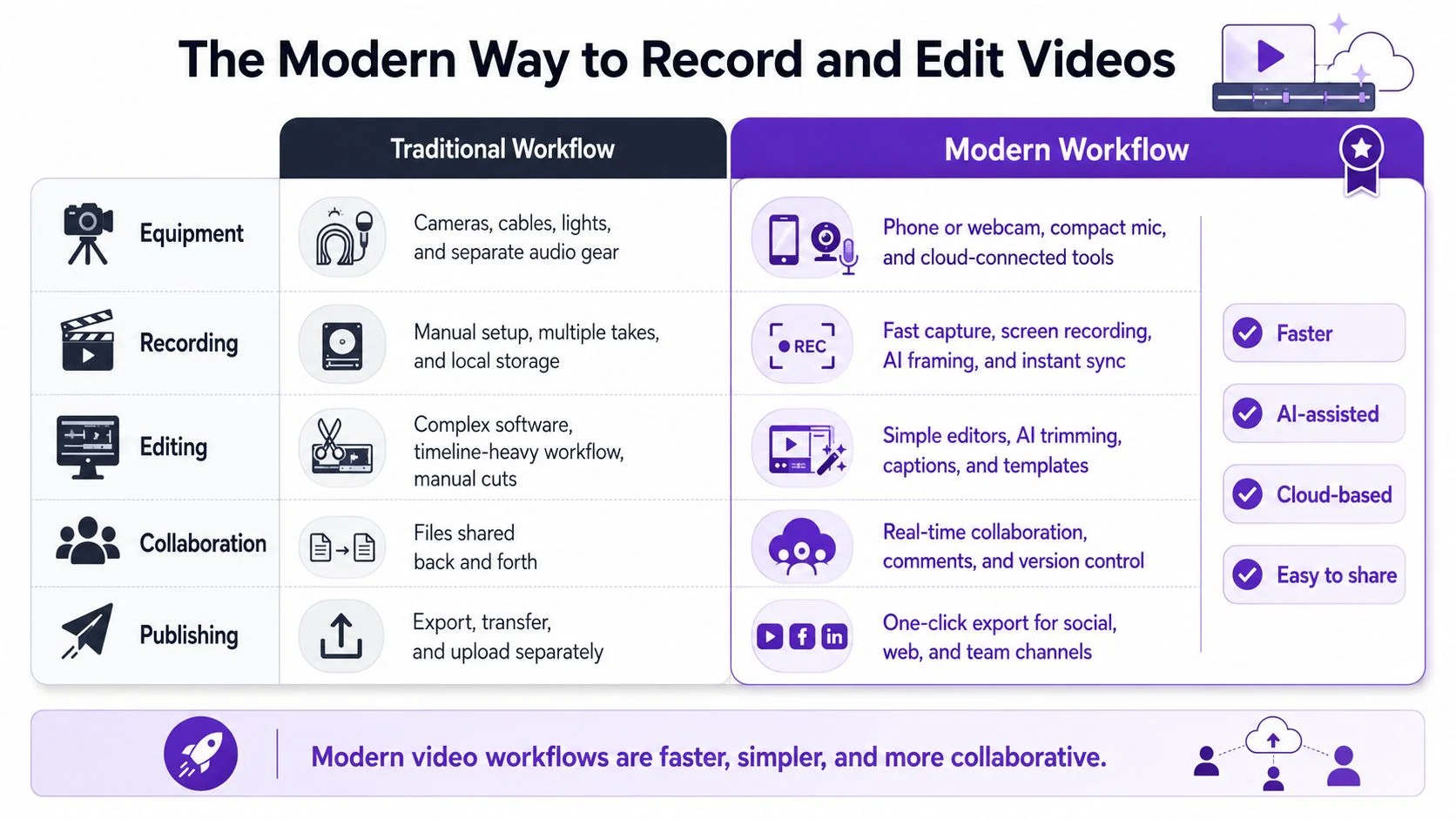
The three workflow options most teams face
Here is the practical comparison.
| Workflow | What it gets right | Where it fails |
|---|---|---|
| Raw screen recorder such as Loom | Fast to start, easy for anyone to use, low friction for SMEs | Recordings are often too long, full of restarts, and not presentation-ready |
| Timeline editor such as Camtasia or Adobe Premiere Pro | Precise control, polished output, strong for specialists | Requires editing expertise, slows iteration, creates bottlenecks |
| Transcript-based AI workflow | Keeps recording simple while making cleanup fast and repeatable | Best when the team commits to a structured production process |
That middle category is where many content teams get stuck. They know raw recordings aren’t good enough for customer-facing assets, but they also know that traditional editing software doesn’t fit a fast-moving product org.
Edit the language, not the timeline
The modern answer is to treat the spoken track as the editing interface.
A subject matter expert records a screen walkthrough and speaks freely. They don’t need to rehearse heavily or deliver a perfect take. The system transcribes the narration, and the editor works from text. Remove a sentence, tighten a phrase, or rewrite a line, and the video updates around that change.
That solves a very real operational problem. Most screen-recorded demos don’t fail because the person chose the wrong transition. They fail because the raw explanation is bloated, repetitive, or slightly out of sequence. Timeline tools can fix that, but not efficiently for every release, article, and internal request.
This is why transcript-based automatic video editing software for tutorials and demos is a much better fit for SaaS teams than either extreme. It preserves the speed of a simple recording tool but removes the dependence on advanced manual editing.
What good modern editing actually changes
The best workflows improve four things at once:
- SME efficiency: The product expert records once instead of performing multiple takes for polish.
- Editing speed: Cleanup happens in the transcript rather than through frame-level timeline work.
- Brand consistency: Templates, voice settings, visual treatments, and output rules stay consistent.
- Output quality: Filler words, awkward pauses, and rough delivery stop defining the final asset.
The most important shift is psychological. When experts know the system can clean up delivery, they focus on explaining the product clearly. That usually leads to better teaching and faster production.
If your editor spends most of their time removing “um,” trimming dead air, and fixing misordered narration, you don’t have an editing problem. You have a workflow design problem.
Record once with reuse in mind
A strong recording session for a product demo or tutorial usually follows this pattern:
- Start with the final path: Open the right browser tab, product state, or account condition before recording.
- Narrate naturally: Speak through the action as if helping a customer live.
- Mark obvious mistakes and keep going: Don’t restart every time you miss a word.
- Capture reusable moments: Record clean product states, transitions, and UI interactions that can be repurposed later.
That gives you source material that can become launch content, knowledge base assets, onboarding modules, and short clips without rebuilding from zero.
Scale Your Content With Localization And Repurposing
Many marketing departments believe the workflow concludes once the primary English-language video is published. For global SaaS organizations, however, that milestone is typically where the actual operational complexity begins.
Support wants the same tutorial for another market. Customer education wants a version with localized narration. Documentation wants article steps and screenshots. If the workflow depends on manual re-editing for every language and every format, the backlog grows immediately.
A better model is one recording, many outputs. That approach matters because marketers keep running into the same barrier: making videos accessible and reusable across languages without rebuilding them manually. A workflow that automatically re-times captions, voiceover, and scenes for each language is built for that exact problem, and platforms in this category can support 74 languages, as described in this overview of scalable multilingual video production.
Localization has to be built into production
Many organizations localize too late. They create an English video, lock visual timing tightly, then discover that translated narration runs longer or shorter. Captions no longer match. Pauses feel odd. Scene cuts hit at the wrong time.
That isn’t a translation issue. It’s a production design issue.
When localization is part of the workflow from the start, the team can:
- Translate narration cleanly: The meaning stays intact instead of being squeezed to fit old timing.
- Retime scenes automatically: Visual pacing adjusts to the new voiceover.
- Keep captions usable: On-screen text remains readable in each language.
- Avoid duplicate editing: Nobody has to rebuild each version by hand.
This is especially useful for demos, onboarding clips, support walkthroughs, and knowledge base videos where the same product action must be explained to multiple markets.
Repurpose across channels without extra recording
The same source recording can also feed multiple content formats:
| Output | Best use |
|---|---|
| Full demo video | Product marketing pages, launch posts, sales follow-up |
| Short feature clip | Social posts, email snippets, in-app announcements |
| Tutorial video | Help center, onboarding, customer success follow-up |
| Step-by-step article | Knowledge base, support docs, SEO support content |
| Screenshot sequence | Release notes, internal training, enablement docs |
That is where efficiency becomes real. You’re not just making marketing videos faster. You’re creating a content supply chain where one recording supports marketing, support, enablement, and documentation.
The most scalable video team isn’t the one that publishes the fanciest edit. It’s the one that turns a single source recording into every format the business needs.
Captions also become more important as you repurpose. If you’re looking for practical guidance on improving video engagement with captions, the Vatis Tech piece is a useful reference because it focuses on the viewer experience as much as the production step.
For teams handling multilingual rollout, services and tools in the category of video translation for tutorials and product videos make the most difference when they also manage timing, not just text conversion.
Distribute Promote And Measure Your Videos
A finished video file is not a distribution plan.
The teams that get real value from making marketing videos decide in advance where each asset will live, how it will be promoted, and what signal will define success. Without that, the video gets posted once, earns a few internal reactions, and disappears into a folder no buyer or customer ever sees.
Put each video in the places people already work
A SaaS video usually needs more than one home.
- Product pages: Embed demos near the section where buyers compare features.
- Help center articles: Pair tutorials with written steps for users who want to skim or watch.
- Email sequences: Use short clips to explain one action, not an entire platform.
- Sales outreach: Give SDRs and AEs short, relevant videos tied to a known pain point.
- Release notes and changelogs: Add feature videos where current users already look for updates.
- Internal enablement: Reuse the same asset for support, onboarding, and training.
This is also where voiceover quality starts to matter. If your team is experimenting with synthetic narration, the Lazybird voiceover creation articles are worth browsing because they focus on practical production choices rather than hype.
Promote with intention
Uploading to YouTube or adding a video to a blog post isn’t promotion by itself. You still need packaging.
Use this short checklist before publishing:
-
Write a clear thumbnail concept — The image should promise the task or outcome, not just show the product UI.
-
Name the result in the title — “How to create a shared workspace” is stronger than “Workspace overview.”
-
Add context around the embed — A two-sentence intro can frame why the viewer should care before pressing play.
-
Pair the video with a CTA — Every asset should point somewhere useful, even if that action is just “read the full guide.”
-
Give internal teams a launch package — Sales, support, and CS are more likely to use the asset if the message and intended use are already spelled out.
Measure the right behavior
Not every video needs the same success definition. The simplest useful model is to look at three layers:
| Layer | What to examine |
|---|---|
| Engagement | Are viewers actually watching enough to get the point |
| Action | Do they click, reply, start a trial, or continue the workflow |
| Outcome | Does the video support conversion, activation, or ticket reduction |
When results are weak, don’t guess. Look at where the behavior breaks. If views are low, placement or packaging may be off. If views are fine but clicks are weak, the CTA may be misaligned. If support videos are watched but tickets remain unchanged, the content may not answer the actual task users are struggling with.
That feedback loop is what turns video from a content request into a repeatable operating system.
If your team needs to turn raw screen recordings into polished demos, onboarding videos, feature releases, and support tutorials without timeline editing bottlenecks, Tutorial AI is built for that workflow. It lets subject matter experts record naturally, edit through the script, localize across languages, and generate documentation from the same recording so one capture can serve marketing, support, sales, and training.