Writing a good procedure is about more than just listing steps. It’s about getting inside the user’s head, defining the task’s boundaries, writing crystal-clear actions, and then putting it all to the test with a real person. The ultimate goal is to create a document so self-explanatory that someone with the right baseline knowledge can nail the task without needing to ask a single question. It’s how you turn confusing, one-off tasks into a system that just works.
Why Clear Procedures Are a Business Superpower
Forget about those dusty binders and ignored Word docs sitting on a shared drive. Truly effective procedures are the unsung heroes of a successful business. Think of them as your team’s playbook—the secret sauce that empowers people, slashes expensive mistakes, and guarantees quality every single time. They are invaluable assets that capture that “tribal knowledge” and turn it into a process anyone can follow and scale.

Learning how to write a procedure isn’t just a documentation chore; it’s a core skill for making your operations run like a well-oiled machine. It’s about building a system that keeps things moving smoothly, even when your go-to expert is on vacation.
The True Impact of Standardization
Standardization gets a bad rap for stifling creativity, but that’s a misconception. It’s actually about creating a solid, reliable baseline for performance. When everyone follows the same proven method, the gains in both speed and accuracy are huge.
In fact, research shows that teams using standardized written procedures see a 23–32% drop in error rates and get things done 16–28% faster than teams relying on informal, word-of-mouth instructions. These numbers aren’t magic; they come from setting clear boundaries, defining decision points, and using consistent formats. You can learn more about how detailed procedural documentation impacts performance and accuracy.
A great procedure can be the difference between a smooth product launch and a last-minute, chaotic scramble. It gives people the clarity they need to act with confidence and autonomy.
“The ultimate purpose of a procedure is to empower someone to act correctly and consistently without needing to ask for help. It’s a tool for independence, not just compliance.”
Building a Foundation for Growth
Clear procedures are also the bedrock for scaling your business and onboarding new people without headaches. Instead of your senior team members having to explain the same tasks over and over, you can hand new hires a reliable guide they can follow from day one. This gets them up to speed much faster and, just as importantly, frees up your experts to focus on higher-level work.
This is especially critical for training documentation, where a lack of clarity can completely derail the learning process.
Ultimately, taking the time to write solid procedures pays off in major ways:
- It kills ambiguity. Everyone knows exactly what to do, when, and how to do it right.
- It drives consistency. The quality of your work stays high, no matter who is doing it.
- It speeds up onboarding. New folks become productive team members much faster, without constant hand-holding.
- It empowers your team. People gain the confidence to handle things on their own, which builds a culture of ownership.
Setting the Stage for a Flawless Procedure
Before you even dream of writing “Step 1,” you need to lay some serious groundwork. It’s tempting to just jump in and start writing, but trust me, that’s a recipe for a confusing mess. Rushing this initial phase is like building a house without a foundation—it’s just going to cause problems later. Think of this as your pre-flight checklist; get this right, and the actual writing becomes ten times easier.
The very best procedures are built on a deep understanding of who will be using them. A common mistake I see all the time is trying to write a one-size-fits-all document. The result? It’s a perfect fit for absolutely no one. You have to get specific.
To really nail this, you first have to get a handle on the process itself. It’s all about mastering content workflow management from the get-go. A solid workflow means your audience analysis, scoping, and writing phases are handled consistently every single time.
Who Are You Actually Writing For?
Audience analysis isn’t just a box-ticking exercise; it’s the heart and soul of clear communication. You have to step into your user’s shoes and see the world from their perspective. A good way to start is by asking a few pointed questions to build a real profile of who they are.
- What’s their current skill level? Are you writing for a brand-new hire who needs every acronym spelled out, or is this for a seasoned pro who just needs a quick reminder? Assuming too much knowledge leads to frustration, but over-explaining can feel condescending.
- What jargon do they already know? Sure, industry acronyms might be second nature to your internal tech team, but they could be totally baffling to someone in a different department or a new employee.
- What tools are they using? Think about their actual work environment. Will they be reading this on a phone out in the field, a tablet in a noisy warehouse, or on a comfy dual-monitor setup at a desk? This small detail changes everything, from your formatting choices to whether you should embed screenshots or even QR codes.
Getting this right is what separates a document that’s technically correct from one that’s actually useful. The goal is to meet people where they are, not where you think they should be.
Defining a Laser-Focused Scope
Once you know your audience, your next job is to lock down a tight, focused scope. This is what stops your procedure from turning into an overwhelming, 50-page novel. Remember, a procedure isn’t a training manual or an encyclopedia—it’s a focused guide for getting one specific task done.
Your scope should clearly answer these three things:
- What specific task this procedure covers.
- What this procedure does not cover.
- When, exactly, this procedure should be used.
For instance, a procedure titled “How to Onboard a New Client in the CRM” is infinitely better than a vague “Client Management Guide.” The first one has a clear beginning and end. The second one could spiral into dozens of unrelated sub-tasks before you know it.
A well-defined scope is your guardrail. It keeps you, the writer, focused on what’s essential, and it tells the reader they’re in the right place to solve their immediate problem.
The “Before You Begin” Checklist
Finally, every great procedure I’ve ever written or used has a “before you begin” section. This is your chance to set the user up for a win by telling them everything they need to have ready before they start. It’s probably the single easiest way to prevent interruptions and mistakes mid-process.
This section really just needs to cover two things:
- Preconditions: What has to be true before this procedure can even start? For example, “You must have manager approval” or “The client’s initial payment must be confirmed in the system.”
- Required Materials: What tools, software, or information will the user need? Get specific here. Don’t just say “access to the system.” Instead, write “active login credentials for Salesforce.”
By front-loading this information, you show respect for the user’s time. You eliminate that all-too-common frustration of getting halfway through a task, only to realize you’re missing a key piece of information or an unfulfilled requirement. It’s a simple step that makes a world of difference.
Crafting Steps That Are Impossible to Misunderstand
Alright, this is where the rubber meets the road: writing the actual, detailed steps. This is the heart of any good procedure, and it’s where clarity either shines or completely falls apart. Our goal is to make each instruction so precise that there’s only one way to interpret it. No guesswork allowed.
Before you even write “Step 1,” you need a solid foundation. This quick flowchart lays out the essential groundwork—thinking through your audience, the scope of the task, and what a person needs to have on hand before they start.
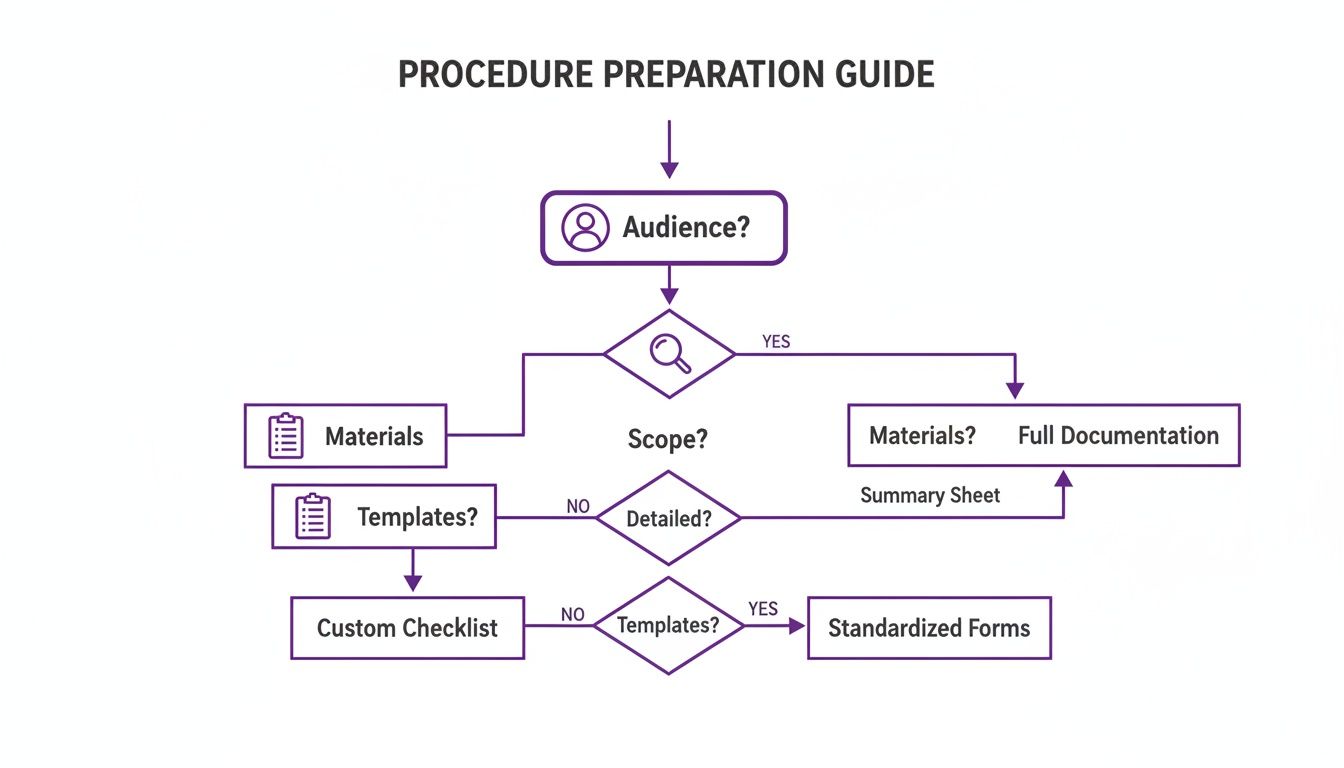
Think of it this way: the steps you write are the final product of careful planning, not the starting point.
Lead with the Verb
The single most effective trick I’ve learned for writing crystal-clear steps is to use the imperative mood. That’s just a fancy way of saying: start every step with a strong action verb. It’s direct, it’s punchy, and it tells the user exactly what to do.
Let’s look at a real-world example I pulled from an old IT support guide.
- Vague and wordy: “The customer ID should be entered into the ‘Account Number’ field, and then the ‘Search’ button must be clicked.”
- Clear and direct: “Enter the customer ID into the ‘Account Number’ field. Click the ‘Search’ button.”
See the difference? The second version gets straight to the point. It cuts out weak, passive phrases like “should be” and “must be,” which just add clutter and water down the instruction.
Navigating Those Inevitable “If-Then” Moments
Procedures are rarely a straight line. Sooner or later, you’ll hit a fork in the road—a decision point where the user has to make a choice. If you handle these “if-then” scenarios poorly, you’re almost guaranteed to confuse and derail your user.
The secret is to guide them through the choice without muddying up the main path. A little smart formatting goes a long way.
Imagine you’re writing a procedure for processing a refund. The big question is whether the customer has their original receipt.
Here’s how not to do it:
If the customer has a receipt, you should process the refund to their original payment method. But if they don’t have a receipt, then the refund has to be issued as store credit, unless it’s over $50, in which case a manager needs to approve it first before you can proceed with the store credit. What a mess. That’s a tangled knot of conditions that forces the reader to stop, reread, and try to untangle the logic. It crams multiple rules and actions into one unreadable block of text.
**A Much Better Approach:**If YES, continue to step 8.If NO, skip ahead to step 11. Clean. Scannable. Obvious. This presents a simple choice and uses indented bullets to clearly direct the user to the right place. The main workflow stays easy to follow, and the exception path is clearly marked.
Deconstruct Complex Actions
Sometimes a single “step” is really three or four smaller actions hiding in plain sight. Lumping them together is a classic mistake that creates mental overload and makes errors more likely. My rule of thumb? If a step asks someone to do more than two distinct things, it probably needs to be broken down.
Take this example from an old warehouse workflow:
Overly Complex:
“Verify the shipping address in the CRM, update the status to ‘Ready for Dispatch,’ generate the shipping label from the carrier portal, and then print two copies of the packing slip.” That’s not one step; it’s four separate tasks pretending to be one. The user has to hold all of that in their head at once, which is a recipe for disaster.
Clear and Deconstructed:
- Verify the customer’s shipping address in the CRM.
- Change the order status to “Ready for Dispatch.”
- Generate the shipping label from the carrier portal.
- Print two copies of the packing slip.
By giving each action its own number, you create a simple checklist. The user can complete one task, mentally check it off, and move to the next. This small change transforms a confusing instruction into a series of foolproof, manageable actions.
Using Templates and Smart Formatting for Clarity
Even the most carefully written procedure will fall flat if it’s just a dense wall of text. How you present the information is every bit as important as the words you choose. Without a clear structure, people waste precious time hunting for the right step, which only leads to mistakes and frustration.
This is exactly why standardized templates and smart formatting aren’t just “nice-to-haves”—they’re non-negotiable for anyone serious about creating procedures that actually work. A consistent look and feel across all your documentation makes your instructions instantly familiar. When someone opens a guide, they should know exactly where to find the purpose, scope, and required materials without having to re-learn your layout every single time.
The Power of a Standardized Template
Think of a template as the blueprint for clarity. It forces you to be consistent and acts as a built-in checklist, ensuring no critical information gets left out. It’s more than just a document; it’s a strategic tool.
Don’t just take my word for it. Survey data from over 3,400 global process owners showed that teams using modular, template-based procedures saw huge benefits. A staggering 61% of these teams scaled their procedures to other sites within six months, a feat managed by only 27% of teams using unstructured, free-form documents.
What’s more, those same organizations saw a 45% faster onboarding for new hires and a 38% reduction in document revisions within the first year. These numbers paint a clear picture: investing time in a solid template design pays off in both the speed and quality of your work. You can dig into more data on how standardization impacts market performance and scalability on coherentmarketinsights.com.
A great template doesn’t have to be complicated. It just needs to cover the essentials:
- Title Block: The procedure’s title, a unique ID, and its version number.
- Purpose & Scope: A quick, one or two-sentence explanation of what the procedure does (and what it doesn’t).
- Responsibilities: A simple list of the roles or job titles responsible for the task.
- Prerequisites: A checklist of tools, materials, software access, or approvals needed beforehand.
- The Steps: The heart of the document, where the detailed, action-oriented instructions live.
Formatting Tactics for Scannability
Once your template is in place, the next layer is smart formatting that guides the user’s eye. The goal here is to make your procedure so easy to scan that someone can find their place in seconds. This isn’t just about making things look pretty; it’s about reducing cognitive load. For a deeper dive, our guide on the best format for technical documentation has a ton of great insights.
Here are a few high-impact formatting tactics I rely on:
- Bold for Key Actions: Use bold text for the most critical verbs and nouns. Think “Click the Submit button” or “Enter the Customer ID.” It immediately draws the eye to the action.
- Bullet Points for Lists: Never bury a list of supplies or settings in a paragraph. Bulleted lists break them out for quick, at-a-glance comprehension.
- Annotated Screenshots: A picture is worth a thousand words, but an annotated one is worth ten thousand. Use arrows, circles, and brief callouts to show exactly where someone needs to click or what they should look for.
The difference this kind of structure makes is profound. Let’s look at a quick comparison to see what I mean.
Procedure Format Comparison
The table below contrasts the real-world experience of using an unstructured document versus a thoughtfully designed, template-based procedure. The advantages of standardization quickly become obvious.
| Attribute | Unstructured Procedure | Template-Based Procedure |
|---|---|---|
| Consistency | Inconsistent; every document is a new experience. | Standardized; users know where to find info. |
| Clarity | Often confusing, with key details buried in text. | High; key info is clearly sectioned and formatted. |
| Efficiency | Slow; users must read carefully to find their place. | Fast; scannable formats guide the user's eye. |
| Error Rate | Higher due to ambiguity and cognitive overload. | Lower due to clear, focused instructions. |
Ultimately, a template-based approach removes guesswork for both the writer and the reader, leading to a much more successful outcome.
The bottom line is simple: great formatting turns a good procedure into one that people will actually use. It respects the user’s time and sets them up for success from the moment they open the document.
Turning a Good Procedure into a Great One with Testing
So you’ve typed the final word on your procedure. Great! But don’t pop the champagne just yet. Hitting “save” doesn’t mean you’re done; it means you’re ready to see if it actually works.
A procedure that hasn’t been tested is just a well-intentioned draft. The only way to know for sure if your instructions are crystal clear is to put them in front of a real person and watch what happens.

This is the phase where theory meets reality. Testing is how you find all the hidden assumptions and fuzzy language you completely missed while you were deep in writing mode.
Finding the Gold in User Feedback
Sure, you can give it a once-over yourself or ask a colleague to check for typos. That helps, but the real magic happens during user acceptance testing (UAT).
This means finding someone who actually fits the profile of the person who will use the procedure. Then, you hand it over and simply observe. Your job is to be a fly on the wall, not a co-pilot.
Watch for every little hesitation, every confused glance, every time they have to re-read a step. Those moments are pure gold. They show you exactly where the instructions break down. Fight the urge to jump in and clarify—letting them struggle a bit reveals the real friction points you need to fix.
Once they’re done, you can debrief. Ask pointed questions to get inside their head:
- “I saw you pause at step 4. What were you thinking right then?”
- “Was any of the wording in this section a bit confusing or new to you?”
- “Did the screenshots actually help, or did they just add to the noise?”
Getting this kind of direct, honest feedback is the absolute fastest way to refine your document and make it genuinely useful.
Building an Audit-Proof Document
Beyond just being clear, a truly great procedure often needs to be bulletproof, especially if you’re in a regulated field. This is where you build measurable checks and quality control points right into the steps themselves. These aren’t just helpful hints; they’re hard stops that force consistency and correctness.
For example, instead of a vague step like, “Check the temperature,” you make it airtight: “Verify the temperature is between 35°F and 40°F and record the reading in Log B.” See the difference? It creates a specific, verifiable action with a clear paper trail.
An analysis of regulated facilities found that procedures with explicit measurable controls and mandatory reviews had nonconformity rates 52% lower than those with narrative-only instructions. Furthermore, when procedures required a documented sign-off at three specific control points, the likelihood of passing a regulatory inspection without critical findings jumped from 63% to 84%. The numbers don’t lie. Embedding numeric criteria and formal sign-offs is what makes documentation reliable and ready for an audit. You can explore more about how procedural controls impact global compliance on globenewswire.com. By building in these elements, you’re not just writing a how-to guide; you’re creating a solid tool for quality assurance and risk management.
Turning Your Procedures into Engaging Video Tutorials
Let’s be honest, sometimes even the most well-written instructions can’t beat watching someone actually do the task. When you need to show, not just tell, turning your procedure into a video guide is the way to go. It makes complex processes click for people in a way text alone often can’t.
The idea of creating a video might sound like a huge undertaking, but it’s gotten a lot easier. You no longer have to be a video pro to produce something polished. In fact, if you want to skip the recording part entirely, some of the best text-to-video AI tools can build a video for you right from your written steps.
The Old Way of Making Videos Was a Pain
For years, creating a tutorial video felt like you were stuck between a rock and a hard place. Easy-to-use recording tools like Loom are great for quick captures, but the raw footage is often 50-100% longer than necessary, filled with pauses and mistakes. On the other end, professional video editing software like Camtasia or Adobe Premiere Pro requires expert knowledge and significant time investment. This created a bottleneck, forcing subject matter experts to become video editors or wait in a long queue for a dedicated video team.
The real goal should be to let the expert who knows the process inside and out create the video. Their expertise should be the focus—not their ability to navigate complex editing software.
A Smarter Way to Create On-Brand Videos
This is where a new wave of tools like Tutorial AI is making a huge difference by generating professional video tutorials directly from screen recordings. The process is streamlined to empower the expert. Simply record your screen and speak freely through the process without any practice or script. Tutorial AI’s tools then automatically transform your raw recording into a polished, professional video that looks as if it was edited in Adobe Premiere Pro.
This allows the subject matter expert to create a whole library of on-brand videos extremely efficiently, including:
- Demos and explainer videos for products and software.
- Employee onboarding videos to get new hires up to speed faster.
- Feature release videos to showcase new functionality.
- Knowledge base and support article videos that resolve customer issues quickly.
At the end of the day, you get studio-quality tutorials without the steep learning curve or time-consuming editing process. To see just how this works, take a look at our guide on how to create training videos using this modern approach.
Common Questions About Writing Procedures
Even with the best roadmap, you’re bound to hit a few bumps when you start writing procedures in the real world. Let’s walk through some of the most common questions I hear and get you some practical, no-nonsense answers.
How Often Should I Be Reviewing and Updating Procedures?
People always want a magic number, but there isn’t one. A decent starting point is to review your most critical procedures at least once a year, and maybe every 18-24 months for the less vital ones.
But honestly, the real answer is much simpler: ** review them whenever something changes.**
Certain things should trigger an immediate update. For instance:
- A new software version rolls out, a tool is replaced, or regulations change.
- You notice a spike in errors or questions about a particular task.
- A new team member gets stuck and gives you feedback that the steps are confusing.
Think of it less as a scheduled chore and more as a living document that should always mirror how the work actually gets done.
What’s the Best Way to Manage Procedures for a Remote Team?
When your team is spread out, old-school methods like printed binders or files on a local server are dead on arrival. Accessibility and version control become your top priorities. Everything has to live in one central, cloud-based spot that anyone can get to, anytime.
A dedicated knowledge base, a well-structured SharePoint site, or a collaboration tool like Confluence are all great options. The goal is to create a single source of truth. This is non-negotiable. It stops people from using that outdated version they saved to their desktop six months ago.
One more tip: make sure your procedures are mobile-friendly. Your team should be able to pull them up on a phone or tablet without a headache.
For a remote team, you can’t just lean over your desk and ask a coworker for help. Clear, easy-to-find procedures become the go-to support system, making them absolutely essential for keeping everyone on track.
This Procedure Is Getting Way Too Long. What Should I Do?
If you find yourself writing a procedure that’s turning into a novel, take that as a warning sign. It almost always means you’re trying to document several different processes under a single heading.
The solution is to break it down.
Look for logical sub-tasks that can be pulled out into their own standalone procedures. For example, instead of one monster document called “New Client Onboarding,” you’d be much better off with a few smaller, linked guides:
- Creating a New Client Record in the CRM
- Generating the Initial Project Invoice
- Scheduling the Client Kick-off Meeting
This modular approach makes each step far easier to digest. It also makes your life a whole lot easier when you need to update just one part of the bigger workflow without having to overhaul the entire document.
Ready to turn your perfectly written procedures into engaging, studio-quality video tutorials in minutes? With Tutorial AI, you can record your screen and let our AI handle the editing, creating polished demos and guides without any video expertise. Start creating professional videos today.