A solid format for technical documentation is more than just a style guide; it’s a strategic framework. It brings together a logical structure, consistent styling, and clear governance standards to make sure every piece of content, from an API reference to a getting-started guide, is clear, easy to find, and trustworthy.
This approach is what turns a random collection of articles into a knowledge base that people can actually rely on.
Defining Your Core Documentation Format
An effective documentation format isn’t about enforcing rigid, inflexible rules. It’s about creating a predictable and intuitive experience for the reader. Think of it as the blueprint for your entire knowledge base, shaping how information is organized, presented, and kept up-to-date.
Having this foundation in place means both your internal teams and your customers can find what they need without a struggle. This consistency is key for guiding users through complex steps and helping them grasp technical concepts without getting lost or frustrated. It reduces their mental effort and builds their confidence in your product.
The Impact of a Standardized Approach
When you commit to a standardized format, the benefits go far beyond just looking good. Research in technical communication shows that combining a well-organized layout with consistent formatting can improve a reader’s comprehension by as much as 60%.
Furthermore, using templates that align with a style guide can cut down on documentation errors by around 40% and speed up the content creation process by 30% or more. The numbers tell a clear story: consistency is directly tied to usability and efficiency.
The following table breaks down the essential pillars that make up a comprehensive documentation format.
Key Components of a Standard Documentation Format
| Component Category | Examples | Primary Goal |
|---|---|---|
| Structure & Templates | Overview, API reference, tutorial, changelog | Ensure every document type has a predictable layout. |
| Formatting Rules | Headings, code blocks, tables, images | Create visual consistency and improve readability. |
| Governance | Naming conventions, metadata, versioning | Maintain order, searchability, and accuracy over time. |
| Accessibility & Delivery | Screen reader compatibility, localization, video tutorials | Make content usable for everyone, everywhere. |
Ultimately, your format is a promise you make to your users. It tells them that your documentation is professional, reliable, and built with their needs front and center. For a deeper dive into building this kind of robust structure, check out this guide on the best format for technical documentation.
This structured approach is the backbone of any successful technical guide, supporting everything from high-level overviews to detailed release notes.
Building Your Document’s Structural Foundation
Every good technical document is built on a logical and predictable structure. This isn’t just about making things look tidy; it’s a fundamental part of the format for technical documentation that helps users find what they need, solve their problems, and get on with their work. When someone knows exactly where to look for an answer, frustration drops and efficiency soars.
A well-thought-out structure means every piece of information, from a high-level overview to the nitty-gritty details of an API endpoint, has a home. This consistency is what builds trust and turns your documentation into a go-to, reliable resource. Think of these structural elements as the core chapters of a user guide, each with a clear job to do.
This diagram illustrates how structure, formatting, and governance are the three main pillars that support a complete and effective documentation standard.
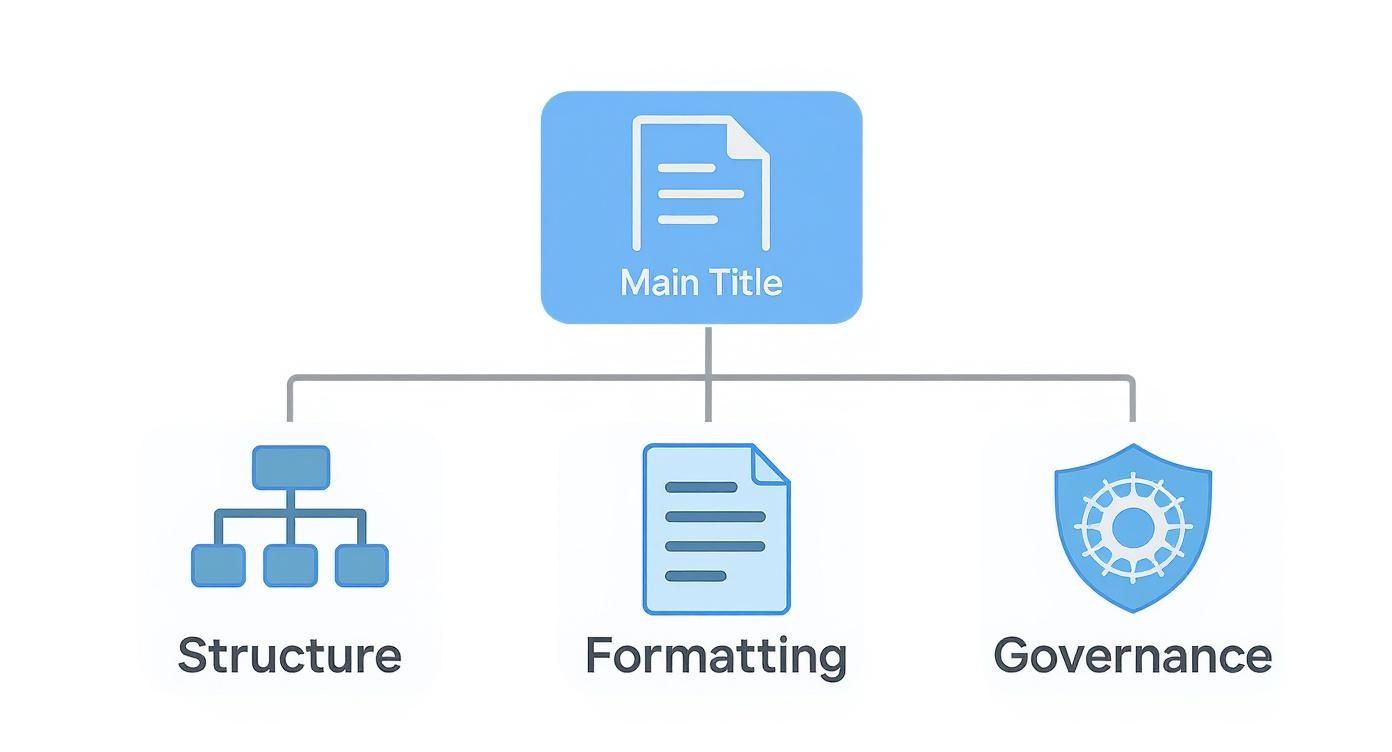
As you can see, successful documentation isn’t just about the words on the page. It’s equally about the consistent rules and management practices holding everything together.
Core Structural Components
To create a document that truly serves its purpose, a few components are absolutely essential. They work together to form a self-contained guide that anticipates and answers a user’s questions from beginning to end.
- Clear Overview and Purpose: Always start by answering the fundamental “what” and “why.” This section needs to briefly explain the document’s scope, its intended audience, and what the reader will be able to do after they’ve finished.
- Prerequisites: Never assume what your user knows. Clearly list any software, permissions, or background knowledge they need before they start. This simple step prevents them from hitting a wall halfway through a procedure.
- Step-by-Step Procedures: This is the core of most technical guides. Use numbered lists, action-focused headings, and helpful screenshots to walk users through each task. The goal is clarity, not confusion.
- API Documentation: When writing for developers, structure is king. Provide detailed information on endpoints, parameters, request/response examples, and error codes. Consistency across your API reference is crucial for a good developer experience.
From Text to Video
Turning written guides into video tutorials is a great way to boost understanding and engagement. But just hitting “record” on your screen often creates more problems than it solves. Easy-to-use recording tools like Loom are great for speed, but a typical recording is often 50-100% longer than necessary, filled with ums, ahs, and dead air.
The alternative, professional video editing software like Camtasia or Adobe Premiere Pro, requires expert video editing knowledge, creating a barrier for the subject matter experts who just want to share what they know. This is where modern AI tools are changing the game.
With Tutorial AI, you can generate video tutorials from simple screen recordings. Its tools let you speak freely without any practice, and your final video will still look professional, as if it was edited in Adobe Premiere Pro. This allows the subject matter expert to create on-brand videos—like demos, onboarding videos, explainer videos, feature release videos, knowledge base videos, and support article videos—extremely efficiently. To learn more about crafting effective educational content, it’s worth exploring these instructional design best practices.
Establishing Rules for Clarity and Consistency
If a solid structure is the skeleton of your technical documentation, then consistent formatting rules are the muscles that make it work. These are the details that take a document from merely functional to truly user-friendly. A clean, uniform format for technical documentation simply makes it easier for your readers to process information, letting them focus on what you’re saying, not how you’re presenting it.
Setting up these rules isn’t about stifling creativity. It’s about creating a predictable, professional experience. When users instinctively know that a code block will always look a certain way or that an H3 heading signals a specific kind of detail, they can move through your content faster and with far more confidence. This kind of consistency is a subtle but powerful way to show your brand’s commitment to quality.
Defining Your Visual Style Guide
A visual style guide is your single source of truth that ensures every piece of content looks and feels the same, no matter who wrote it. Think of it as a living document that your whole team can turn to for guidance.
Your guide needs to nail down the specifics for these core formatting elements:
- Headings (H1, H2, H3): Define a clear purpose for each level. For example, H1 is reserved for the document title, H2s break up the major sections, and H3s tackle the sub-topics inside them. This builds a logical hierarchy that’s a breeze for both people and search engines to scan.
- Code Blocks: Decide exactly how code snippets will appear. This should cover syntax highlighting for various languages, whether to include a copy-to-clipboard button, and how to label file names or command outputs clearly.
- Tables: Lay out the standard design for displaying data. Specify header styles, cell padding, and text alignment to keep every table looking clean and readable.
- Lists: Standardize when to use bullet points (for unordered items) versus numbered lists (for sequential steps). It’s a simple rule, but it dramatically improves how easily users can follow procedural content.
A well-designed knowledge base goes a long way in keeping the end user engaged with your content. By offering an inviting, clear experience, users are given a consistent look-and-feel that matches your brand.
Putting Consistency Into Practice
Let’s take something as common as an API parameter description. Without clear rules, one writer might use a simple bolded list, while another builds an elaborate table. A style guide ensures they both present that information identically, which makes for a much smoother user experience.
Now, put yourself in the shoes of a user following a tutorial. If the formatting is all over the place, it’s tough to tell the difference between explanatory text, a command they need to type, and the output they should expect. A consistent format—with distinct styles for code blocks and clear headings—eliminates that confusion entirely. It’s a small detail that can mean the difference between a user succeeding and giving up in frustration.
5. Versioning and Release Notes
When your product changes, your documentation has to keep pace. A solid plan for version control and writing clear release notes isn’t just a “nice-to-have”—it’s essential. This is how you show users they can trust your content to be accurate for the specific product version they’re using.
Without a versioning strategy, you’re setting users up for confusion and frustration when the docs don’t match what they see on screen. Adopting a system like semantic versioning (Major.Minor.Patch) is a widely accepted best practice. It gives everyone a logical way to understand the scope of an update, whether it’s a major new feature or a small bug fix. Our guide on how to view document version history shows a great visual example of this in action.
Writing Release Notes People Actually Read
Good release notes are more than a simple changelog; they tell a story about how the product is getting better. They need to be scannable and easy to digest for everyone, from developers to end-users.
The trick is to group updates into logical, easy-to-follow categories so readers can jump straight to what interests them. I always recommend a structure like this:
- 🚀 New Features: Announce the big new things and, more importantly, what they help users achieve.
- ✨ Improvements: Detail how you’ve made existing features better, faster, or easier to use.
- 🐛 Bug Fixes: Be transparent about what you’ve fixed. This builds a ton of credibility.
Keep each point short and sweet, and focus on the impact from the user’s perspective. For some great real-world inspiration, check out these examples of effective release notes.
How Agile Changed the Game for Documentation
The way we build software has completely changed how we handle documentation. Agile development cycles demand a more iterative and lightweight approach. Instead of massive, static manuals, we now rely on user stories and continuous release notes that align directly with sprints. In fact, companies that embrace this report they’ve cut down on documentation bloat by as much as 50%, all while keeping their content more current.
The secret is to treat documentation as part of the development process, not as a chore to be done at the end. When you do that, your version histories and release notes become consistently accurate, which is the bedrock of building trust with your users. This iterative mindset turns your documentation into a living resource that truly reflects the state of your product with every single release.
Making Your Docs Findable with Metadata
Let’s be honest: even the best documentation is worthless if your users can’t find it. This is where a smart approach to metadata and naming conventions comes in. It’s what turns a simple folder of documents into a genuinely useful, searchable resource. Nailing this is a cornerstone of any solid format for technical documentation, helping both users and your own team find what they need, fast.
These aren’t just behind-the-scenes details; they’re the foundation of your entire information architecture. When you standardize how you tag and name content, you make your internal search exponentially better, simplify content management, and give users the confidence to navigate the knowledge base on their own.
Core Metadata for Every Document
Think of metadata as the label on a filing cabinet drawer. It tells you what’s inside without you having to pull it open and rifle through the contents. As your documentation library grows, having a consistent set of metadata fields for every single article, guide, and tutorial is absolutely critical for keeping things from descending into chaos.
At a minimum, every piece of content you create should include these key data points:
- Title: Make it clear, descriptive, and unique. No one benefits from five articles titled “Getting Started.”
- Author/Owner: Who’s on the hook for keeping this content accurate? List the person or team.
- Version: The specific product or software version this document applies to, like
v2.5.1. - Last Updated: The date of the last revision. This simple date helps users instantly gauge if the information is still relevant.
- Tags/Keywords: Think like your user. What terms would they search for? Good examples include “API,” “billing,” “integration,” or “user permissions.”
A well-designed knowledge base goes a long way in keeping the end user engaged with your content. By offering an inviting, clear experience, users are given a consistent look-and-feel that matches your brand.
Standardizing Naming Conventions
Beyond the metadata tags, the actual file names and page URLs need a predictable, logical structure. A messy naming system is a recipe for disaster, making it nearly impossible for anyone to browse content logically or figure out how different documents relate to each other.
The key is to establish a clear, simple pattern and then enforce it religiously. For instance, a great convention to follow is:
product-feature-action.html
- Example 1:
reporting-api-getting-started.html - Example 2:
user-management-add-new-user.html
This structure makes your URLs human-readable and provides instant context. It’s also a gift to search engine optimization, making it easier for both internal search tools and external engines like Google to index your content effectively. Sticking to this discipline is one of the highest-impact, lowest-effort things you can do to improve the usability of your entire documentation set.
Turning Written Guides into AI-Powered Video Tutorials
While a well-structured written guide is essential, let’s be honest—many people learn better by watching than by reading. Transforming your detailed documents into engaging video tutorials is a fantastic way to reach more people and make sure your key points really land. This approach caters to different learning styles and can make a huge difference in how well users understand and stick with your content.
The problem is, the journey from a text document to a polished video is often a bumpy one. The go-to method for many is a quick screen recording with a tool like Loom, but that can be surprisingly inefficient. These raw takes are often 50-100% longer than they need to be, full of awkward pauses, mistakes, and repeated clicks that can test a viewer’s patience and hide the important information.
On the other hand, you have heavyweight professional editing software like Camtasia or Adobe Premiere Pro. These tools are incredibly powerful, but they come with a steep learning curve and demand a serious time commitment. This creates a bottleneck, as the subject matter experts (SMEs)—the people with the actual product knowledge—rarely have the specialized video editing skills to use them effectively.
Bridging the Gap with AI Video Generation
This is exactly where AI-powered tools are making a real difference for documentation teams. A new wave of video creation platforms, like Tutorial AI, gets rid of the frustrating trade-off between speed and quality. They’re built to empower the SME—the person who knows the product inside and out—to create studio-quality videos without any editing experience.
The process is refreshingly straightforward. The expert can just talk through a process and perform a walkthrough naturally, without a script or hours of practice. They can concentrate entirely on sharing their expertise, confident that the AI will handle the tedious post-production work. The platform automatically transcribes the audio, and by simply editing the text transcript, the video edits itself.
By offering an inviting, clear experience that looks great on both mobile and desktop devices, users are given a consistent look-and-feel that matches your brand instead of ordinary technical writing text across a corpus of dull, lengthy technical documents.
From Raw Recording to Polished Tutorial
Tutorial AI’s technology analyzes the raw screen capture and narration, turning an unscripted demo into a professional video that looks like it was cut in Adobe Premiere Pro. This intelligent editing process takes care of all the details.
- Smart Trimming: It automatically snips out long pauses, filler words like “um” and “ah,” and any moments where the speaker corrects themselves.
- Smooth Motion: The tool adds polished zooms and pans that guide the viewer’s eye to the most critical parts of the screen, making it easy to follow along.
- On-Brand Visuals: It applies your company’s branding—logos, color schemes, and custom fonts—to ensure every video looks consistent and professional.
This empowers SMEs to produce a wide range of on-brand videos with remarkable efficiency. Whether they’re creating product demos, onboarding flows, explainer videos, or tutorials for support articles, the focus stays on the content, not on a complicated editing timeline.
For teams wanting to add an extra layer of polish, an AI voice generator for videos can ensure the narration is consistently crisp and clear. The end result is a much faster, more scalable method for enriching your technical documentation with high-quality visual content.
Practical Documentation Templates and Examples
The best way to build a solid format for technical documentation is to see how it works in practice. Why start from scratch when you can use a proven template? These pre-built frameworks give you a solid foundation, saving you valuable time and ensuring you don’t overlook critical details.
Think of templates as a reliable starting point. They offer a predefined structure, so you can stop worrying about the layout and focus on what really matters: creating clear, accurate, and helpful content for your users.
Choosing the Right Template for the Job
Not all technical documents are the same, and your template choice should reflect that. A tutorial for a first-time user needs a completely different structure than an API reference aimed at seasoned developers. The key is to match the template to the job at hand.
For instance, a standard guide is all about a logical, step-by-step flow. On the other hand, release notes need to be scannable, delivering high-impact updates at a glance.
To help you decide, here’s a quick breakdown of the most common documentation types and what they’re used for.
Comparison of Documentation Template Types
| Template Type | Primary Use Case | Key Sections Included |
|---|---|---|
| Standard Guide | Teaching users how to perform a specific task or use a feature. | Overview, Prerequisites, Step-by-Step Instructions, Troubleshooting. |
| API Documentation | Providing developers with the technical details needed to integrate. | Endpoints, Parameters, Request/Response Examples, Error Codes. |
| Release Notes | Communicating updates, new features, and bug fixes to users. | New Features, Improvements, Bug Fixes, Version Number. |
Each of these templates is built to meet a specific audience’s needs, presenting information in a format they expect and can easily digest.
Adopting a consistent structure across all your guides, references, and notes does more than just look professional—it builds trust. When users know what to expect, they can find answers faster and feel more confident using your product.
Frequently Asked Questions
Even with a solid format for technical documentation, you’re bound to run into some tricky situations when you start applying it in the real world. Think of this section as a quick reference to tackle some of the most common questions and challenges that pop up.
What Is the Best Way to Handle Documentation for Multiple Product Versions?
This is a classic problem, especially for software that’s constantly evolving. The most effective strategy is to build version control right into your documentation platform or knowledge base. You’ve probably seen this on other sites—a simple dropdown menu lets users pick their version, like v2.1 or v3.0.
When a user makes a selection, the documentation dynamically filters to show only the content relevant to that specific version. This is a lifesaver for users, as it prevents them from trying to follow instructions for a feature their version doesn’t even have. It also makes life much easier for your technical writers during updates.
How Can I Make My Written Documentation More Engaging?
Let’s be honest, walls of text can put anyone to sleep. To keep your readers engaged and help them understand complex topics, you need to break things up with good visuals.
- Screenshots and GIFs: Instead of just describing a user interface, show it. Use annotated screenshots to point out exactly what users need to click, and use short, looping GIFs to demonstrate quick actions or workflows.
- Video Tutorials: For more complicated processes, nothing beats a short, embedded video. It gives users a dynamic, step-by-step walkthrough that’s often easier to follow than written instructions alone.
- Informative Diagrams: When explaining a system’s architecture or a complex workflow, a clear flowchart or diagram can make the concept click instantly. It’s about providing that high-level overview before diving into the details.
How Can We Create Professional Videos Without a Video Editor?
Many teams don’t have a dedicated video expert on staff, which can feel like a major roadblock. You know that polished tutorials are effective, but professional tools like Adobe Premiere Pro have a steep learning curve. On the other hand, a raw screen recording from a tool like Loom can be 50-100% longer than it needs to be, full of pauses and mistakes.
This is where newer, AI-powered tools are really changing the game. With Tutorial AI, you can generate video tutorials from simple screen recordings. Its tools let you speak freely without any practice, and your final video will still look professional, as if it was edited in Adobe Premiere Pro. This allows the subject matter expert to create on-brand videos—like demos, onboarding videos, explainer videos, feature release videos, knowledge base videos, and support article videos—extremely efficiently.
Ready to turn your screen recordings into polished, professional tutorials in minutes? Tutorial AI empowers your team to create high-quality, on-brand videos without any editing experience. See how it works at Tutorial.ai.