Think of really effective documentation and training as the unsung hero of a growing business. It’s what separates chaotic, interruption-driven growth from a smooth, scalable operation. When done right, it captures expert knowledge and makes it available on demand, turning individual expertise into a powerful, shared company asset.
Why Great Documentation and Training Is Your Competitive Edge

For too many companies, the state of internal knowledge is a mess. Sound familiar? You’ve got chaotic wikis full of outdated pages, a folder of rambling video tutorials no one has time to watch, and a culture of constant “shoulder-tapping” that kills any chance of deep, focused work. This isn’t just annoying—it’s a massive drain on productivity and morale.
Now, picture the alternative. A new hire gets up to speed in days, not weeks, thanks to clear, step-by-step guides. Your sales team answers tricky technical questions with confidence, pulling up a perfect, up-to-date demo on the spot. Support tickets get resolved in minutes because the team has a reliable knowledge base to lean on. This level of clarity isn’t a nice-to-have; it’s a core operational advantage that hits the bottom line. Learning how to create an internal knowledge base is often the first critical step in making this happen.
The Shift From Chore to Strategy
The old view of documentation was that it was a tedious, administrative chore. That’s changing, fast. Today, smart companies see it as a strategic imperative. The market reflects this shift: the global corporate training market is projected to grow by an incredible USD 43.86 billion between 2025 and 2029.
North America is leading the way, accounting for 46% of that market, with a huge focus on technical training—exactly the kind of software demos and compliance guides that modern teams need. A big piece of this is e-learning, which can cut traditional training costs by a staggering 50-60%.
This explosive growth isn’t just about throwing money at the problem. It’s a sign that businesses finally recognize that scalable knowledge transfer is essential to survive and thrive.
Empowering Experts With Modern Tools
In the past, creating high-quality training content, especially video, was a huge bottleneck. Your subject matter expert (SME) was stuck with two bad options. They could hit “record” on a tool like Loom and create a quick-and-dirty demo, but these recordings are often 50-100% longer than necessary, full of “ums,” pauses, and mistakes.
The other route was to hand that raw footage to a video editor, who would then spend hours cleaning it up in professional video editing software such as Camtasia or Adobe Premiere Pro. This process is slow, expensive, and requires expert video editing knowledge that most teams just don’t have.
This is where new AI-powered tools are completely changing the game. With a platform like Tutorial AI, an expert can generate video tutorials based on simple screen recordings. Tutorial AI’s tools let you speak freely without any practice and still your video will look professional as if it was edited in Adobe Premiere Pro. It allows the subject matter expert to create on-brand videos extremely efficiently, producing everything from demos, onboarding videos, and explainer videos to feature release videos and knowledge base videos for support articles. This new reality sets the stage for the practical strategies we’re about to dive into.
Connecting with Your Audience Before You Create
Trying to create great documentation and training without knowing who it’s for is a recipe for disaster. It’s like a chef meticulously preparing a five-star steak dinner, only to discover their guests are all vegetarian. Before you write a single word or record a single video, you have to get inside the heads of your learners.
This isn’t about slapping together generic user profiles. It’s about building realistic personas that capture the very different needs of the people using your product. Think about it: a brand-new customer trying to get started has a completely different mindset than a seasoned power user or a sales engineer prepping for a big demo.
Identifying Learner Personas
First things first, you need to break your audience down into a few distinct groups based on their roles, what they want to accomplish, and what they already know. You don’t need to go overboard here; just start with the most obvious splits in your user base.
You’ll likely end up with personas like these:
- The New Customer: This person is all about getting set up and scoring that first quick win. They need simple, step-by-step guides and straightforward explainer videos that get them to “aha!” as fast as possible.
- The Power User: They’ve already mastered the basics. Now they’re hunting for advanced workflows, keyboard shortcuts, and anything that will make them more efficient. They love dense, skimmable articles and tutorials that get straight to the point.
- The Internal Team Member: This could be a salesperson who needs a killer demo script or a support agent who needs to go deep on troubleshooting a tricky feature. Their training needs are laser-focused on their specific job.
Once you define these groups, you can finally stop making one-size-fits-all content that helps no one and start creating targeted material that actually hits the mark.
Pinpointing Struggles and Goals
With your personas in hand, it’s time to put yourself in their shoes. What are they constantly struggling with? What are they really trying to do with your software? This isn’t a guessing game—it’s detective work.
The most effective training content is a direct answer to a real and urgent question. Your job is to uncover what those questions are before your audience even has to ask. Go talk to your customer support team. Seriously. They’re on the front lines and hear about the most common points of confusion every single day. Dig through support tickets and look for patterns. Your sales team is another goldmine; they know exactly what questions and objections pop up before a customer ever signs on.
For instance, if support tickets are blowing up with questions about a specific integration, that’s a massive flashing sign. It’s your cue to create a crystal-clear video tutorial and a detailed knowledge base article on that exact topic. The whole point is to get ahead of the problems.
Matching Content Format to the Learner
Finally, think about the best way to deliver the information. The medium you choose is just as important as the message itself. A developer might want to search through text-based API docs, while a visual learner will get way more from watching a video. The format directly impacts how well someone actually absorbs the knowledge.
Think about these classic pairings:
- Video Tutorials: Perfect for walking through a process, onboarding new users, or showing off a complex workflow.
- Knowledge Base Articles: The best choice for deep, searchable information, technical specs, and step-by-step written instructions.
- Interactive Demos: Fantastic for sales enablement, letting potential customers experience the product in a guided, hands-on way.
This methodical approach is the foundation of any good learning experience. For a closer look at how to structure your content effectively, it’s worth exploring some core instructional design best practices that are directly applicable here. When you line up your personas, their problems, and the right format, you create documentation that feels personal, genuinely helpful, and immediately valuable.
Building Your AI-Powered Content Creation Engine
Once you know who you’re creating content for, the next step is to build the engine that actually produces the goods. This is all about designing a modern, agile workflow for creating both text and video. And for most teams, the single biggest roadblock has always been video production—a process that’s traditionally been a massive pain.
Let’s be honest, making even a simple training video used to be a frustrating chore. A subject matter expert (SME) would record their screen, often rambling through a long take filled with “ums,” mistakes, and repeated explanations. This raw footage, often 50-100% longer than it needed to be, was then tossed over the wall to a specialist who was a wizard with complex tools like Adobe Premiere Pro or Camtasia.
This old-school approach created a slow, expensive dependency on a handful of skilled editors. The SME—the person with the actual knowledge—was completely disconnected from the final product, which led to endless back-and-forth reviews. Thankfully, a new, AI-driven approach completely flips this outdated model on its head.
The AI-Powered Video Workflow
Imagine your top engineer needs to create a tutorial on a new API endpoint. Instead of blocking out half their day for multiple takes and edits, they just hit record and start talking. No script. No practice runs. They just explain the process naturally, like they’re showing a colleague how it works.
That’s the magic of an AI-native platform like Tutorial AI. It empowers the SME to create a polished, on-brand video with incredible speed by generating video tutorials based on screen recordings. The AI does all the heavy lifting that once required a video pro.
But before you hit record, it’s crucial to have a clear plan. This flow shows the essential prep work that comes before you create anything.
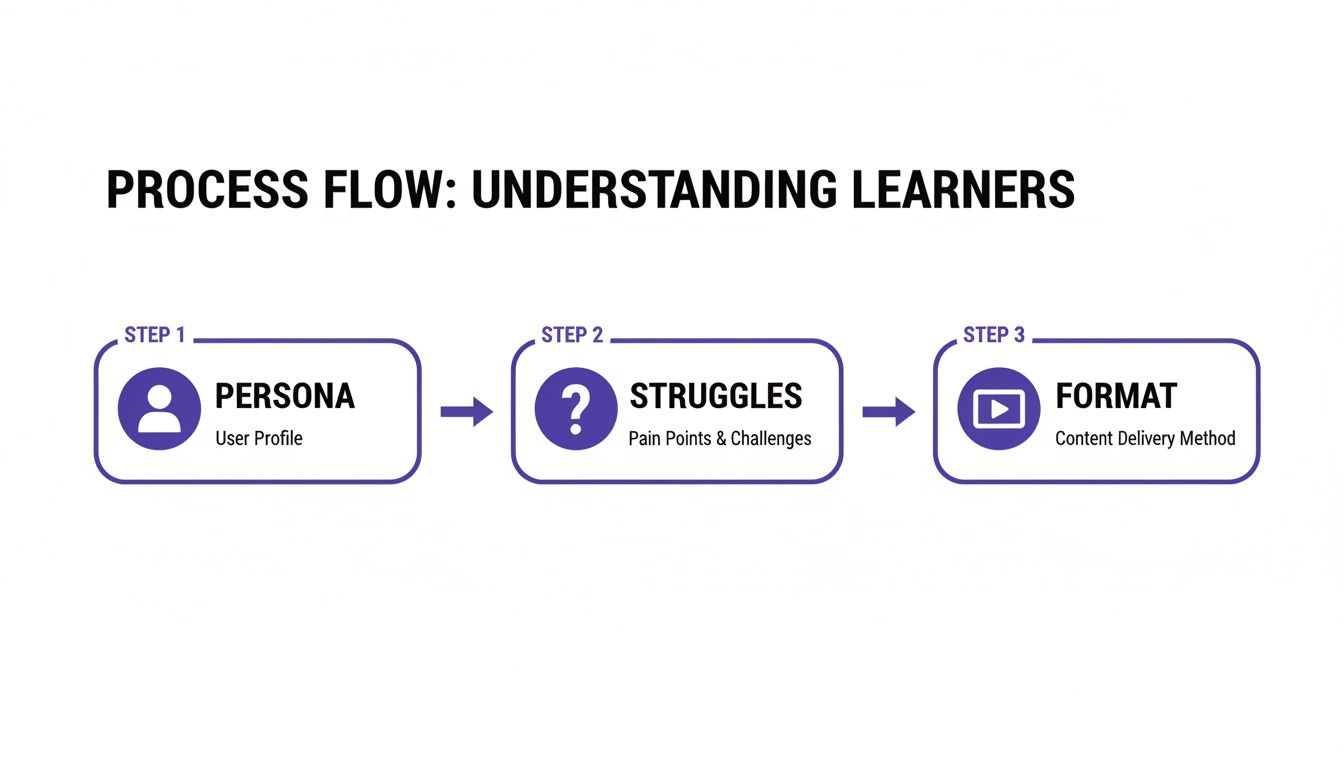
As you can see, defining the user persona, pinpointing their struggles, and picking the right format are non-negotiable first steps. Get this right, and your content will actually hit the mark.
From Raw Recording to Polished Tutorial
With Tutorial AI’s tools, your expert can speak freely without any practice, and the final video will look professional as if it was edited in Adobe Premiere Pro. The system automatically transcribes the audio, cleans up the script for clarity, and adds studio-quality AI narration. It also applies smart visual edits, like zooming in on important details and smoothing out jerky cursor movements, making sure the final product is tight and professional.
This approach is a game-changer for creating all kinds of essential training assets:
- Demos: Quickly whip up compelling product demos for your sales and marketing teams.
- Onboarding Videos: Guide new users through setup and their first “aha!” moments.
- Explainer Videos: Break down complex features into simple, easy-to-follow visual guides.
- Feature Release Videos: Announce and showcase new functionality to your entire user base.
- Knowledge Base Videos: Add visual context to support articles to drive down ticket volume.
- Support Article Videos: Provide clear, step-by-step solutions for common customer headaches.
The real win here is getting speed without sacrificing quality. The person who knows the material best—the SME—can now own the entire process. It allows the subject matter expert to create on-brand videos extremely efficiently. This dramatically shortens the feedback loop and gets valuable content in front of users faster than ever before.
The End of the Video Bottleneck
To really see the difference, let’s compare the old way with the new. The table below breaks down just how much friction an AI-powered workflow removes from the process.
Traditional Video Editing vs AI-Powered Workflow
| Phase | Traditional Workflow (Camtasia/Premiere Pro) | Tutorial AI Workflow |
|---|---|---|
| Preparation | SME writes a detailed script. Rehearses multiple times to get the delivery right. | SME thinks about key talking points. No script or rehearsal needed. |
| Recording | SME records multiple takes, trying to get a "perfect" one. Very time-consuming. | SME records a single, natural take, mistakes and all. |
| Editing & Post-Production | Hand-off to a specialized video editor. Manual process of cutting clips, removing mistakes, adding zooms, and creating narration. (4-8 hours per video) | AI automatically transcribes, generates a clean script, adds AI voiceover, and applies smart visual edits like zooms and blurs. (~15 minutes per video) |
| Review & Iteration | SME reviews the edited video. Multiple rounds of feedback and revisions between SME and editor. | SME reviews the AI-generated draft and makes any final tweaks directly. The loop is closed instantly. |
| Required Skills | Deep expertise in complex video editing software. | Ability to explain a topic and use a simple web interface. |
This shift from a manual, specialized process to an AI-assisted one fundamentally changes the economics of creating documentation and training. The bottleneck is gone.
By empowering the expert to also be the creator, you decentralize content production. An engineer can create a technical deep-dive, a product manager can record a feature update, and a support agent can build a troubleshooting guide—all using the same simple, efficient workflow. This means your knowledge base stays current, your onboarding feels more helpful, and your internal teams are always up to speed. You can finally create the specific, targeted video content your audience needs, right when they need it, instead of adding it to a backlog that’s a mile long. This kind of agility ensures your training materials can actually keep pace with your product.
Choosing the Right Tools for Your Tech Stack
A great documentation and training strategy is one thing on paper, but it’s the technology you choose that actually brings it to life. The key is to build a tech stack where your tools talk to each other, letting you create content once and push it everywhere you need it. Think of it as an ecosystem, from your internal knowledge base all the way to a full-blown Learning Management System (LMS).
And make no mistake, the world of e-learning is booming. The corporate training market alone is on track to hit $462.6 billion by 2027—a massive leap from $245.5 billion in 2022. A huge piece of that is the explosive growth of LMS platforms, which are expanding at a 16.4% CAGR. All told, the e-learning sector is expected to grow by an astounding USD 326.9 billion between 2025 and 2029.
This incredible demand puts a ton of pressure on teams to create high-quality, engaging material efficiently. At the heart of this challenge are AI-powered video creation tools. They’re quickly becoming the engine that produces the visual content all these other platforms depend on.
The Central Role of AI Video Creation
We all know video is the most effective medium for training, but producing it has always been a huge headache. It’s slow, expensive, and requires specialized skills. This is exactly the problem AI tools are designed to fix. Instead of wrestling with manual, frame-by-frame editing, these platforms automate the tedious work, so literally anyone can create a professional-looking tutorial.
Take Tutorial AI, for example. It’s built specifically to generate video tutorials based on screen recordings, creating a whole suite of polished assets. Your own subject matter experts (SMEs)—the people who actually know the product—can quickly churn out critical assets like:
- Demos and explainer videos for the sales and marketing teams.
- Onboarding videos to get new customers up to speed.
- Feature release videos to keep users in the loop.
- Knowledge base videos and support article videos to help deflect support tickets.
The idea is simple: let your experts create on-brand, high-quality videos without needing a video editor on speed dial.
Bridging the Gap Between Ease and Quality
For years, teams have been stuck with a frustrating trade-off. On one hand, you have easy-to-use screen recorders like Loom. They’re fantastic for quick, informal videos, but the final product is often 50-100% longer than necessary, full of “ums,” mistakes, and rambling. They just don’t have the professional polish you need for customer-facing materials.
On the other end of the spectrum is professional video editing software like Camtasia or Adobe Premiere Pro. They can do anything, but they demand a steep learning curve and expert video editing knowledge. Most SMEs simply don’t have the time or desire to become expert video editors, which creates a massive production bottleneck.
Tutorial AI’s tools are designed to eliminate this trade-off. They let you speak freely without any practice and still your video will look professional as if it was edited in Adobe Premiere Pro. The magic is in its intelligent features. The platform can automatically generate a studio-quality AI voiceover in over 30 languages, add post-recording cursor effects to highlight what’s important, and use smart zooms to focus the viewer’s attention. The end result is a video that’s clear, concise, and looks completely professional.
Building an Integrated and Scalable Workflow
Ultimately, you want to pick tools that integrate seamlessly. Your video creation platform should be the central hub, with finished content flowing out to all your other systems. For example, a video you create in Tutorial AI can be embedded directly into a Zendesk knowledge base article or uploaded as a course module in your LMS.
This creates a workflow that can actually scale because you aren’t constantly rebuilding content for different channels. By choosing tools that play well together, you build a cohesive and efficient documentation and training ecosystem. If you’re figuring out how to connect these systems, our guide on Learning Management System integration can show you how it all fits together. This connected approach is what lets your teams create and share knowledge as fast as your business moves.
Measuring What Matters for Continuous Improvement
Great documentation and training isn’t a static library of articles you write once and forget. It’s a living, breathing system that has to grow and adapt right alongside your product and your users. To make sure it’s actually doing its job, you need to look past simple vanity metrics like page views and focus on data that shows real business impact. This creates a powerful feedback loop, making your content smarter and more effective over time.
Effective measurement starts with asking the right questions. We need to shift from asking, “How many people saw this article?” to “Did this article actually solve the user’s problem?” That subtle change in perspective is everything. It’s how you prove the value of your work and show a clear return on the time and money you’re investing.
From Vanity Metrics to Business Impact
The real success of your content isn’t measured in clicks; it’s measured in outcomes. Every tutorial, every knowledge base article, every guide should have a clear business goal attached to it. That’s how you track performance against results that the rest of the company actually cares about.
Here are a few examples of metrics that truly matter for different types of content:
- For Support Articles: The name of the game is ticket deflection. Are people finding answers in your help center instead of opening a support ticket? A high deflection rate means you’re saving the company money and proving your self-service strategy works.
- For Product Tutorials: You’re looking for feature adoption. Are users who engage with your tutorials more likely to try—and stick with—a new feature? This metric draws a direct line from your training content to product engagement.
- For Sales Enablement: How does your content affect the sales cycle? Do clear demos and technical guides help your sales team close deals faster? A shorter sales cycle is a win for everyone, getting revenue in the door more quickly.
When you zero in on these kinds of business-critical outcomes, the value of your documentation becomes undeniable. While the context is different, the principles of tracking engagement and impact found in guides on social media analytics and reporting can offer some surprisingly relevant insights.
Creating a Continuous Feedback Loop
Analytics tell you what is happening, but only direct user feedback can tell you why. The magic happens when you combine both. This one-two punch helps you spot content gaps, identify outdated articles, and figure out what to create or update next.
A simple “Was this article helpful?” button at the end of each page is probably one of the most powerful, low-effort feedback tools you can possibly use. Those yes/no clicks give you an immediate signal on content quality. Getting this feedback doesn’t have to be a huge production. You can use simple surveys, embedded forms, or even just have conversations with customers and your own internal teams. The point is to open up channels where people can easily tell you what’s working, what’s confusing, and what’s flat-out missing. This is the real-world input that keeps your documentation and training from going stale.
If you want to dive deeper into this, our guide on how to measure training effectiveness provides a complete framework for making sure your efforts are always aligned with both user needs and business goals.
Going Global with Multilingual Content

If your product has a global footprint, but your training only speaks English, you’re leaving a huge opportunity on the table. To truly scale your documentation and training, you need to speak your customers’ language. For most teams, this brings up the painful reality of traditional localization: it’s slow, expensive, and a logistical headache.
Think about the old way of localizing just one training video. You’d have to find translators, hire voice actors for every single language, and then sit through hours of re-editing to sync the new audio. It’s a massive drain on the budget and a project that can drag on for months. This glacial pace means international users often get stuck with outdated materials—or nothing at all.
Why You Can’t Afford to Ignore a Multilingual Strategy
Let’s be clear: having content in multiple languages isn’t just a “nice-to-have” anymore. It’s a business necessity. The global education and training market is on track to hit a staggering $681.674 billion by 2033, growing at 17.4% each year.
While North America is a big piece of that pie, the real explosion is happening elsewhere. Europe and Asia-Pacific are seeing growth of 53.41% and 49.61%, respectively. That’s a clear signal that you need content that connects with users in booming markets like Germany, the UK, China, India, and Japan. If you want to dig into the numbers yourself, you can explore the full market report for a detailed breakdown.
This is where AI completely changes the game. It lets you sidestep the old, manual grind and move with incredible speed.
Imagine creating a polished video tutorial once and, in a matter of minutes, having it ready for every major market you serve. That’s what an AI-first approach to localization makes possible.
AI-Powered Agility for Global Training
This is precisely the problem tools like Tutorial AI were designed to solve. Instead of wrestling with a clunky localization process, you can produce a video in one language and instantly create new versions with studio-quality, lifelike AI voices in over 30 languages. The need to find and manage voice actors just disappears.
But the magic is in the details. A truly game-changing feature is what Tutorial AI calls ‘AutoRetime’. It intelligently re-syncs all your scenes, captions, and on-screen callouts to perfectly match the timing of the new voiceover. The result is a localized video that feels just as seamless and professional as the original.
This means your team can finally create and maintain top-tier documentation and training for every single market, without needing a massive localization budget. What used to be a daunting roadblock is now a scalable advantage.
Got Questions About Documentation and Training? We’ve Got Answers.
Even the best-laid plans run into tricky questions. When you’re building a documentation and training program from the ground up, a few common hurdles always seem to pop up. Let’s tackle them head-on with some practical, no-nonsense advice.
How Do We Decide What to Create First?
Start where the pain is most acute. Your support ticket queue is an absolute goldmine of ideas. Find the top 3-5 questions that pop up again and again, and turn those answers into your first set of knowledge base articles or quick tutorials. This is the single fastest way to take a load off your support team.
Next up, have a chat with your sales and customer success teams. What questions are they constantly answering? What features do prospects or new customers always get stuck on? Building content around those sticking points can shorten sales cycles and boost user activation. A simple impact-versus-effort matrix can help you sort through your ideas and focus on the quick wins that deliver the most value.
What’s the Perfect Length for a Training Video?
When it comes to software tutorials, think short and sweet. The ideal length is somewhere between 2 and 5 minutes. That’s just enough time to teach one specific thing—how to create a new project, how to invite a teammate, etc.—without your audience’s attention starting to drift.
If you need to explain a more complicated workflow, don’t try to cram it all into one epic 20-minute video. That’s a surefire way to lose people. Instead, break it down into a series of shorter, bite-sized videos. Think of it as a playlist where each video covers one step of the process. This makes the information much easier to digest and lets users jump directly to the part they need.
How Can a Small Team Handle This Without a Dedicated Writer?
The secret is to empower your existing experts and use tools that make content creation painless. Don’t ask a product manager or an engineer to suddenly become a video production guru; that’s a recipe for failure.
Your goal should be to remove as much friction as possible. Instead of asking experts to learn complex editing software, give them AI-powered tools that handle the polishing for them. That way, they can focus on sharing their knowledge, not fiddling with timelines and transitions. Make documentation a shared habit. Add an “update the docs” line item to your “definition of done” for every new feature release. Create a set of simple templates and a brand kit so that anyone, from any department, can jump in and create content that looks professional and consistent. This turns documentation and training from one person’s massive headache into a manageable, team-wide effort.
Ready to eliminate the video production bottleneck and empower your experts? With Tutorial AI, your team can turn simple screen recordings into studio-quality tutorials in minutes, without any editing experience. See how it works at Tutorial.ai.