Many organizations considering an avatar for chatbot are dealing with the same bottleneck. They want support, onboarding, demos, and knowledge-base content to feel more human, but they don’t want to create a production studio inside the company. Text-only chat feels efficient, yet impersonal. Raw screen recordings feel authentic, yet messy.
That tension is why chatbot avatars matter now. An avatar can turn a bot from a utility into a guide. It can also become a repeatable content layer for tutorials, release walkthroughs, and support flows, especially when teams need a consistent face and voice across web, in-app, and video surfaces.
What Is a Chatbot Avatar and Why It Matters
A chatbot avatar is the visible persona attached to an automated assistant. In the simplest version, it’s a profile image. In the most advanced version, it’s an interactive digital human that speaks, reacts, and guides users through tasks.
That distinction matters because users don’t experience bots as model architectures. They experience them as interfaces. The avatar becomes the point of contact for your brand’s tone, clarity, and credibility.
The market direction supports that shift. The global AI avatar market is estimated at USD 10.4 billion in 2025 and projected to reach USD 110.9 billion by 2034, with a 30.1% CAGR, and Interactive Digital Human avatars are expected to hold 69.5% of the market share in 2025, according to Dimension Market Research’s AI avatar market analysis.
Why the avatar changes the experience
A text chatbot asks users to infer personality from words alone. An avatar gives them a visual anchor. That can make a support interaction feel less like searching a database and more like getting help from a guide.
The strongest implementations usually do three things well:
- They reduce ambiguity by showing users who is “speaking” in the interface.
- They reinforce brand identity through style, motion, voice, and tone.
- They make repeated interactions easier because users recognize the same assistant across touchpoints.
When teams miss this, the avatar becomes decoration. When they get it right, it supports wayfinding.
Practical rule: If the avatar doesn’t clarify role, tone, or trust, it’s just interface weight.
Where teams use avatar for chatbot most effectively
The best use cases are repetitive but high-value interactions. Customer support is the obvious one, but not the only one. Product education, feature discovery, onboarding walkthroughs, internal IT help, and sales demos all benefit when the assistant can explain, not just answer.
This is especially true when the same assistant needs to appear in multiple formats. A company might use one chatbot persona in an embedded help widget, then reuse that persona in narrated explainer videos or step-by-step support articles. That continuity lowers friction. People don’t have to re-learn who is helping them every time they switch channels.
Comparing the Different Types of Chatbot Avatars
Not every avatar for chatbot should aim for realism. In practice, teams do better when they match avatar type to job, budget, and risk tolerance. A support bot on a documentation site has different needs than a virtual presenter in a product demo.
Chatbot Avatar Type Comparison
| Avatar Type | Complexity & Cost | Best For | Key Consideration |
|---|---|---|---|
| Static image | Low | Help widgets, internal tools, FAQ bots | Easy to deploy, but limited emotional range |
| 2D animated character | Moderate | Friendly support, education, onboarding | Motion adds warmth, but can feel gimmicky if overdone |
| 3D stylized avatar | Moderate to high | Product experiences, branded assistants, guided flows | Stronger presence, but requires design discipline |
| Photorealistic or video avatar | High | Tutorials, demos, multilingual explainers, premium support | Most human-like, but highest uncanny-valley risk |
Static and 2D options
A static avatar works when the bot’s job is narrow and the product already carries most of the trust load. Think search assistance, internal IT help, or a lightweight support widget. It’s fast to implement and hard to break.
2D animated characters add warmth without pretending to be human. That’s often a good middle ground for SaaS products. A stylized guide can feel approachable, especially when the audience expects software help, not a digital actor.
What doesn’t work is adding idle movement just because the tool offers it. Unnecessary motion competes with the task.
3D stylized versus photorealistic
3D stylized avatars give teams more control over brand shape language, wardrobe, gesture, and environment. They can feel premium without crossing into eerie realism. That’s why many product teams prefer them for customer education or onboarding assistants.
Photorealistic avatars and video avatars have more impact in instructional settings. They can present, narrate, and demonstrate with more authority than an icon or cartoon. They also demand stronger script writing, cleaner lip sync, and better content governance.
A realistic face raises user expectations. People will judge timing, eye contact, pauses, and pronunciation much more harshly.
If you’re evaluating vendors in this space, it’s useful to compare how tools handle realism, customization, and ease of production. This breakdown of HeyGen vs Synthesia for AI avatar video is a good reference point because those trade-offs often map directly to chatbot-avatar decisions too.
A simple selection filter
Use this quick lens before choosing an avatar type:
- Start with task complexity: Short answers need less visual richness than narrated explanations.
- Check brand fit: A playful mascot can work for SMB software, but may undercut credibility in regulated contexts.
- Assess maintenance load: The more realistic the avatar, the more users notice every mismatch in voice, script, and motion.
- Plan for reuse: If the same character will appear in chatbot UI and video tutorials, choose a style that scales across both.
Teams usually regret choosing the most advanced avatar first. They rarely regret choosing the clearest one.
Strategic Benefits and Key UX Considerations
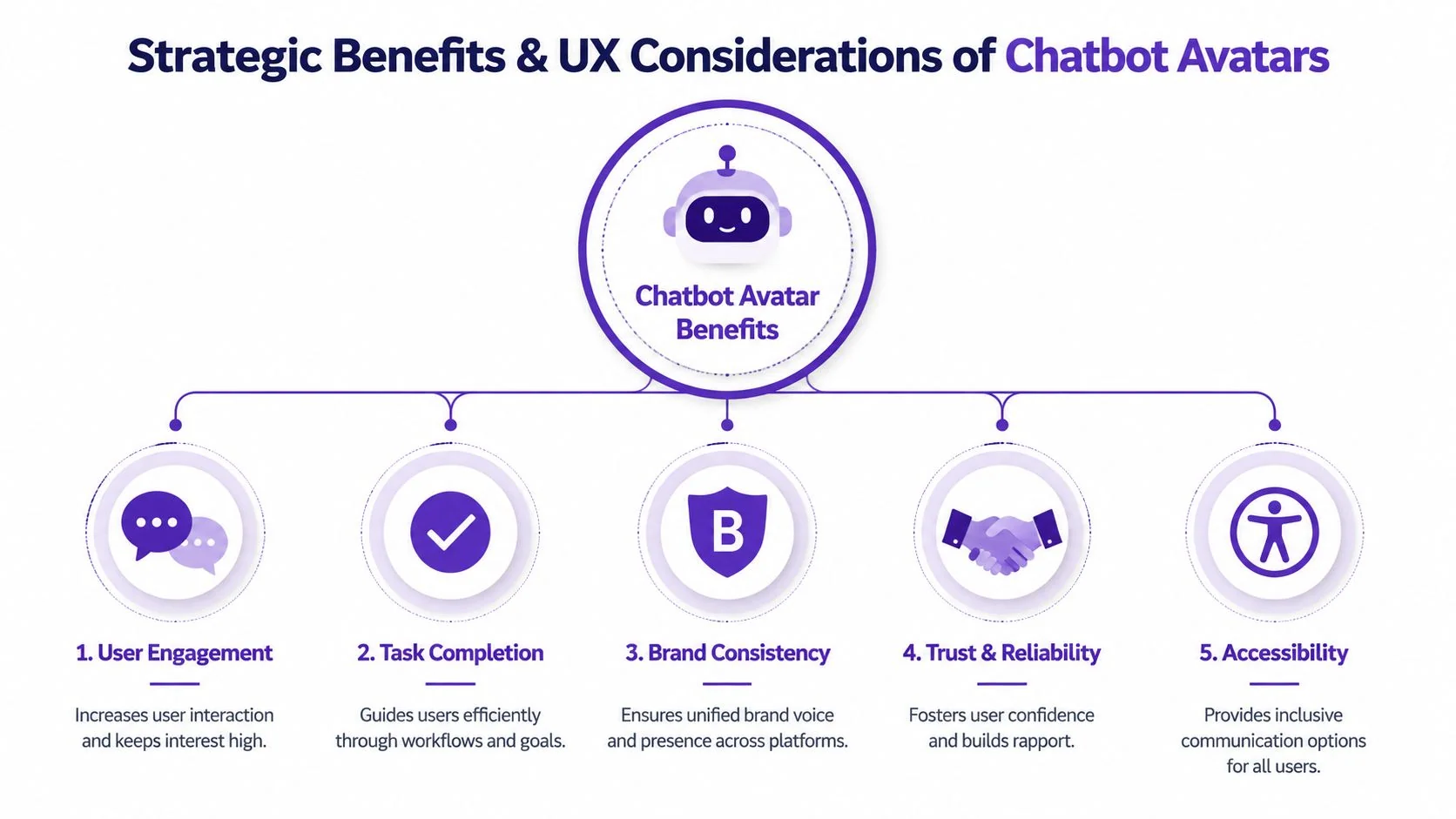
A good avatar doesn’t just make the interface look modern. It gives users a stable sense of who is helping them, what kind of help they’re about to get, and whether they should trust the answer.
That matters in support, training, and guided selling because the user is often making a small judgment before reading a single sentence. Does this feel official? Does this feel safe? Does this look like it knows the product?
Where the business value actually comes from
The strategic upside usually comes from consistency, not novelty. When the same assistant appears in the chat widget, the onboarding flow, the release explainer, and the support article video, users get continuity. They start recognizing a pattern of help.
That can support several outcomes:
- Clearer product guidance because the assistant feels like a designated guide, not a floating utility.
- Stronger brand recall because voice, visual identity, and teaching style stay aligned.
- Lower friction across channels because users don’t have to adjust to a new support format every time.
The UX mistakes that hurt adoption
The most common mistake is overbuilding the avatar and underdesigning the role. Teams spend weeks on facial realism, then give the bot generic copy and weak fallback behavior.
Another mistake is ignoring total cost of ownership. That’s not just software spend. It’s script maintenance, multilingual updates, review cycles, brand approvals, and the operational overhead of keeping the avatar useful. As discussed in this analysis of the TCO gap in avatar adoption, decision-makers still lack clear frameworks for judging when avatar-based tutorials justify the added effort over simpler formats.
A planning checklist for cross-functional teams
Before production starts, align on these questions:
- Role clarity: Is the avatar a host, a coach, a support agent, or a narrator?
- Visual distance from reality: Should it feel human, stylized, or abstract?
- Tone rules: What should it never say, and how formal should it sound?
- Escalation behavior: When should it hand off to text, docs, or a human?
- Reuse scope: Will this persona appear only in chatbot UI, or also in tutorials and demos?
The best avatar systems feel deliberate. The worst ones feel bolted on.
The right standard for many development groups isn’t “most lifelike.” It is “most dependable for the job.”
How to Create Video Avatars for Tutorials and Demos
The fastest way to understand avatar value is to stop thinking only about chat windows. The most effective use of an avatar for chatbot is often adjacent to chat itself: product demos, onboarding videos, feature release announcements, knowledge-base walkthroughs, and support article videos.
That’s where many teams run into an ugly production trade-off. A quick Loom recording is easy, but it’s often much longer than it needs to be because subject matter experts think aloud, restart, wander, or over-explain. The polished alternative is software like Camtasia or Adobe Premiere Pro, but those tools expect editing skill, timeline patience, and time most product teams don’t have.
Start with the raw screen recording
The practical workflow starts with a screen capture. Record the product flow, click through the task, and narrate naturally. Don’t try to sound like a voice actor. The goal is to capture subject matter knowledge while it’s fresh.
If your source audio is noisy, fix that before avatar generation. Clean narration improves transcription, script editing, and final lip sync. This Guide to cleaning video sound is a useful reference if you need a quick process for reducing background issues before moving into AI-driven production.
Tighten the message before you animate a face
An avatar magnifies script quality. If the narration rambles, the final result will still ramble, just with a digital presenter attached.
A better workflow looks like this:
- Record the full task once with natural speech.
- Transcribe and rewrite the narration into a shorter, cleaner explanation.
- Regenerate the voiceover from the edited script.
- Add the avatar layer only after the message is sharp.
- Pair it with focused visuals such as zooms, callouts, cursor emphasis, and captions.
That order matters. Teams that begin with avatar selection often waste time polishing delivery before they know what the content should say.
Field note: Users forgive a stylized avatar. They don’t forgive a confusing tutorial.
Build for repeatable content, not one-off videos
This production model works especially well for software education because the same recorded product flow can support multiple outputs. One screen recording can become a demo for sales, an onboarding video for new customers, and a support article video for the help center.
It also solves a common scaling problem. Subject matter experts can speak freely without rehearsing every line, then refine the explanation in text. That makes the final video look professionally edited without demanding Premiere-level editing knowledge from the person who knows the product best.
A practical example of this workflow appears in this guide on how to create AI video from screen recordings.
Later in the process, video avatars can act as the intro, outro, or transition layer rather than carrying the entire screen time. That’s often the best balance. Let the software UI stay central, and let the avatar guide attention when context or reassurance matters most.
Here’s a useful reference video for that kind of production flow:
What works and what doesn’t
A few patterns consistently perform better in practice:
- Use the avatar to frame the task: Open with purpose, then move quickly into the product interface.
- Keep it on-brand but not dominant: The UI should remain the star in tutorials.
- Use script edits instead of re-recording: That is where efficiency is gained.
- Avoid full-body talking heads for long demos: They consume screen space and add little instructional value.
The most effective teams treat avatars as a scalable presentation layer for product knowledge. Not as a novelty effect.
Technical Integration and Implementation Steps
The technical stack behind a chatbot avatar is more straightforward than it first appears. Most implementations combine conversation logic, speech generation, and visual animation in a sequence that can be swapped or tuned depending on latency and quality needs.
The core pipeline
At a high level, an advanced avatar system follows this path:
- Input capture through text or voice
- Speech recognition if the user is speaking
- Response generation from the language model
- Text-to-speech output
- Avatar animation driven by the audio
- Rendering and delivery inside the product interface or video player
Intel’s overview of AI avatar talking bot architecture with ASR, LLM, TTS, and Wav2Lip-style animation is useful because it describes how those modules fit together in production systems. The key operational takeaway is that lip sync doesn’t require a full 3D character pipeline. Audio-driven animation can be enough for many tutorial and support use cases.
Rendering decisions teams should make early
If the avatar will appear in tutorials, export settings matter. In Microsoft Azure’s Text to Speech Avatar service, the default output is 1920 × 1080 at 25 FPS with a default bitrate of 2 Mbps, and vp9 supports an alpha channel for green-screen-style compositions with custom backgrounds, as described in Azure’s Text to Speech Avatar documentation.
Those details affect practical production choices:
- Resolution: Full HD is usually enough for tutorials, LMS modules, and embedded knowledge-base video.
- Frame rate: Smooth enough for facial animation without creating unnecessary rendering load.
- Bitrate: Important when teams distribute multilingual content across bandwidth-constrained environments.
- Codec selection: Especially relevant if you want transparent-background avatars over product footage.
Implementation steps for product teams
For a cross-functional team, the rollout usually works best in this order:
- Define the delivery context: Real-time support assistant, pre-rendered tutorial, or hybrid.
- Choose the composition model: Embedded video tile, floating assistant, or full-scene presenter.
- Connect orchestration logic: Route user input, model response, and media generation in a reliable sequence.
- Add fallbacks: Text mode, captions, and non-avatar rendering should always remain available.
- Instrument the experience: Track where users abandon, replay, or escalate.
If you’re designing more complex flows where multiple automation layers coordinate user context, handoffs, and response generation, this Tekk guide to AI agent orchestration is a helpful companion read.
Keep the architecture modular. Teams change TTS vendors, avatar engines, and front-end surfaces more often than they expect.
The wrong approach is wiring the avatar so tightly into the stack that every UX change becomes an engineering project. The right approach is treating it as a presentation layer connected to a clear orchestration path.
Advanced Strategy Accessibility Localization and Privacy
The hard part isn’t launching an avatar. It’s making the system hold up across diverse users, languages, and governance requirements.
Accessibility has to be designed in
Avatars can improve clarity, but they can also create barriers if teams assume everyone wants audiovisual guidance. Some users need captions. Others prefer text-only interaction. Some may find continuous movement distracting or fatiguing.
A mature implementation gives users control:
- Provide captions by default for spoken avatar content.
- Offer a text-only alternative beside avatar-based guidance.
- Limit unnecessary motion in idle states and transitions.
- Make controls obvious so people can pause, mute, or dismiss the avatar quickly.
If the avatar is the only path to understanding the workflow, the design is too brittle.
Localization is more than translation
Multilingual rollout is where many polished avatar programs break. A translated script can be accurate and still feel wrong once timing, emphasis, pacing, and facial motion change across languages.
There is also a major evidence gap here. As noted in Ravatar’s discussion of multilingual avatar design gaps, there is little data on whether realistic or simplified avatars work better for non-native language learners. That matters for companies producing software training across markets because visual realism may not always improve comprehension.
For teams localizing at scale, the practical move is to test presentation style by audience, not assume realism wins. In many cases, a simpler avatar with cleaner pacing, clearer captions, and well-timed visuals may outperform a more elaborate character. If you’re planning multilingual production workflows, this overview of video translation services for tutorials and demos is a relevant reference point.
Privacy and trust are part of the UX
An avatar changes how users interpret automation. A human-like face can increase trust, but it can also raise expectations around disclosure and data handling. Users should know when they’re interacting with AI, whether the system stores voice input, and how escalation works.
Users don’t object to automation as much as they object to ambiguity.
Privacy reviews should cover voice capture, transcript retention, analytics instrumentation, and any personalization logic tied to the avatar. The more personal the interface feels, the more transparent the system needs to be.
Conclusion Your Next Steps
Choosing an avatar for chatbot isn’t a cosmetic decision. It’s a product, brand, and operations decision wrapped into one. The right avatar can make support feel clearer, tutorials feel more guided, and product education feel more consistent across channels.
The strongest teams start small. They pick one job for the avatar, define the persona carefully, test with real users, and keep a non-avatar fallback in place. They also treat script quality, localization, accessibility, and maintenance as core design work, not cleanup tasks.
An avatar should earn its place. If it improves clarity, trust, and repeatability, keep investing. If it only adds visual noise, simplify.
If you’re creating demos, onboarding videos, explainer videos, feature release videos, knowledge base videos, or support article videos, Tutorial AI is worth a look. It lets subject matter experts record naturally, then turns raw screen recordings into polished, on-brand videos without requiring timeline-heavy editing skills. That makes it a practical way to produce professional tutorial content at scale, especially when you need consistent voice, visuals, captions, and multilingual versions from the same source recording.