Organizations comparing heygen vs synthesia are dealing with the same mess. Sales wants product demos by Friday. L&D needs onboarding videos for the next cohort. Marketing wants localized clips for new markets. The people who know the product best aren’t trained presenters, and the people who can edit well are already overloaded.
That bottleneck is why AI video tools moved from novelty to operational necessity. But once you start testing them, a second problem appears. Two tools can both make avatar videos and still be built for very different jobs.
The End of the Traditional Video Bottleneck
A common workflow still looks like this. A product marketer writes a script, records several takes, trims awkward pauses in a timeline editor, fixes captions, re-exports, then asks a regional teammate to localize it. By the time the video is approved, the feature UI has already changed.
AI avatar platforms remove a lot of that production friction. Instead of booking a studio or asking a subject matter expert to deliver flawless takes on camera, teams can script a video, choose an avatar, generate voiceover, and publish quickly. That matters when you need repeatable output, not one hero video every quarter.
Why these two tools dominate the shortlist
In practice, HeyGen and Synthesia keep appearing because they solve the same top-level problem from different angles. Both help teams produce polished talking-head style videos without traditional filming. Both are viable for business use.
The important difference is philosophical.
- HeyGen leans toward realism, creative flexibility, and multilingual reach.
- Synthesia leans toward control, governance, and enterprise training workflows.
- Neither tool was built first for screen-heavy software tutorials, even though many SaaS teams try to use them that way.
The decision isn’t just about avatar quality. It’s about which production bottleneck hurts your team most.
If your biggest issue is making short, persuasive, multilingual videos fast, one answer starts to look obvious. If your biggest issue is controlled internal training at scale, the other does.
That split is where most buying mistakes happen.
HeyGen and Synthesia At a Glance
If I had to summarize the market position in one sentence, it would be this: HeyGen feels like a modern content engine, while Synthesia feels like a corporate video system.
That doesn’t make one universally better. It means each one reflects a different operating model.
| Platform | Best fit | Core strength | Main limitation |
|---|---|---|---|
| HeyGen | Sales, marketing, multilingual outbound, fast content teams | Natural-looking avatars, flexible creative output, broad language support | Less compelling for screen-first tutorial workflows |
| Synthesia | Enterprise L&D, internal comms, regulated teams | Governance, professional training format, LMS-oriented workflow | Less expressive and less flexible for creative customer-facing content |
| Neither | Screen-led product tutorials and software demos | Strong avatar generation | No native end-to-end screen tutorial workflow |
HeyGen feels built for momentum
HeyGen is usually the better fit when a team needs videos that don’t feel stiff. Its strongest appeal is the sense that the avatar is trying to communicate, not just recite. That’s why sales enablement teams, product marketers, and growth teams often gravitate toward it first.
It also benefits teams that publish globally. Language breadth and translation workflow matter more than most buyers expect, especially when you’re turning one source script into multiple market-specific videos. If you want a broader sense of how marketers evaluate platform differences like this, these insights into HeyGen’s capabilities are a useful companion read.
For teams mapping the broader category, this roundup of AI video creation tools is also useful because it frames avatar generators as just one branch of the market rather than the whole answer.
Synthesia feels built for process discipline
Synthesia tends to win when the video itself is part of a larger controlled system. That’s common in internal learning, HR training, compliance communication, and large-company enablement. The avatars are designed to look professional and consistent, not necessarily vivid.
That difference matters. Some teams don’t want a presenter that feels highly stylized or overly expressive. They want reliable delivery, easy collaboration, and a format stakeholders recognize as “safe” for corporate use.
If legal, IT, procurement, and L&D all need to sign off on the same workflow, Synthesia usually makes more immediate sense than a creativity-first tool.
The overlooked strategic issue
The essential buying question isn’t “Which avatar looks better?” It’s “What kind of video operation are you building?”
If your team produces customer-facing clips across languages and needs speed, you’ll usually value naturalness and iteration. If your team publishes structured internal education, you’ll care more about standardization. And if your team mostly creates product walkthroughs, onboarding videos, and support explainers, both tools solve only part of the problem.
Detailed Feature Showdown HeyGen vs Synthesia
A team producing weekly sales demos, onboarding modules, and release walkthroughs will feel these differences fast. HeyGen and Synthesia can both turn a script into an avatar video. They create very different production habits.
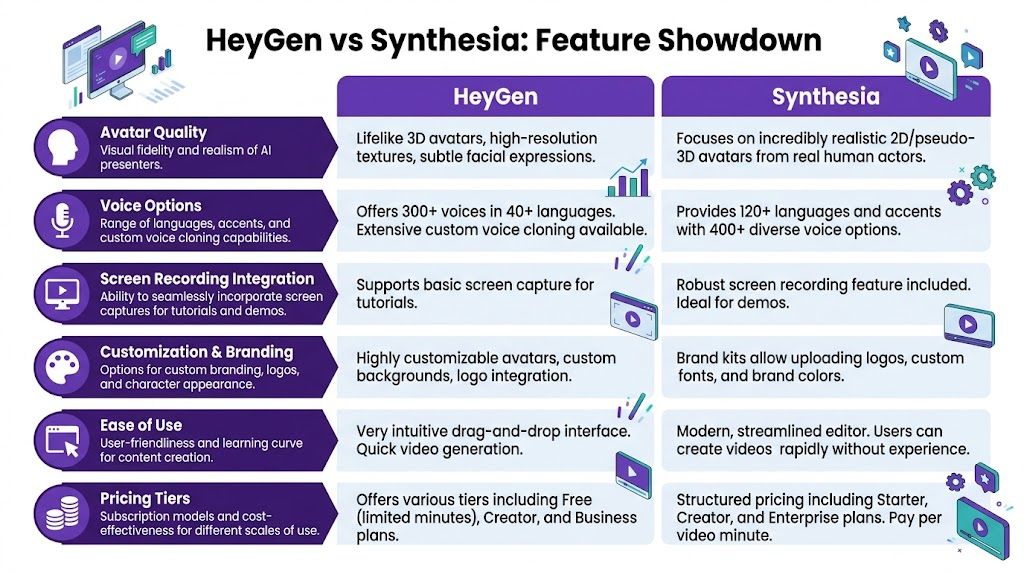
Avatar realism and presenter style
The practical split is simple. HeyGen usually looks more lifelike on first watch. Synthesia usually looks more controlled and more acceptable to conservative internal stakeholders.
That distinction matters because “good” depends on the job. For demand generation, outbound prospecting, and localized product promos, HeyGen often produces a stronger first impression. For HR updates, policy training, and repeatable internal education, Synthesia’s more restrained presenter style is often the safer fit.
I would not choose based on avatar count alone. Teams rarely fail because they had too few faces to choose from. They fail because the presenter tone feels wrong for the audience.
| Feature area | HeyGen | Synthesia |
|---|---|---|
| Presenter feel | More natural and camera-ready | More formal and standardized |
| Best fit | Sales demos, marketing videos, multilingual outreach | Training, internal comms, compliance content |
| Creative range | Stronger for branded, audience-facing videos | Stronger for structured, repeatable formats |
| Stakeholder comfort | Better when polish and personality matter | Better when approval and consistency matter |
Voice quality, lip-sync, and speech pipeline
Voice quality decides whether viewers keep watching. An avatar can look polished and still lose trust if the cadence is off or the mouth movement lags behind the script.
In side by side use, HeyGen usually feels stronger on natural delivery for short, customer-facing videos. Synthesia is good enough for many business cases, but I see it perform best when the goal is clarity and consistency rather than warmth or personality. That is a meaningful trade-off, not a flaw.
The production layer behind the voice also matters. Teams publishing at scale eventually care about timing, transcript accuracy, retakes, and editability more than headline features like voice cloning. If you want a quick primer on the speech systems behind these workflows, this explanation of Automatic Speech Recognition (ASR) is useful. For teams comparing narration options more broadly, this guide to AI voice generators for videos helps frame why the voice stack often matters as much as the avatar itself.
Language support and localization workflow
This is one of HeyGen’s clearest advantages in practice. It is well suited to teams that need one core message adapted across regions without rebuilding the whole video from scratch.
That makes a real difference for SaaS companies running multilingual outbound, product marketing launches, or region-specific explainers. The value is not just language coverage. It is how quickly a team can turn one approved script into several versions that still feel watchable.
Synthesia also supports multilingual publishing and can handle global internal education well. The workflow tends to feel more structured than fast. If the job is broad employee communication across offices, that is often fine. If the job is rapid market testing with localized variants, HeyGen usually gives commercial teams more flexibility.
Rendering speed and production flow
Render time is only one part of production speed. Setup time, revision friction, and failed exports matter more once a team is producing videos every week.
A benchmark-oriented comparison at BlogRecode’s Synthesia vs HeyGen review found meaningful workflow differences in setup time, rendering behavior, and re-render risk across a test batch. That matches what I have seen. HeyGen often feels faster for campaign work because it gets you from idea to acceptable draft quickly. Synthesia can be efficient too, but the workflow makes more sense when a team values structure over speed.
For a one-off video, that gap may be small. For ten revisions across multiple stakeholders, it gets expensive fast.
Editing model and control
The editing philosophies are different.
HeyGen is better suited to fast iteration. It works well when a marketer or sales enablement lead needs to test hooks, swap lines, and ship an updated version the same day. Synthesia gives teams more of a managed production environment with clearer scene structure, which helps during formal review cycles.
Here is the trade-off:
- HeyGen is usually easier for quick-turn customer-facing videos
- Synthesia is usually easier for controlled training production
- Neither is ideal for screen-heavy software tutorials where the interface, not the presenter, is the main subject
That last point gets missed in a lot of comparisons. If the video’s job is to teach a workflow inside a product, avatar quality matters less than screen clarity, step capture, and update speed.
Collaboration, security, and enterprise fit
Synthesia is usually the safer recommendation for large organizations with heavy approval requirements. It is built for environments where legal, procurement, IT, and L&D all need confidence in the same system. That includes governance, collaboration controls, and enterprise buying patterns that large companies already understand.
HeyGen has improved here and can fit serious business use. I still see it adopted more often by teams that care first about output quality and production speed, then work backward into governance requirements.
If security review is long and formal, Synthesia often gets less internal resistance. If the business pressure is to produce persuasive external video quickly, HeyGen often earns stronger support from the team creating the content.
Analytics, automation, and business use
These tools also differ in what kind of operation they support.
HeyGen tends to make more sense for revenue teams. Sales, growth, and product marketing groups often care about watchability, speed, personalization, and campaign output. Synthesia tends to make more sense for training operations. L&D, HR, support education, and compliance teams usually care more about repeatability, clear review paths, and standardized delivery.
That is why “best platform” is the wrong question for a lot of buyers. The better question is which workflow matches the video job.
The shared limitation
Both platforms are still avatar-first systems. That works for presenter-led communication. It does not fully solve software tutorials, UI walkthroughs, product onboarding, or support videos where the screen should lead and the presenter should stay secondary.
For software companies, that gap matters more than slight differences in avatar quality. A polished AI presenter can improve a release announcement. It will not replace a purpose-built tutorial workflow.
Comparing Pricing Models and Plan Value
Pricing in heygen vs synthesia gets tricky after the pilot stage.
A solo creator can make either tool look affordable. The budget changes once sales wants localized demos, HR wants onboarding videos, and product marketing wants a steady stream of launch assets. At that point, you are no longer buying one seat. You are choosing a video workflow your team can afford to run every month.
One useful habit is to study how other software categories frame pricing trade-offs. Broader reads like these comparative analyses in AI tools are helpful for that reason. They push you to examine packaging, usage limits, and upgrade triggers instead of stopping at the monthly headline price.
Cost rarely stops at the base plan
In practice, the expensive part is usually not the starter subscription. It is the collection of extras that show up once the team wants branded avatars, approvals, localization, collaboration, or deeper integrations.
Synthesia often feels easier to forecast because its packaging is built with structured business rollouts in mind. That works well for finance teams and procurement. If the plan is to produce repeatable internal training across departments, predictable packaging matters more than creative flexibility.
HeyGen gives teams more room to experiment with format, style, and campaign output. I have found that useful for sales demos, launch clips, and market-specific variants. The trade-off is that experimentation tends to increase complexity. More experiments usually mean more versions, more stakeholders, and more pressure on whoever owns production.
You can also benchmark avatar-platform spend against Tutorial AI pricing options if part of your budget is really for product walkthroughs or software education, not just presenter-led videos.
Plan value depends on the job
This is the part buyers often miss. A higher-priced plan can still be a good deal if it supports the work cleanly.
For example, Synthesia can deliver stronger plan value for internal enablement teams because the workflow is easier to standardize. If an L&D lead needs repeatable onboarding modules, policy updates, or compliance refreshers, stability usually matters more than squeezing out another creative variation.
HeyGen often shows better value for go-to-market teams that need speed and persuasion. If a revenue team is producing short demos, personalized outreach videos, or localized campaign assets, the return usually comes from faster iteration and better viewer engagement, not from strict cost predictability.
Same category. Different economics.
What mid-market teams should check before signing
Mid-market buyers usually run into pricing problems when the tool expands from one owner to shared infrastructure.
Check these points before committing:
- Custom asset costs: Branded avatars, voice cloning, or premium presentation assets may sit outside the standard plan.
- Team access: A tool that works for one content manager can get expensive once sales, customer success, and training all need seats or approvals.
- Feature gates: Collaboration controls, APIs, LMS features, advanced localization, and interactive elements are often reserved for higher tiers.
- Workflow fit: If your team mainly needs screen-led tutorials, paying more for better avatars may not improve the output that matters.
I have seen teams justify avatar software on a simple per-seat comparison and then run into friction six weeks later because their real need was cross-functional production. That is where plan value gets decided.
A premium plan makes sense if the business is producing avatar-led communication at volume. If the team is forcing an avatar platform to handle product education, support walkthroughs, and software tutorials, the spend gets harder to defend because the workflow is mismatched to the job.
Which Tool Is Best for Your Use Case
A revenue team trying to send personalized follow-ups, an L&D manager building onboarding modules, and a support lead making product walkthroughs can all buy the same avatar tool and still end up with very different results. The deciding factor is not which platform looks better in a demo. It is which workflow matches the job your team needs to ship every week.
I would choose based on production pattern first, not brand preference. If the team needs rapid message variation, frequent localization, and videos tied to campaigns or pipeline activity, HeyGen usually fits better. If the team needs repeatable lessons, controlled approvals, and a format that can hold up across an entire training library, Synthesia is usually easier to run at scale.
For sales demos and outbound enablement
Best fit: HeyGen
Sales videos live or die on speed. Messaging changes after a pricing update, a new objection appears in calls, or a regional team needs a localized version by tomorrow. HeyGen is easier to slot into that pace.
Use it for:
- Prospecting intros customized for account segments- Follow-up videos after discovery calls- Short product teasers for specific industries- Localized sales support clips
The key question is simple. Will this video be revised often and tied to live pipeline motion? If yes, HeyGen is usually the cleaner choice.
For internal training and compliance communication
Best fit: Synthesia
Training teams care less about charm and more about consistency. The work is not a one-off asset. It is a library that needs version control, stakeholder review, and a format that stays usable across onboarding, policy updates, and recurring compliance modules.
Use Synthesia when the video needs to feel standardized, not personalized. That matters more than avatar realism in HR, operations, and regulated environments.
For knowledge base videos and support explainers
Best fit: neither as the primary tool
This is the use case where buyers overestimate what avatar platforms can do. A support video usually succeeds because the screen is clear, the pacing is tight, and the cursor behavior makes the product easy to follow. An avatar can help with the intro or outro, but it is rarely the core production need.
If the product UI is carrying the explanation, choose the workflow around the screen recording first. Then decide whether an avatar adds anything useful.
For marketing campaigns and social clips
Best fit: HeyGen
Campaign teams often need volume with variation. One message becomes five audience versions, three language versions, and several creative hooks for testing. That kind of output favors a workflow built for quick swaps and rapid turnaround.
I have found HeyGen more practical here because campaign production is rarely about making one polished video. It is about producing many viable versions before the window closes.
For multi-speaker training series
Best fit: Synthesia
A structured training program often needs different presenter styles across departments, lesson types, or audience groups. In that situation, avatar range becomes an operational advantage. The point is not making every presenter feel lifelike. The point is keeping the series organized and visually consistent as the catalog grows.
That is a different job from sales or marketing. Synthesia tends to fit it better.
A simple way to decide
Choose HeyGen if your team is measured on response, campaign output, localization speed, or fast message testing.
Choose Synthesia if your team is measured on training coverage, reviewability, consistency, or long-term content maintenance.
Choose neither as your main system if the actual assignment is product walkthroughs, help-center videos, or software tutorials. That workflow has different requirements.
When Avatars Arent Enough The Case for Tutorial AI
A product marketer needs a release video by Friday. A customer success lead needs the same feature explained for onboarding. A support team wants that walkthrough turned into a help-center asset. In all three cases, the primary task is not presenting to camera. The primary task is showing the product clearly on screen.
That is the gap in the heygen vs synthesia conversation. Both tools are built around presenters first. A large share of business video work, especially in SaaS, is built around the interface.
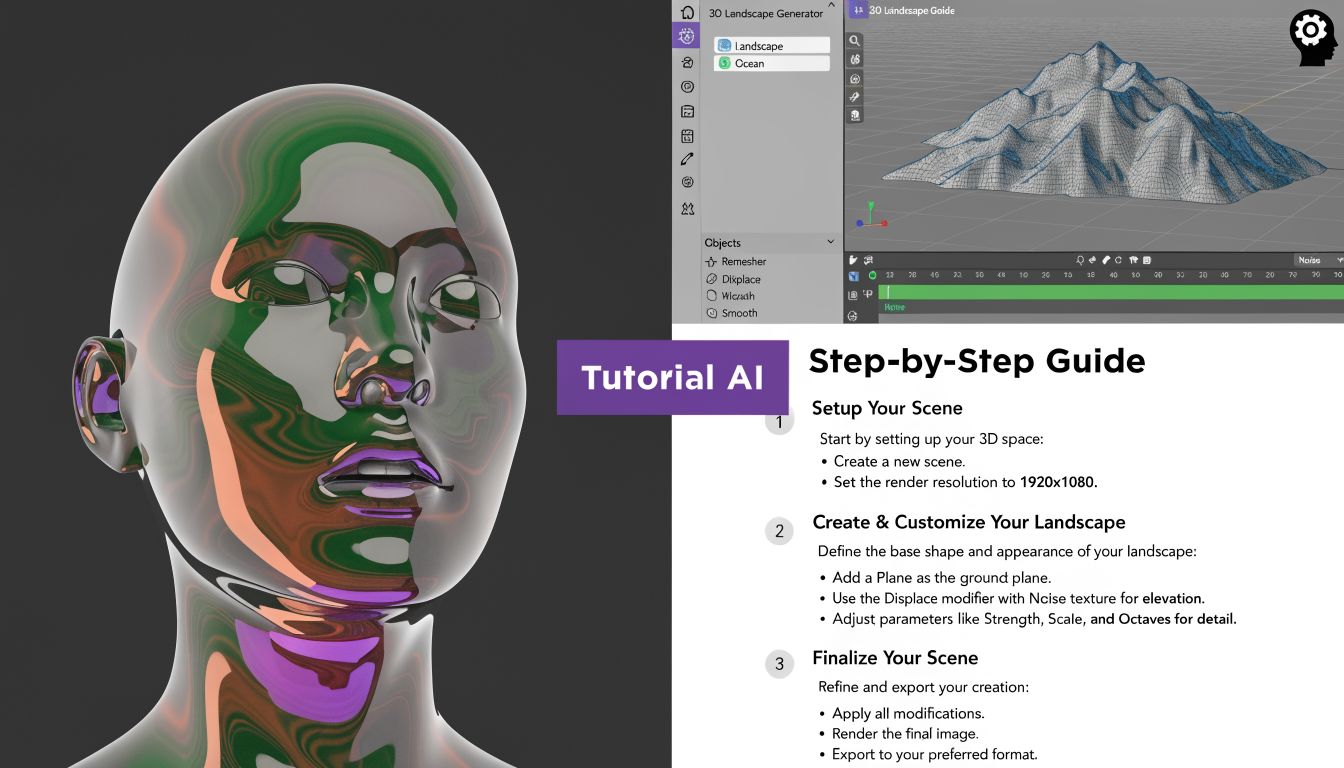
I have run into this repeatedly. HeyGen works well when a person-like delivery helps the message land, such as outbound intros, promo clips, or localized campaign variations. Synthesia fits structured training programs better, especially when teams need consistency, approvals, and repeatable lesson formats. But neither is the tool I would choose first for a product walkthrough, feature tutorial, or support video built around a live interface.
The bottleneck starts after recording.
Teams often capture a screen recording in Loom or a similar tool because it is fast and familiar. That part is fine. The problem is what the raw file contains: extra clicks, pauses, repeated explanations, missed steps, and narration that made sense in the moment but sounds scattered on playback. The expert knows the product. The viewer does not.
The old fix is manual editing in Camtasia or Premiere Pro. That can produce a polished result, but it adds a second skill set to a job that usually belongs to someone in product marketing, customer success, support, or enablement. If that person cannot edit, the work gets handed off. If it gets handed off, turnaround slows down.
Tutorial AI addresses that specific workflow. It starts from the assumption that experts should explain the product naturally first, then tighten the video after the fact without rebuilding everything on a timeline.
A practical tutorial-first workflow looks like this:
- Record the product walkthrough. Focus on explaining the task, not performing a perfect take.
- Convert the narration into editable text. Clean up the explanation at the script level.
- Cut repetition and tighten steps. Shorter videos are usually clearer videos.
- Apply screen-level guidance. Add zooms, cursor emphasis, and blur where needed.
- Generate polished narration that matches the edited flow. No full reshoot required.
That workflow matters because software tutorials fail for very specific reasons. Viewers miss the cursor. They lose the field you clicked. They cannot tell which menu changed. They do not need a more expressive avatar. They need better visual guidance.
For software demos and training, Tutorial AI covers features that avatar tools do not put at the center:
- Post-recording cursor emphasis
- Zooms tied to the important UI step
- Text-based editing for spoken explanations
- Blurring or cleanup for sensitive screen areas
- Narration updates without rerecording the whole walkthrough
This changes the production model. Instead of asking, “Which avatar looks best?”, the better question is, “What does this video need the viewer to follow?” If the answer is a face, voice, and message delivery, HeyGen or Synthesia can be the right fit. If the answer is clicks, menus, product behavior, and task completion, a tutorial-first tool is the better category.
That distinction matters in day-to-day business work. Sales teams may still want an avatar-led intro before the demo. L&D teams may still prefer Synthesia for policy modules and repeatable internal courses. But for release explainers, onboarding walkthroughs, support videos, and knowledge base content, the screen is the main character. Tutorial AI is built for that reality.
The mistake is not choosing a weaker avatar platform. The mistake is forcing an avatar workflow onto a screen-recording job.
Final Verdict and Your Decision Checklist
A team choosing between HeyGen and Synthesia is rarely choosing between two avatars. They are choosing a production workflow. That is the decision that affects speed, approvals, and whether the final video fits the job.
My short verdict is practical. HeyGen is usually the better fit for customer-facing videos where delivery, realism, and speed matter. Synthesia is usually the safer fit for structured internal training where review processes, consistency, and enterprise controls matter. Tutorial AI is the better fit when the screen needs to do the teaching.
Choose based on the job
Use this filter before you compare features again:
- Choose HeyGen if you need sales outreach videos, marketing clips, or localized campaign content that should feel natural and fast to produce.
- Choose Synthesia if you need repeatable training content for HR, compliance, operations, or any environment where legal, IT, and L&D stakeholders need a predictable process.
- Choose Tutorial AI if your videos are product walkthroughs, onboarding flows, support explainers, release videos, or knowledge base tutorials where viewers need to follow clicks, fields, and interface changes clearly.
That distinction saves time. I have seen teams spend weeks comparing avatar quality when the actual problem was that they were making screen-led content in an avatar-led tool.
A simple decision test
Ask these three questions before you commit:
| Question | Best answer |
|---|---|
| Do viewers need to connect with a presenter and message delivery matters most? | HeyGen |
| Do stakeholders need review controls, training consistency, and easier enterprise rollout? | Synthesia |
| Do viewers need to track actions on screen step by step? | Tutorial AI |
One more check helps. Look at what usually slows your team down now. If the bottleneck is script-to-video speed for outbound and campaign work, HeyGen often feels faster. If the bottleneck is approvals and standardization, Synthesia usually creates fewer problems. If the bottleneck is editing product walkthroughs after the recording is done, avatar tools are solving the wrong problem.
The best choice is the one that matches the kind of video your team needs to publish every week.
If your team creates software demos, onboarding walkthroughs, knowledge base videos, or support explainers, Tutorial AI is built for that workflow from the start. You can record naturally, clean up the script like a doc, apply cursor effects and smart zooms after the fact, and publish an on-brand tutorial without needing Premiere-level editing skills.