When we talk about learning management system content, we’re really talking about the lifeblood of your training program. This isn’t just a collection of files; it’s the courses, the videos, the quick-reference guides, and the quizzes that actually teach and develop your people. Think of it as the strategic asset that transforms your LMS from a simple software platform into a powerful engine for everything from onboarding new hires to upskilling your entire team.
Building Your LMS Content Foundation
Before you even think about hitting “record” on a video or writing a single quiz question, you need a solid strategy. I’ve seen it time and again: a scattered, “let’s just make stuff” approach always leads to a messy content library that confuses learners and, frankly, doesn’t deliver results.
Great learning content starts with a clear purpose. Every single piece of training should tie directly back to a measurable business outcome. Your goal isn’t just to fill the LMS; it’s to build a structured, intentional learning journey that actually improves performance.
This strategic foundation is more important now than ever. With over 412,402 companies using LMS tools, and these platforms making up 89% of all learning tech in businesses, a well-planned content strategy is no longer a “nice-to-have.” It’s essential.
Defining Clear Learning Objectives
Every piece of content you create needs a “why.” Vague goals like “improve sales skills” just won’t cut it. You have to get specific. Think SMART objectives: Specific, Measurable, Achievable, Relevant, and Time-bound.
So, instead of that vague goal, a much better one would be: “After completing this module, sales reps will be able to demonstrate our new product’s three key features and handle the two most common customer objections, leading to a 10% increase in demo-to-trial conversions within Q3.”
See the difference? That level of clarity gives you a roadmap. It ensures every video, document, and assessment serves a distinct purpose, moving learners toward a specific skill. Without it, you’re just creating content that might be interesting but is ultimately ineffective.
Understanding Your Target Audience
Who are you actually training? The learning needs of a brand-new hire are worlds apart from those of a senior manager who needs a quick update on a new compliance protocol. Taking the time to build out detailed learner personas is a game-changer for creating content that connects.
Ask yourself a few key questions about your audience:
- Current Knowledge Level: Are they total beginners who need the basics, or are they experts looking for advanced, specialized information?
- Role and Responsibilities: How will this training directly help them do their day-to-day job better?
- Learning Preferences: Do they prefer watching short videos, working through interactive scenarios, or reading detailed guides? A mix is usually best.
- Time Constraints: Are these frontline workers who need quick, mobile-friendly lessons they can squeeze in between tasks, or can they set aside an hour for a deep-dive course?
When you’re first starting out, it’s also smart to explore what the best LMS software options are for your specific needs, as your platform choice can heavily influence how you deliver content.
Mapping Out the Right Content Formats
Once you know your objectives and your audience, you can start picking the right formats for the job. A one-size-fits-all approach is a recipe for disengagement. You have to match the format to the learning goal.
For instance, a screen-recorded video tutorial is perfect for showing someone how to navigate a new software workflow. On the other hand, an interactive branching scenario is far better for letting a customer service rep practice handling difficult conversations.
The table below provides a simple framework to help you align your business goals with the right content and success metrics.
LMS Content Planning Framework
| Business Goal | Target Audience | Learning Objective | Recommended Content Format | Key Metric |
|---|---|---|---|---|
| Reduce customer support tickets by 15% | New Customers | Onboard users to the 3 core features of the product within their first week. | Short video tutorials, interactive product tour, downloadable quick-start guide. | Product feature adoption rate, reduction in "how-to" support tickets. |
| Increase sales team's close rate by 5% | Sales Representatives | Equip reps to overcome the top 2 pricing objections effectively. | Role-playing scenarios, battle cards, video examples of successful pitches. | Demo-to-close conversion rate, average deal size. |
| Ensure 100% compliance with new safety regulations | Warehouse Staff | Certify all staff on new safety protocols within 30 days. | Microlearning modules, video demonstrations, graded final assessment. | Course completion rates, assessment pass/fail rates, reduction in safety incidents. |
Using a framework like this ensures you’re not just creating content for the sake of it. You’re building a targeted learning program designed to drive real, measurable change in the business. And don’t forget to check our guide on learning management system integration to make sure your chosen formats will play nicely with your tech stack.
Designing Content That Actually Engages Learners
Let’s be honest—a lot of corporate training feels like a chore. The real goal when creating content for your learning management system is to completely flip that script. We need to move away from just dumping information on people and start creating active, engaging experiences they actually want to participate in.
This means rethinking our entire approach. Instead of building massive, hours-long courses, the focus now is on creating tight, digestible modules that respect people’s time. Your team doesn’t have endless hours to block out for training; they need knowledge that can fit into the cracks of a busy workday.
The Power of Microlearning and Blended Formats
The secret to modern engagement is microlearning. It’s all about breaking down complex topics into short, focused lessons, usually running between three and seven minutes. Each tiny piece of content should be laser-focused on a single, specific learning goal.
But microlearning isn’t just about making your videos shorter. It’s about mixing and matching different formats to build a richer, more dynamic learning path. A really effective module might pull together a few different elements to hit a key concept from multiple angles.
- Short Video Demos: Show, don’t just tell. A quick video is perfect for demonstrating a process or walking through a specific task.
- Interactive Scenarios: Let people practice making decisions in a safe space, like how to handle a tricky customer conversation.
- Quick Quizzes and Knowledge Checks: These provide instant feedback and help new information stick.
- Downloadable Text Guides: A simple PDF or checklist gives learners something they can save and refer back to on the job.
This blended strategy keeps things fresh and appeals to different learning styles, which helps you avoid the stale, monotonous feel of so many corporate training programs. If you want to be sure your content is hitting the mark, digging into some usability testing methodologies can give you incredible insight into how people are actually interacting with it.
From Unscripted Recordings to Polished Tutorials
Video is a fantastic tool for engagement, but actually producing it can be a massive headache. When it comes to generating video tutorials from screen recordings for demos, onboarding videos, or feature releases, many teams find themselves stuck between two bad options.
On one side, you have your subject matter experts (SMEs) using simple screen recorders like Loom. It’s quick and easy, sure, but those raw recordings are often 50-100% longer than they need to be. They’re full of ums, ahs, long pauses, and rambling explanations that just kill the learning experience.
On the other side, you have professional editing tools like Camtasia or Adobe Premiere Pro, which require expert video editing knowledge. This creates a huge bottleneck. The SME has to hand off their raw footage to a specialized video editor, which adds days (or weeks) and significant cost to the whole process.
Tutorial AI bridges this gap. Its tools let you speak freely without any practice, and still your video will look professional as if it was edited in Adobe Premiere Pro. It empowers the subject matter expert to generate on-brand videos from screen recordings extremely efficiently. This workflow is a game-changer for getting content out the door. It completely removes the editing bottleneck, empowering the person who actually has the knowledge—the SME—to create polished, on-brand explainer videos, knowledge base videos, and support article videos with incredible speed. To dive deeper into building great training, check out these instructional design best practices.
Crafting a Narrative and Visual Identity
At the end of the day, great learning content tells a story. Even a dry, technical tutorial can have a simple narrative: here’s the problem, here’s how you solve it, and here’s the successful result. When you script your lessons with a clear beginning, middle, and end, they become far more memorable.
Your visual design is just as important. All your content should look clean, professional, and consistent with your brand. Use high-quality graphics, stick to your company’s style guide, and make sure any text is easy to read. A polished look and feel sends a clear signal to learners that this content is valuable and worth their attention.
Producing High-Quality Video Tutorials at Scale
We all know video is king when it comes to engaging learning management system content. But let’s be honest—actually making those videos often feels like a massive headache. Most teams find themselves stuck between two equally frustrating options.
On one hand, you can empower your subject matter experts (SMEs) to just hit “record” with a simple tool like Loom. It’s fast, sure, but the results are rarely pretty.
You end up with raw, unedited recordings that are often 50-100% longer than necessary. They’re littered with ums, ahs, long pauses, and repeated sentences that make learners tune out. Because it’s unscripted, the SME might meander off-topic or forget a crucial point, leading to a confusing and less-than-professional final cut.
The goal is to create a much more intentional learning journey by combining focused micro-lessons with smart, blended formats and compelling visuals.
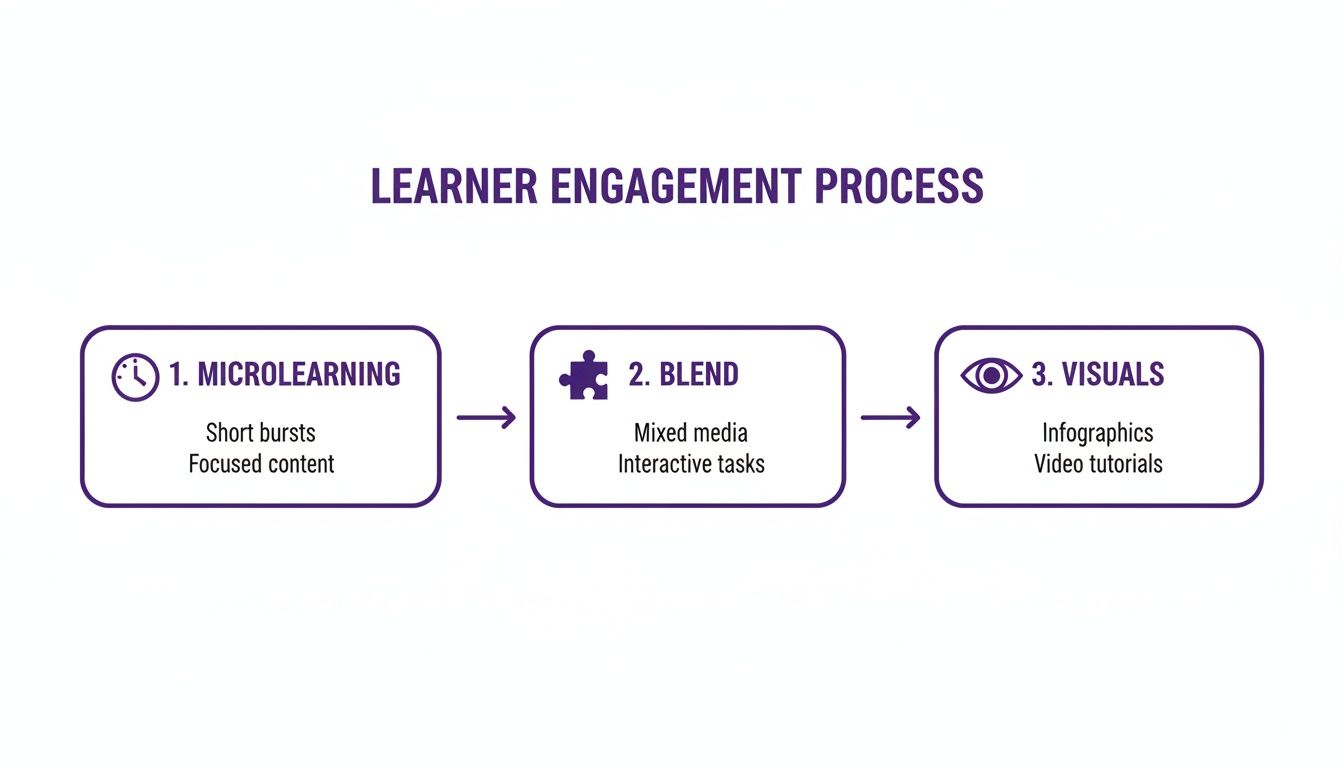
This structured approach shows how each piece can build on the last to create a far more effective and engaging training module.
Escaping the Editing Bottleneck
The other option? Go all-in with professional editing suites like Camtasia or Adobe Premiere Pro. These tools can definitely create a polished video, but they require serious technical skill and introduce a huge production bottleneck.
This more traditional workflow looks like this: your SME records their screen, then hands the raw footage over to a dedicated video editor. This back-and-forth adds days—sometimes weeks—to the timeline. It’s a slow, painful process that makes it nearly impossible to create and update content quickly. It also separates the expert from the final product, opening the door for misinterpretations and endless revision cycles.
A Smarter Workflow with AI
This is where a new wave of tools is completely changing the game. Platforms like Tutorial AI are built to bridge that gap between speed and quality, creating a much more sensible workflow for making video tutorials at scale.
This modern approach lets the person who actually knows the material—the SME—create a polished, on-brand video without touching a complex timeline. They just record their screen and talk through the process, just like they would during a live demo.
The core idea is to empower the expert to be the creator. By removing the technical barriers of traditional video editing, you can dramatically accelerate content production for demos, onboarding videos, feature releases, and knowledge base articles. With an AI-powered system, the SME doesn’t have to stress about making mistakes. The platform automatically transcribes their audio, and from there, editing the video is as simple as editing the text. Said “um” or repeated a sentence? Just delete the text, and the AI instantly snips out the corresponding video and audio, stitching everything back together seamlessly.
Turning Experts into Efficient Creators
The impact on efficiency here is massive. An SME can record a walkthrough for a new feature or an onboarding flow without needing a single practice run. They can just speak naturally, knowing any little flubs can be cleaned up in seconds.
The AI then does all the heavy lifting:
- Cutting Mistakes: It automatically finds and removes filler words, awkward pauses, and retakes.
- Tightening Narration: The pacing is smoothed out to keep the viewer’s attention.
- Polishing Visuals: Smart zooms and highlights are added automatically to draw the eye to the right part of the screen at the right time.
The final video looks and sounds like it was painstakingly edited by a pro, but it was created in a fraction of the time. The interface makes it as intuitive as working in a text document, completely removing the complexity of video editing.
This empowers your internal experts to produce high-quality support videos and other crucial training materials at scale, directly building out your library of valuable learning management system content.
Making Your Content Accessible to Everyone
You’ve created some brilliant learning management system content. But what good is it if a huge chunk of your audience can’t actually use it? The real win isn’t just uploading a course; it’s making sure every single learner has an equal shot at success, no matter their ability, location, or language.
For any company with a diverse or global team, this isn’t some feel-good extra. It’s a must-have. Companies that get accessibility right tend to see better employee retention and build a much stronger, more inclusive culture. It all starts with building your content to be usable by everyone from the very beginning.
Designing for Universal Accessibility
Accessibility simply means designing your courses so people with disabilities can get through them without hitting a wall. The gold standard here is the Web Content Accessibility Guidelines (WCAG), which lays out a solid framework for making digital content inclusive.
You don’t need to be a WCAG expert overnight. Focusing on a few core practices can make a world of difference and ensure your content plays nice with assistive tech like screen readers.
Here are the non-negotiables I always check for:
- Alt Text on Every Image: This is just a short, written description of an image. Screen readers read it aloud, so users with visual impairments don’t miss out on crucial context.
- High-Contrast Colors: Make sure your text and background colors have enough contrast. It’s a game-changer for learners with low vision or color blindness.
- Keyboard-Only Navigation: Can someone navigate your entire course—buttons, links, quizzes, everything—using just their keyboard? This is essential for anyone who can’t use a mouse.
- Accurate Video Captions: Closed captions are vital for learners who are deaf or hard of hearing. They’re also a huge help for people in loud offices or who just prefer to read along. If you need a hand with this, our guide on how to add captions to videos breaks it down.
Accessibility isn’t an afterthought you tack on at the end. It’s a fundamental part of good instructional design. When you build with these principles from the start, you create a better learning experience for everyone, not just for those who need assistive tech.
Going Beyond Translation to True Localization
When you’re training a global team, just feeding your script into a translation tool won’t cut it. A direct, word-for-word translation almost always misses the mark on cultural nuances, regional examples, and common phrases. It’s a recipe for confusing or disengaging your learners.
That’s where localization comes in. Localization is about adapting your content so it feels like it was made for a specific culture.
This means thinking about local currencies, date formats, and even the imagery you use. The tone of a voiceover might need to be adjusted to fit cultural expectations. This deeper adaptation is what makes training feel truly relevant and authentic.
Historically, this was a massive headache—a costly and slow process involving a small army of translators, voice actors, and video editors for every single language. As a result, most companies only localized their absolute most critical content.
Using AI to Streamline Global Content Delivery
Thankfully, modern tools are changing the game, making high-quality localization something you can actually do at scale. For instance, platforms like Tutorial AI completely change how you can approach multilingual video content.
You can start with a single video tutorial in English and, in minutes, generate a natural-sounding AI voiceover in over 30 languages. Suddenly, you don’t need to find and coordinate with dozens of voice actors.
Even better, some tools can automatically re-time your visuals to match the new, translated script. Let’s say the German narration is longer than the original English; the platform can automatically extend the scene to fit, making sure the final video feels polished and professional for every single learner.
How to Measure Your Content’s Real Impact
You’ve poured hours into creating fantastic learning management system content. That’s a huge win, but it’s only half the story. If you can’t show that your work is actually moving the needle, you’ll find it tough to get the resources and support you need to keep your training programs growing.
The trick is to look past the obvious “vanity metrics.” A high number of course enrollments looks great on a report, but it doesn’t tell you if anyone actually learned something valuable. To prove your content’s real worth, you have to dive into your LMS analytics and connect the dots between learning data and real-world business results.
This is how the learning and development team stops being seen as a cost center and starts being recognized as a strategic partner. When you can draw a straight line from a new training module to a tangible improvement in the business, you’re speaking a language every leader understands.
Moving Beyond Vanity Metrics
First things first: shift your focus from surface-level numbers to metrics that actually reflect learning and engagement. Your LMS is sitting on a goldmine of data, but you have to know where to dig.
Instead of just noting who enrolled in a course, start looking at how they moved through it. Are a lot of people dropping off after a specific video? Is there one quiz question that everyone seems to fail? These are huge red flags pointing directly to content that’s confusing, boring, or just too difficult.
Here are the core metrics that tell the real story:
- Completion Rates: This is the most fundamental one. If completion rates are low, something is wrong with the content itself or its relevance to the learner.
- Assessment Scores: Are people actually passing the quizzes and knowledge checks? If scores are consistently low for a specific module, it’s a clear sign that the material isn’t sticking.
- Time to Completion: How long is it taking people to finish? If it’s way longer than you planned, the content might be too dense. If it’s much shorter, you might have made it too easy.
- Learner Feedback: Never underestimate the value of asking people directly. Use surveys and ratings to find out what learners found helpful and where they got stuck.
The goal isn’t just to report these numbers; it’s to use them as a diagnostic tool. This data is your roadmap for continuous improvement, showing you exactly where to refine your content for maximum impact. This data-driven approach is more important than ever. The global LMS market is expected to explode from $18.7 billion in 2022 to $46.9 billion by 2027. This growth was kicked into high gear when COVID-19 disrupted learning for 95% of students worldwide, forcing a massive shift to cloud-based LMS platforms. On these platforms, analytics that track metrics like completion and drop-off rates are essential for seeing what’s working and what isn’t. You can discover more insights about the LMS market growth from Rise Up.
Connecting Learning Data to Business Outcomes
This is where the magic happens. Tracking completion rates helps you improve your courses, but linking that data to key performance indicators (KPIs) is what proves your value to the entire company.
To do this, you’ll need to collaborate with department heads. Find out what business metrics their teams are measured on. Then, you can design training specifically to move those numbers and use your LMS analytics to track the correlation.
Suddenly, your training isn’t just a “check-the-box” activity anymore—it’s a powerful tool for business growth. You’re no longer just creating courses; you’re solving specific, measurable business problems.
To get started, it helps to know which metrics to watch and what they truly mean for your business.
Essential LMS Content Metrics and Their Meanings
The table below breaks down some of the most powerful metrics you can track in your LMS and explains the actionable insights they provide.
| Metric | What It Measures | Actionable Insight |
|---|---|---|
| Skill Gap Analysis | Compares pre- and post-training assessment scores. | Shows the direct knowledge gain from a specific course, proving its effectiveness in closing a specific skill gap. |
| Behavioral Change Observation | Tracks on-the-job performance metrics before and after training. | Connects a sales training module to an increase in close rates or a customer service course to higher satisfaction scores. |
| Operational Efficiency | Measures changes in business process metrics after a training program. | Demonstrates that a new onboarding module leads to a shorter time-to-productivity for new hires. |
| Reduced Support Tickets | Monitors the volume of internal or external support requests for a specific topic. | Proves that a new series of "how-to" video tutorials successfully reduced customer confusion and freed up support agents. |
By focusing on these outcome-oriented metrics, you can build an undeniable business case for your learning management system content. You’ll be able to show exactly how your work leads to a shorter sales cycle, fewer safety incidents, or a more efficient support team. That’s how you secure the investment you need to continue building a world-class learning program.
Where We’re Headed: AI and Hyper-Personalized Learning
The days of the one-size-fits-all training module are over. Let’s be honest, they never really worked that well in the first place. Today, the most innovative companies are building dynamic learning ecosystems that actually adapt to the individual, creating a powerful engine for skill development and employee retention.
We’re moving toward LMS content that is intelligent and deeply personal. AI-driven platforms can now build unique learning paths based on an employee’s role, their existing skills, and even their career goals. This is a massive leap from the static, clunky course catalogs we’ve all had to scroll through.
Think about an LMS that does more than just sit there and host content. Imagine a system that proactively suggests a short video tutorial the moment it detects a learner is struggling. Or one that automatically unlocks advanced modules as soon as they demonstrate mastery. This is the kind of responsive learning that keeps people engaged because it gives them exactly what they need, right when they need it.
AI is Now a Content Creation Partner
The real shift isn’t just in how learning is delivered, but in how the content itself gets made. Let’s talk about video, which has become the backbone of modern training. Producing great video tutorials has always been a huge bottleneck for learning and development teams.
Your subject matter experts (SMEs) are wizards at what they do, but they aren’t video editors. A quick screen recording made with a tool like Loom is often 50-100% longer than it needs to be, full of “ums,” long pauses, and mistakes. On the other end of the spectrum, professional tools like Camtasia or Adobe Premiere Pro require specialized skills, which makes the whole process slow and expensive.
This is exactly the gap a tool like Tutorial AI is built to fill. It lets an SME simply record their screen, speak naturally without a script, and the AI handles the rest. It cuts out the mistakes and awkward pauses, transforming raw footage into a polished, on-brand tutorial that looks like it was professionally edited. This completely changes the game for creating essential video-based learning, such as:
- Demos and Onboarding Videos: Quickly create clear, concise walkthroughs for new hires or customers.
- Explainer and Feature Release Videos: Announce new functionality with high-quality content that gets people excited.
- Knowledge Base and Support Article Videos: Build out a comprehensive library of self-help resources without draining your team’s time.
From Predictive Analytics to a Smarter Workforce
This intelligent approach also makes training more proactive. Using predictive analytics, organizations can spot critical skill gaps across teams before they become major business problems. This allows L&D leaders to get ahead of the curve and develop targeted training that addresses what the company will need tomorrow, not just what it needed yesterday.
Looking ahead, the use of AI for personalizing LMS content is set to explode. By 2026, an estimated 72% of enterprises will be using platforms that tailor learning paths and help automate content creation. The business impact is undeniable—companies with strong learning cultures are 92% more likely to be innovative.
Even more critically, well-trained employees are 49% less likely to leave. This shows a direct, powerful link between effective training and talent retention. Discover more insights about the future of learning management systems. This isn’t just a futuristic concept; it’s about building a smarter, more adaptive learning environment that fuels real growth.
A Few Common Questions We Hear About LMS Content
When you’re diving into creating content for a learning management system, a few practical questions always seem to pop up. Getting these right can be the difference between a training program that people actually use and one that just collects dust.
How Long Should a Single LMS Video Be?
We’ve all been there—stuck watching a 20-minute video for one tiny piece of information. To avoid that, I always recommend keeping individual microlearning modules between 3 and 7 minutes long.
This is the sweet spot for holding someone’s attention and covering one specific learning objective really well. If you have a beast of a topic, don’t try to cram it all into one video. Break it down into a series of shorter, bite-sized lessons. Your learners will thank you for respecting their time and making it easy to learn on the go.
What’s the Smartest Way to Keep Content Current?
Nothing makes a training library feel obsolete faster than outdated content, especially for things like software walkthroughs where the UI is always changing. The trick is to use tools that don’t make you start from scratch for every minor update.
Think about it: if a button moves in your software, you don’t want to have to re-record and re-edit an entire 5-minute tutorial. That’s a massive time sink. This is where tools like Tutorial AI have completely changed the game for us. You can literally edit the video by just changing the text in the transcript. The AI handles regenerating the audio and syncing the video. It turns a potential headache into a quick, manageable fix.
How Can We Make Professional-Looking Videos Without a Pro Editor?
This is a big one. On one hand, you have quick screen recordings from tools like Loom, which are great but often end up being 50-100% longer than necessary because of pauses and mistakes. On the other, you have powerful software like Adobe Premiere Pro, which requires a steep learning curve.
The most effective approach is to give your subject matter experts tools that handle the heavy lifting. We’ve had great success with platforms like Tutorial AI for this. An expert can just hit record and talk through a process naturally, mistakes and all. The AI then cleans up the raw recording, tightens the edits, and produces a polished tutorial that looks like it came from a professional video editor.
It’s a huge win. Your experts can pump out high-quality, on-brand videos without getting bogged down in the technical details, which is exactly what you need to scale content production.
Ready to stop the video production bottleneck and let your experts do what they do best? With Tutorial AI, you can transform rough screen recordings into polished, professional tutorials in a matter of minutes. Start creating better learning content today.