If you’re creating video tutorials, demos, or training content, adding a voice over in Spanish is one of the most powerful moves you can make to reach a massive global audience. But this is about so much more than a simple translation. To get it right, you need a thoughtful approach to cultural localization—one that makes your message feel authentic and builds real trust.
Why Spanish Voice Over Is Your Next Big Growth Play
When you expand into the Spanish-speaking market, you’re not just adding numbers to your potential audience count. You’re tapping into a vibrant, digitally-savvy community that actively seeks out and consumes video content. Offering your tutorials, onboarding guides, and support videos in their native language is a game-changer. It removes friction and shows you’re genuinely invested in their success.
This guide will walk you through a practical, no-nonsense workflow for producing a professional voice over in Spanish. We’ll break down what seems like a complex project into a series of achievable steps that deliver a huge impact.
The Untapped Power of a Truly Connected Audience
So many companies stop at translating their website, but they’re missing out on the deeper connection that localized video creates. Imagine a potential customer watching your product demo in clear, natural-sounding Spanish. It immediately builds rapport and boosts their confidence in your brand. This is especially critical for complex or technical software where every detail matters.
The engagement numbers speak for themselves. The Spanish-speaking audience is incredibly active on audio and video platforms, often outpacing general market trends. In fact, a recent report found that 93% of Spanish-speaking adults use short-form video platforms. Even more telling, 91% of those aged 18-54 turn to YouTube for videos, music, and podcasts. You can dig into more data on Spanish-language media trends to see just how engaged this audience is. They aren’t just there; they are actively looking for content that speaks to them.
Benefits That Go Beyond the Obvious
Localizing your video content with a Spanish voice over brings some serious strategic advantages that directly fuel business growth and make customers happier.
- Better User Comprehension: When viewers can focus on your content instead of struggling with a foreign language, they understand your product better. This leads to faster adoption and they actually remember what they learned.
- A Stronger Brand Image: A professional voice over sends a clear message: your company is thoughtful, inclusive, and committed to its global users. It just looks good.
- Deeper Market Penetration: You can effectively reach and win over customers in more than 20 Spanish-speaking countries, opening up entirely new streams of revenue.
When you invest in quality localization, you aren’t just translating words—you’re translating your brand’s core value and commitment to a new and enthusiastic market. That simple step could be the very thing that makes a customer choose you over a competitor.
Preparing Your Script: The Foundation of a Great Spanish Voiceover
Before you even think about microphones or voice actors, it all starts with your script. This is where most projects go wrong. A common pitfall is just plugging an English script into a translation tool and calling it a day. That approach almost always results in a clunky, unnatural voice over in Spanish that misses the mark.
What you’re really aiming for is localization, or better yet, transcreation. This isn’t about a word-for-word swap. It’s about having a native speaker fundamentally rewrite your script to capture the original message, tone, and feel. They’ll find the right cultural equivalents for your idioms and references, ensuring your content truly connects with a Spanish-speaking audience. Skip this step, and you’ll leave viewers confused by phrases that simply don’t make sense.
Adjusting the Script’s Rhythm and Flow
Here’s something that catches a lot of people by surprise: sentence structure. Spanish is often a more descriptive language, meaning it can take more words to express the same idea you had in English. What was a short, punchy sentence in your original script can easily become a lengthy one in Spanish.
If you stick to a direct translation, the voice actor will sound rushed, trying to cram too many words into a short time slot, completely throwing off your video’s pacing. You have to adapt the script itself.
- Chop up long sentences. Take your complex English sentences and break them into shorter, more manageable ones for the Spanish version.
- Plan for expansion. A good rule of thumb is that Spanish text can be 15-25% longer than the English original. Build this extra time into your script to avoid timing nightmares.
- Keep it conversational. Write like a real person talks. The goal is for the voiceover to sound like a helpful guide, not a robot reading a manual.
Getting this right is a game-changer. Learning how to convert video scripts for multi-language voiceovers is a key skill for anyone serious about reaching a global audience.
A Real-World Example: From Awkward to Authentic
Let’s see this in action. A literal, machine-like translation feels cold, while a properly localized script feels warm and natural.
Before Localization (The Robotic Version):“Quickly click the ‘Submit’ button to leverage our advanced analytics feature.”This is a classic example of corporate-speak. The word “leverage” is a dead giveaway and sounds incredibly stiff in Spanish.
After Localization (The Human Version):“Para usar nuestra función de análisis, solo tienes que hacer clic en el botón ‘Enviar’.”This is so much better. It’s direct, simple, and how a real person would explain it. The English equivalent is, “To use our analysis feature, you just have to click the ‘Submit’ button.” Studying a good voice over script example can give you a better feel for crafting this kind of natural dialogue.
The goal isn’t just to be understood; it’s to be forgotten. A perfect localized script allows the viewer to focus entirely on your message and visuals, without ever being distracted by awkward phrasing or unnatural timing. It should feel completely native.
Choosing the Right Spanish Voice and Accent
With your script properly localized, you’ve reached a crucial fork in the road: picking the voice that will bring it all to life. This isn’t a minor detail; the voice you choose literally becomes the voice of your brand for a new audience. How they perceive you hinges on this decision.
The first big question is whether you need Castilian Spanish or Latin American Spanish. If you’re targeting Spain, the choice is simple—you need the distinct pronunciation and vocabulary of Castilian Spanish. But if your audience is scattered across the Americas, things get a bit more interesting.
The Power of Neutral Latin American Spanish
For reaching the broadest possible audience from Mexico down to Argentina, the industry gold standard is Neutral Latin American Spanish. Think of it as the “general broadcast” accent of the Spanish-speaking world. It’s carefully crafted to avoid hyper-regional slang and specific inflections, making it clear and understandable to everyone. It’s the same sound you’ll recognize from Hollywood movie dubs or major international ad campaigns.
There’s a reason for this. The Spanish-language dubbing industry is massive, with Mexico serving as a major hub for Latin American projects. They’ve perfected this neutral accent, allowing a single voiceover to work across more than 20 countries. For a deeper dive, it’s worth reading about the dynamics of the Spanish voice-over world.
Human Voice Actors vs. Modern AI Voices
The final piece of the puzzle is deciding who—or what—will do the talking. Should you hire a human voice actor or use a modern AI voice? There’s no single right answer here. Both have their strengths, and your best bet depends on your budget, timeline, and the specific needs of your project.
Let’s break down the two main paths you can take.
A professional human voice actor brings a level of warmth, emotion, and subtle nuance that technology is still learning to replicate. If your video needs to feel highly personal, empathetic, or carry a very specific personality, a human is often the best choice.
But that human touch comes with a few practical considerations:
- Cost: Top-tier talent comes at a price. Fees can vary wildly based on their experience, where the audio will be used, and how long your script is.
- Time: Finding the right person, scheduling recording sessions, and then editing the audio isn’t an overnight process. It can take days, sometimes weeks.
- Revisions: What happens when a line in the script changes? You’re back to square one—scheduling another session, which means more time and more money.
On the flip side, AI voice technology has made incredible leaps. Forget the clunky, robotic voices of the past. Today’s AI can produce incredibly natural-sounding audio in a wide range of styles and accents. For tutorials, demos, and support content, AI offers a potent mix of quality and sheer efficiency. The best AI voice generator for videos can give you consistency and speed that’s simply impossible to match with a traditional workflow.
Here’s a quick comparison to help you weigh your options:
Human Voice Actor vs. AI Voice Comparison
| Factor | Human Voice Actor | AI Voice Generator |
|---|---|---|
| Emotion & Nuance | Can deliver deep emotional range and subtle inflections. Ideal for brand stories. | Natural-sounding, but less capacity for complex emotional delivery. Best for instructional content. |
| Cost | Higher upfront cost. Fees include studio time, talent, and usage rights. | Significantly lower cost, often a subscription-based model. No per-project fees. |
| Speed & Turnaround | Days to weeks, depending on casting, recording, and editing cycles. | Minutes to hours. Audio can be generated almost instantly. |
| Revisions & Updates | Requires new recording sessions, adding time and cost. | Instant and free. Edit the script and regenerate the audio in seconds. |
| Consistency | Tone can vary slightly between sessions. | 100% consistent tone and pace across all recordings, now and in the future. |
Ultimately, the choice comes down to your priorities. If you need a voice that can connect on a deeply emotional level for a flagship brand video, a human actor is a powerful investment. But for the bulk of instructional content where clarity, speed, and scalability are king, AI is often the smarter, more practical choice.
The real game-changer with AI is scalability. Need to fix one sentence? Regenerate it in seconds. Want to offer your tutorial in five different Spanish accents? You can do that in minutes, without hiring five different people. This kind of flexibility is a massive advantage for teams producing content at scale. It completely removes the logistical headaches, empowering you to create a high-quality voice over in Spanish for every single video without the friction of a traditional recording process.
A Modern Workflow for Creating Tutorial Videos
When it comes to making high-quality tutorial videos, it often feels like you’re stuck between a rock and a hard place.
On one hand, you have the dead-simple screen recorders like Loom. They get the job done quickly, but you often end up with a rambling, unedited video that’s 50-100% longer than it needs to be. That extra fluff is a killer for viewer engagement.
On the other hand, you have the heavy-duty professional suites like Camtasia or Adobe Premiere Pro. These are incredibly powerful, no doubt, but they demand a ton of expertise. This creates a huge bottleneck, especially for the subject matter experts who know the product cold but have zero interest in becoming professional video editors.
Bridging the Gap Between Easy and Professional
This is exactly where a modern, AI-powered workflow comes in and completely changes the equation.
Imagine just hitting “record” on your screen and talking through your process naturally, without stressing over a perfectly memorized script or flawless delivery. That’s the idea behind a platform like Tutorial AI. You can create demos, onboarding flows, or knowledge base videos just by speaking your mind.
The system takes your off-the-cuff speech and transcribes it into text. Then, the magic happens: you can edit the text just like you would a Google Doc. Chop out the “ums” and “ahs,” fix a misstatement, or tighten up your phrasing. Once the script is solid, the tool regenerates a perfect, studio-quality voice over in Spanish that sounds crisp and professional.
This process essentially hands your subject matter expert the keys to a professional video editing suite, without the steep learning curve. They can stay in their genius zone—sharing knowledge—while the technology handles the polish.
From Raw Recording to Polished Tutorial
The real power here is how this approach streamlines the entire creation process, not just the audio. It’s about empowering you to create polished, on-brand videos at a speed that just wasn’t possible before.
- Demos and Explainers: Need to show off a new feature? Just record a quick walkthrough. The AI will handle cleaning up your narration, ensuring the final video is tight and to the point.
- Onboarding Videos: You can easily create a whole series of welcome videos to guide new users. The AI voice provides a consistent, professional tone across every single module.
- Knowledge Base Videos: Why just write a support article when you can turn it into a visual guide? This makes following complex instructions so much easier for your customers.
As you build out your workflow, never forget the importance of sound quality in video production—it’s absolutely critical for making sure your Spanish voiceover lands with clarity and professionalism.
The flowchart below breaks down the key decisions you’ll need to make when choosing the right voice for your project.
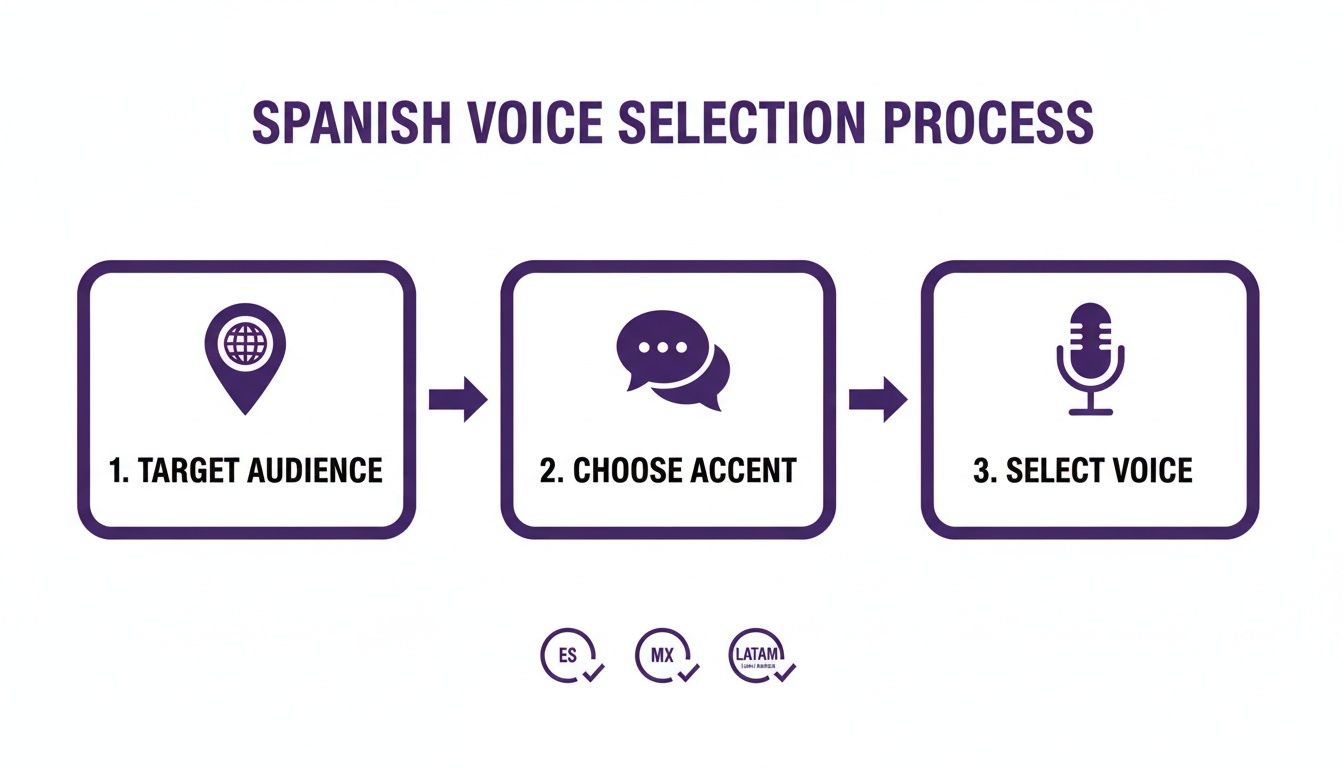
As you can see, a great voiceover starts with knowing your audience long before you start listening to voice samples.
Automating the Tedious Editing Work
One of the biggest headaches in video localization has always been the manual re-syncing. When you swap an English voice track for a Spanish one, everything breaks—the timing of the visuals, the pop-up text, the captions. Going back to fix all of that frame-by-frame is mind-numbingly tedious.
A modern workflow automates this away. With features like automatic scene timing adjustments, the moment you generate the new voice over in Spanish, all the visual elements—captions, callouts, and scene transitions—magically realign with the new audio.
This one feature alone can shave hours of painstaking manual labor off every single video. For any team trying to produce content at scale, that kind of automation is a game-changer. You can dig deeper into how to create training videos with AI to see how these pieces all fit together in a real-world workflow.
You’ve put in the hard work localizing your script and getting the audio just right. Now it’s time for the final push: quality control and distribution. This last mile is where you polish everything to perfection and make sure your video actually finds its audience.
Don’t be tempted to rush this part. Tiny mistakes here can easily undermine all the effort you’ve invested. A thorough quality assurance (QA) pass isn’t just a suggestion; it’s essential for a professional result.
Your Quality Assurance Checklist
Before you even think about hitting that “publish” button, you need to put on your detective hat and scrutinize every detail. I always run through a mental checklist, and it’s saved me from embarrassing mistakes more times than I can count.
- Pronunciation and Pacing: Play the entire voice over in spanish from start to finish. Is your brand name pronounced correctly? What about tricky technical terms or feature names? Does the narrator sound natural, or are they rushing through key points?
- Audio-Visual Sync: This is a big one. Watch the screen like a hawk. When the voiceover says “click this button,” does the cursor actually click it at that exact moment? Any lag or mismatch feels jarring to the viewer and immediately breaks the immersion.
- Caption Accuracy: Read every single caption. Are they timed perfectly with the speech? Are there any typos? They need to be a perfect mirror of the spoken audio.
- Translated On-Screen Text: It’s so easy to miss this. Double-check all the text that appears visually in your video—callouts, lower thirds, graphics. I’ve seen projects where a single English word was left in a complex graphic, instantly making the whole thing feel amateur.
Here’s the most important piece of advice I can give you: have a native Spanish speaker do the final review. They will spot the awkward phrases, cultural missteps, or tonal issues that non-native speakers (and all software) will inevitably miss. This is your ultimate safety net.
Smart Distribution for Maximum Reach
Creating a flawless localized video is fantastic, but it’s only half the job. Now, you have to get it in front of the right eyeballs. Just uploading it to YouTube or Vimeo and hoping for the best is a recipe for disappointment.
You need to think like your audience and optimize everything for discovery. This means translating all the video’s metadata into Spanish.
- Video Title: Don’t just translate the English title directly. Craft a compelling, keyword-rich Spanish title that speaks to your target viewer.
- Video Description: Write a detailed description in Spanish. Use relevant keywords to explain what the video covers and why someone should watch it.
- Tags and Keywords: Use a healthy mix of broad and specific tags, all in Spanish. This is how you tell the platform’s algorithm who to show your video to.
Optimizing your metadata signals to search engines that your content is made for a Spanish-speaking audience. This dramatically increases its visibility. And trust me, the demand is there. Spanish language voice-over talent is the most requested non-English resource in the creative world, with 52% of clients planning to use it for marketing.
If you want to dig deeper into this trend, you can discover more insights on global voice-over trends. By localizing your video’s metadata, you’re not just translating words; you’re tapping directly into a massive, active market that is looking for content just like yours.
Common Questions About Spanish Voiceovers
When you start localizing videos, a handful of questions pop up almost immediately. Let’s tackle some of the most common ones I hear from teams diving into Spanish voiceovers for the first time.
What’s the Single Biggest Mistake to Avoid?
Without a doubt, the biggest pitfall is doing a direct, word-for-word translation of your English script. It’s a classic mistake that instantly screams “we used a cheap tool.” Spanish has a different flow, a unique sentence structure, and its own cultural nuances.
Trying to force English idioms or corporate jargon into Spanish just doesn’t work. The result is a stiff, robotic narration that will completely disconnect from your audience. The solution is true localization, where a native speaker adapts the meaning and intent of your script, not just the words. This is what makes a video feel authentic.
How Much Should I Budget for a Professional Spanish Voiceover?
This really depends on the route you take, and the costs can swing wildly.
If you hire a traditional voice actor, you could be looking at anywhere from a few hundred to several thousand dollars. The final price tag depends on their experience, how long the script is, and the usage rights—where you plan to show the video.
On the other hand, AI voice platforms usually operate on a subscription model. This gives you predictable costs and lets your team create as many voiceovers as they need without worrying about per-project fees. For any team that’s consistently creating tutorials or demos, it’s a much more sustainable and budget-friendly approach.
What Do I Do About On-Screen Text and Graphics?
You absolutely have to translate all on-screen text. It’s a non-negotiable part of creating a seamless experience.
Here’s a pro tip: Spanish text is often longer than English. We call this “text expansion,” and it can mess up your designs if you’re not prepared. You might find that your perfectly designed callouts and titles suddenly look cramped or get cut off.
The good news is that modern video tools can make this much less of a headache. Instead of having to go back to a separate design program to re-render every graphic, you can often edit text elements right inside the video platform. This keeps your visuals and the new Spanish narration perfectly in sync.
How Can I Make High-Quality Videos Without Wasting Time?
This is the classic struggle for teams making tutorials and demos. You need to balance quality with efficiency.
Easy-to-use recording via tools like Loom is often 50-100% longer than necessary, filled with pauses and retakes. On the flip side, professional video editing software such as Camtasia or Adobe Premiere Pro requires expert video editing knowledge, creating a huge bottleneck.
This is exactly the gap tools from Tutorial AI are designed to fill. By generating video tutorials based on screen recordings, it lets you create demos, onboarding videos, explainer videos, feature release videos, knowledge base videos, and support article videos with incredible speed. Tutorial AI’s tools let you speak freely without any practice, and still your video will look professional as if it was edited in Adobe Premiere Pro. It allows the subject matter expert to create on-brand videos extremely efficiently.
Ready to create studio-quality tutorials in minutes? Tutorial AI turns your raw screen recordings into polished, professional videos with AI voices in over 30 languages. Start creating for free at Tutorial.ai.