A quick reference guide template is essentially a ready-to-use framework for creating those super-handy, one-page documents that help your team get things done right—and fast. Think of it as a standardized blueprint. It ensures the most critical information is always presented in a clear, consistent way, turning what might be a complicated process into simple, easy-to-follow steps.
Why Standardized Guides Are Your Secret Weapon
Let’s be real for a moment. Most teams are swimming in a sea of disorganized information. You’ve got notes scattered across a dozen different apps, wikis that haven’t been touched since last year, and lengthy documents that nobody has time to read. It’s a recipe for confusion, not clarity. This is exactly where a solid quick reference guide template becomes an invaluable tool.
Picture a new sales rep fumbling with the CRM while on a call with a big client. Or a support agent racking their brain trying to remember a tricky troubleshooting process. In those critical moments, searching for information is a massive waste of time and a huge risk for making mistakes. A good template gives you a reliable structure, transforming that mess of scattered knowledge into an accessible resource anyone can grab and use with confidence.
Turning Chaos into Clarity
This isn’t just about cranking out another document. It’s about building a smarter system for sharing knowledge that actually empowers your team. When you standardize the format, you eliminate the mental gymnastics employees have to do just to figure out where to look. Everyone knows exactly what to expect and where to find the info they need, every single time.
This has a direct impact on your bottom line by:
- Speeding up onboarding: New hires can get up to speed much faster when they have clear, actionable guides for their most important tasks.
- Slashing costly mistakes: A simple, checklist-style format makes sure no critical step gets skipped.
- Empowering your people: When the right answer is easy to find, employees feel more capable and autonomous in their work.
The Measurable Impact of a Good Guide
The benefits here aren’t just theoretical; the data backs it up. In high-pressure environments like operating rooms, using concise guides has been shown to cut task completion time by an average of 18–24% and reduce procedural errors by a whopping 22%.
That same effect carries over into the business world. Companies have reported 12–30% faster onboarding and a 15–27% drop in errors for new hires after they started using one-page process guides. You can dig deeper into how effective templates drive results if you’re curious about the performance metrics.
Here’s a quick look at the core benefits of spending less time on tasks and making fewer mistakes.
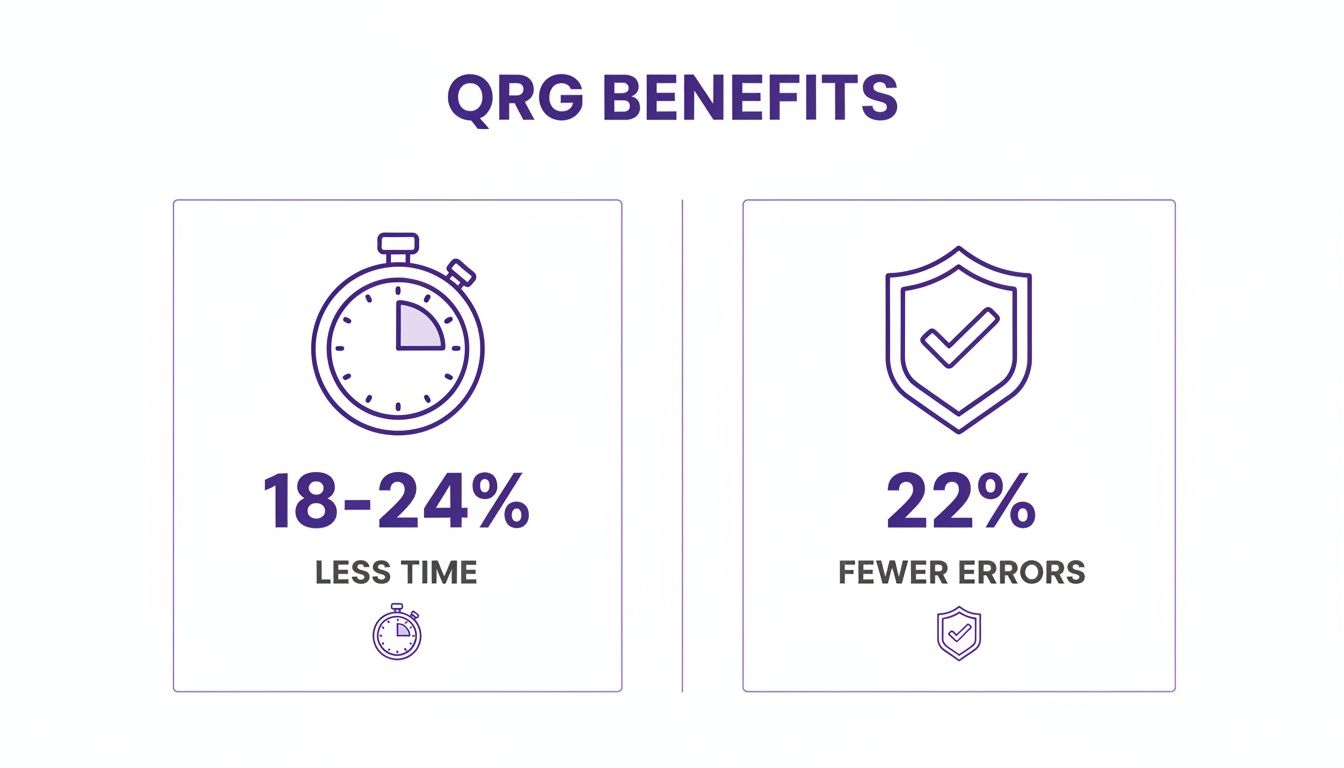
This data really drives home how a simple documentation tool can lead to major wins in both speed and accuracy.
A great quick reference guide does more than just inform; it builds operational muscle. It creates a baseline of competence across the entire team, freeing up senior members from answering repetitive questions and allowing everyone to focus on more strategic work. At the end of the day, a strong quick reference guide template is a small investment that delivers a huge return. It turns the crucial—but often ignored—practice of knowledge sharing into a real strategic advantage. As you build out your own guides, thinking about the right documentation of training can take these benefits even further. This simple document is your first step toward building a more efficient, accurate, and self-sufficient team.
The Anatomy of a Truly Useful Reference Guide
Before you even think about templates, let’s talk about what makes a quick reference guide actually work. The best ones aren’t just checklists; they’re masterclasses in efficiency, designed to cut through the noise and give people the exact information they need, right when they need it.
I’ve seen it time and again: the difference between a guide that becomes a team’s go-to resource and one that just collects digital dust is all in the structure. The right components work together to make complex processes feel simple and repeatable.
Start with a Crystal-Clear Purpose
Every great guide kicks off with two things: a direct, searchable title and a short purpose statement. The title needs to be specific. Think “How to Process a Customer Refund in Stripe,” not something vague like “Refund Info.” People search for problems, so title your guide like the solution.
Right after the title, a single sentence should tell the user exactly what they’ll achieve with the guide. It manages their expectations from the get-go.
For example:
- Title: Onboarding a New Client in Asana
- Purpose: This guide walks through the 7 essential steps for setting up a new client project, from initial folder creation to sending the kickoff email.
This immediate clarity confirms they’ve found the right document and know what the finish line looks like. It’s a foundational principle in any good format for technical documentation.
Focus on Action-Oriented Steps
The core of your guide is the instructions. This is where you need to be relentlessly direct. Write each step as a command, starting with an action verb.
There’s a world of difference between “The final report should be exported” and “Export the final report as a PDF.” One is a passive suggestion; the other is an unambiguous command that tells the user precisely what to do next.
A great guide doesn’t describe the process; it walks the user through it. Each step should be a clear, logical action that moves them closer to the goal. This approach minimizes cognitive load and makes following along feel effortless. This is how you turn a dense procedural document into a streamlined job aid. A wall of text explaining a software workflow can easily become a crisp, numbered list that people can actually follow.
Weave in Smart Visuals
Visuals aren’t just there to look pretty—they’re a critical part of comprehension. Often, a single, well-placed screenshot or a simple diagram can do the heavy lifting of several paragraphs of text. Visuals serve as landmarks, reassuring the user they’re in the right place.
Here are a few visual aids that pack a punch:
- Annotated Screenshots: Use arrows, boxes, and short text callouts to point directly to the buttons, fields, or menus a user needs to click.
- Simple Diagrams: Got a process with a fork in the road? A basic flowchart can clarify conditional logic instantly (e.g., “If client is ‘Type A,’ do this; if ‘Type B,’ do that”).
- Icons and Symbols: Consistent icons for tips, warnings, or important notes help make the guide scannable and draw attention to key details.
When you pair concise text with targeted visuals, you cater to how people actually learn and speed up understanding immensely. The goal is for someone to glance at a step and get it in seconds.
Get Ahead of Common Roadblocks
Finally, the most thoughtful guides I’ve built are the ones that anticipate where people are going to get stuck. Adding a small section for common problems or FAQs is a total game-changer. It’s a proactive move that saves tons of time for both the user and the expert who would otherwise be fielding the same questions over and over.
This can be as simple as a bulleted list:
- Common Error: “Permission Denied” message appears.
- Solution: Make sure you’re logged in with your administrator account before starting.
By addressing these potential friction points right in the guide, you build your team’s confidence and make the whole process feel smoother. It shows you’ve thought through the entire user journey, bumps and all. This kind of foresight is what turns a decent template into an indispensable tool.
Downloadable Templates and Real-World Examples
All the theory in the world doesn’t help until you can put it into practice. A truly effective quick reference guide isn’t just a document; it’s a flexible tool that bends to fit your team’s specific ways of working. To get you started on the right foot, I’ve put together a ready-to-use template you can download and start customizing right away.
It comes in both Google Docs and Microsoft Word formats, so you can drop it straight into your team’s existing workflow without any headaches. But let’s be honest, a blank page can feel a little daunting. That’s why I’ve also created three pre-filled examples to show you what’s possible—think of them as mini-case studies for different parts of a business.
To give you a quick overview of what these examples cover, I’ve put them into a simple table. This shows just how versatile a single template can be when applied to different departmental needs.
Quick Reference Guide Template Examples by Department
| Department | Use Case Example | Key Components Included |
|---|---|---|
| Customer Support | Processing a Customer Refund in Stripe | Step-by-step UI navigation, pre-approved customer messages, and CRM documentation protocol. |
| Account Management | Onboarding a New Client in Asana | Client project setup checklist, instructions for inviting stakeholders, and kickoff email templates. |
| Marketing | Publishing a Blog Post in WordPress | Pre-publish SEO checklist, formatting guidelines, and post-publish promotion steps. |
These examples are designed to move you from idea to implementation quickly. Let’s dig into what each one looks like in action.
Example 1: Support Team Guide
Use Case: Processing a Customer Refund in Stripe.
For a customer support team, handling refunds is a high-stakes task where accuracy and empathy are everything. One wrong click or a poorly worded message can sour a customer relationship for good.
This guide walks an agent through the process with zero ambiguity:
- Locate the correct customer transaction using a screenshot of the search bar so there’s no confusion.
- Navigate the refund interface with numbered steps pointing to the exact buttons and fields.
- Communicate with the customer using pre-approved message snippets to maintain a consistent, helpful tone.
- Document the refund in the company’s CRM, creating a clear audit trail.
This is a perfect example of how a guide can enforce precision in repetitive, critical tasks, ensuring every agent follows the exact same proven protocol.
Example 2: Account Team Guide
Use Case: Onboarding a New Client in Asana.
First impressions are everything. A messy, disorganized onboarding process can kill a new client’s confidence before the relationship even begins. This guide is for an account management team, designed to make every client feel like they’re in capable hands from day one. If you’re looking for more inspiration on building comprehensive internal documents, this Performance Handbook Template offers a great look at structured, clear communication.
This pre-filled template shows how to map out a process centered on the client experience:
- Initial Project Setup: A simple checklist for creating the main project, necessary folders, and standard tasks.
- Inviting Stakeholders: Clear instructions on adding the client to the project with the right permissions.
- Assigning First Tasks: Guidance on how to assign the initial “Welcome” and “Information Gathering” tasks.
- Kickoff Email Protocol: A go-to template for the official welcome email, ensuring a consistent and professional message.
In this scenario, the quick reference guide essentially acts as a project manager, standardizing the crucial first steps that pave the way for a successful partnership.
A well-designed quick reference guide doesn’t just list steps; it codifies excellence. By capturing the best practices of your top performers, you make that expertise accessible to everyone on the team. This is how you turn that hard-won “tribal knowledge” into a scalable, repeatable asset.
Example 3: Marketing Team Guide
Use Case: Publishing a Blog Post in WordPress.
Modern marketing workflows are a tangle of different tools and platforms. It’s incredibly easy for small but important details to get missed along the way. This example is for a marketing team, making sure every blog post is published flawlessly—from SEO checks to the final social media push.
It breaks a complicated digital process down into simple, manageable pieces:
- Pre-Publish Checklist: Covers all the SEO must-haves, like meta descriptions, focus keywords, and image alt text.
- Formatting and Review: Includes steps for adding internal links, setting a featured image, and running a final grammar check.
- Scheduling and Publishing: Shows exactly where to find the scheduling options to post at the optimal time.
- Post-Publish Promotion: A final list of to-dos, like sharing the new post on social channels and sending it to the email list.
Taken together, these three examples show just how adaptable a single template can be. Whether your process is customer-facing, project-driven, or highly technical, the core structure delivers clarity, consistency, and confidence for your team. They help turn the idea of a “quick reference guide” into a practical tool you can start using today.
Getting Your Guides Off the Ground and Into Workflows
So, you’ve got a killer quick reference guide template. That’s a huge first step, but the real magic happens when people actually start using it. The goal isn’t just to create a document; it’s to weave it into the very fabric of your team’s daily work. Let’s break down how to turn that guide from a neat idea into an indispensable tool.
The biggest barrier to adoption I’ve seen? Internal jargon. We all use it. It’s shorthand for those in the know, but for a new hire or someone from another department, it’s like a foreign language.
A simple rule of thumb is to write for the newest person on your team. That means defining acronyms, spelling out those quirky project code names, and explaining concepts in plain English. This one habit makes your guides useful to everyone, not just the inner circle.
Get Your Experts Involved from Day One
You want your guides to be accurate and get immediate buy-in, right? Then you need to co-create them with the people who live and breathe these processes every day—your subject matter experts (SMEs).
When you bring SMEs into the creation process, you’re doing more than just fact-checking. You’re giving them a sense of ownership. They become champions for the guide, promoting it to their peers and helping you keep it fresh and relevant.
A simple workflow looks like this:
- The First Draft: You or a team lead sketches out the guide using the template.
- The SME Pass: Your expert reviews it for technical accuracy, adding those crucial little details and nuances you might have missed.
- The Final Polish: You take their feedback, clean up the formatting, and add the final branding touches.
This back-and-forth ensures the final guide isn’t just theoretically correct but practically useful.
Keep Your Branding on Point
A consistent, professional look does more than just make your guides pretty. It builds trust. When all your guides share the same logo, company colors, and fonts, they instantly feel official and reliable.
This visual consistency helps people recognize the document as part of your official knowledge base. It gives the information more weight and makes it easier to scan, as people get used to where to find things in the layout.
A consistent design language across all your guides reduces cognitive load. Team members don’t have to re-learn how to read a new document each time; they can instantly find what they need, which is the entire point of a quick reference guide.
Put Your Guides Where People Can’t Miss Them
Even the most perfect guide is worthless if nobody can find it. You have to put your guides directly into the flow of work, making them impossible to ignore. The goal is to make opening the guide easier than tapping a coworker on the shoulder.
Think about where your team lives digitally. That’s where the guides need to be.
Here are a few tactics that have worked wonders for me:
- Pin them in your main Slack or Microsoft Teams channels.
- Embed them right into your company wiki or knowledge base, like Confluence or Notion.
- Link them directly from tasks in project management tools like Asana or Jira.
When your guides are always just one click away, people will actually use them.
Bring Your Guides to Life with AI-Powered Video
Let’s be honest, written guides are fantastic, but some things are just easier to show than to tell. When you’re dealing with complex software or a hands-on process, adding a video to your quick reference guide can make a world of difference for comprehension. It’s how you take your instructions from static text to a living, breathing tutorial.
The big problem, though, has always been the frustrating trade-off in creating those videos. You could use a simple screen recorder like Loom, which is fast and easy. The downside? These recordings are often 50-100% longer than they need to be, filled with rambling, awkward pauses, and confusing mouse movements.
The alternative is diving into professional editing software like Adobe Premiere Pro or Camtasia. While powerful, this route requires expert video editing knowledge that most of your subject matter experts just don’t have. This creates a bottleneck, leaving valuable knowledge stuck waiting for an overbooked video editor.
Bridging the Gap Between Raw Recordings and Polished Tutorials
This is where Tutorial AI’s tools let you speak freely without any practice and still your video will look professional as if it was edited in Adobe Premiere Pro. It allows the subject matter expert to create on-brand videos extremely efficiently.
Imagine your go-to expert simply hitting “record” and walking through a process on their screen, explaining it naturally. No script. No multiple takes. They just focus on what they do best—sharing their knowledge—and let the technology handle the heavy lifting.
Tutorial AI takes that raw recording and automatically transforms it into a polished, on-brand video. This unlocks the ability for your team to efficiently generate all kinds of video tutorials based on screen recordings:
- Demos: Clear, concise showcases of how a feature works.
- Onboarding Videos: Guiding new hires or users through their first critical steps.
- Explainer Videos: Breaking down complicated topics into simple, visual lessons.
- Feature Release Videos: Announcing new updates with a compelling walkthrough.
- Knowledge Base Videos: Adding much-needed visual context to support articles.
- Support Article Videos: Showing customers exactly how to solve a common problem.
The final product looks like it was meticulously crafted by a professional editor, but it was created in a tiny fraction of the time. The AI can even handle the voiceover, giving you the option to use an AI voice generator for videos for a perfectly consistent and professional sound across all your content.
Why This Matters for Your Quick Reference Guides
When you embed these AI-powered videos directly into your quick reference guide, you create a powerful, multi-format learning tool. Some people love to scan text, while others absorb information best by watching. By offering both, you make your guides more accessible and effective for everyone on your team. To learn more about the broader technologies that can elevate your guides, check out this piece on AI powered content creation.
The combination of a concise written guide and a polished video tutorial creates a support asset that is greater than the sum of its parts. It empowers users to solve problems independently by giving them the exact format they need, right when they need it. Ultimately, this approach puts the power of creation directly into the hands of the person with the knowledge—your subject matter expert. It removes friction, eliminates delays, and lets you build a rich library of genuinely helpful content. Your team saves time, your users get clearer instructions, and your guides become the indispensable resources they were always meant to be.
Common Questions About Quick Reference Guides
As you start rolling out your quick reference guide template to different teams, a few practical questions are bound to pop up. Answering them upfront makes the whole process smoother and stops small hiccups from turning into big headaches. Let’s tackle the most common ones so you can get the most out of your guides from day one.
What Is the Ideal Length for a Quick Reference Guide?
Keep it to a single page. If you absolutely must, a front-and-back sheet is the maximum. The whole point is in the name: “quick.”
If you find a process needs more than a page or two to explain, that’s a huge clue. It means the process itself is too complex for one guide. Your best bet is to break it down into smaller, more focused guides for each distinct part of the workflow.
Remember, it’s not just about physical length, but about how fast someone can scan it. Use short sentences, bold headings, and plenty of white space. The goal is clarity, not cramming every last detail onto the page.
How Often Should I Update My Guides?
Think of your guides as living documents, not static PDFs you create once and forget. It’s smart to schedule a regular review, maybe once a quarter, to make sure everything is still relevant.
But the real work happens in real-time. The moment a process, a piece of software, or a company policy changes, the guide needs to be updated. Outdated information is more dangerous than no information at all because it breaks trust.
The best way to manage this is to assign an “owner” to each guide. This person is the go-to for keeping it accurate. Also, listen to your team. If people are still asking questions about something that’s supposedly covered in a guide, it’s a clear signal that the document needs a rewrite or some clarification.
A guide is only useful if it’s trusted. Regular, proactive updates build confidence and ensure your team sees the guides as a reliable single source of truth, not an archive of old procedures.
What Are the Best Tools for Creating a Guide?
You don’t need fancy, expensive design software. Honestly, the best tools are the ones your team already knows how to use. For most of us, that means:
- Google Docs & Microsoft Word: These are perfect for text-heavy guides and collaborative writing. Nearly everyone is familiar with them, which makes it incredibly easy for different people to jump in and make updates.
- Canva or Venngage: When you need something with a bit more visual polish—especially for customer-facing guides or documents that need to stick to strict branding—these tools are fantastic. They’re user-friendly and packed with templates that make design simple.
The right choice is whatever lowers the barrier to creation and maintenance. The more complex the tool, the less likely people are to keep the guides updated. Keep it simple.
Can I Use These Guides for Customers?
Absolutely! Quick reference guides are an excellent format for customer documentation. They work especially well for onboarding new users to your product, highlighting key features, or walking through common troubleshooting steps.
A great guide empowers customers to solve problems on their own, which can drastically cut down on your support ticket volume.
Just remember to scrub any internal jargon from the text—make sure it’s 100% customer-friendly. And, of course, ensure the branding perfectly matches your company’s official style. For an even better customer experience, pair the written guide with a short, easy-to-follow video tutorial. This caters to different learning styles and really makes the information stick.
Ready to create polished, professional video tutorials to accompany your guides in a fraction of the time? With Tutorial AI, you can turn any screen recording into a studio-quality demo without any editing expertise. Try it for free today.