Think of an instruction guide template as your secret weapon for creating training materials that actually work. It’s a pre-built framework that ensures every guide you produce is clear, consistent, and easy to follow. Whether you’re making a software tutorial or documenting a standard operating procedure, a solid template saves a massive amount of time and effort.
Why a Great Instruction Guide Template Is a Game Changer
Let’s get beyond the obvious “it saves time” benefit. The real power of a well-designed template is how it becomes a central asset for your entire organization. It’s the single source of truth that standardizes how you share knowledge, which in turn drives efficiency, cuts down on mistakes, and ultimately helps your business run smoother.
I’ve seen this happen firsthand with fast-growing startups. They often struggle with inconsistent training, especially with remote teams. One new hire gets one set of instructions, another gets a completely different version, and chaos ensues. The result is a mess of confusion and inconsistent work. By creating and sticking to one instruction guide template, they standardize the entire onboarding process. This single change can completely turn around quality scores and dramatically shorten how long it takes a new person to become effective.
Slashing Onboarding Friction and Boosting Productivity
A standardized format removes the guesswork for everyone. When instructions always follow a familiar, logical flow, new team members can pick things up much faster and with more confidence. This kind of consistency is absolutely critical when you’re trying to scale a team.
In fact, some studies have shown that well-structured training guides can reduce training time by up to 40%. It’s not just about speed; it’s about clarity.

The takeaway here is simple: a clean layout with clear headings and helpful visuals makes even the most complex information feel manageable. It’s less intimidating for the learner and far more effective.
Guaranteeing Operational Consistency
When every person on the team follows the same playbook, you ensure operational consistency. This means fewer errors, higher-quality work, and a much more streamlined workflow. A great template makes sure that critical steps are never missed and that best practices are always front and center, which is vital for maintaining high standards as you grow.
For any team that depends on getting processes right, solid documentation of training isn’t just a “nice-to-have”—it’s the foundation for success.
To make this more tangible, let’s break down what should go into a truly effective instruction guide template.
Core Components of an Effective Instruction Guide Template
| Component | Purpose | Example |
|---|---|---|
| Clear Title & Intro | Sets context and expectations. | "How to Set Up Your New Project in Asana" |
| Prerequisites | Lists what the user needs before starting. | "You'll need an active Asana account and Admin access." |
| Numbered Steps | Provides a clear, sequential path to follow. | "1. Click the '+' icon. 2. Select 'New Project'." |
| Visual Aids | Clarifies complex steps with screenshots/videos. | A screenshot highlighting the "New Project" button. |
| Troubleshooting/FAQ | Addresses common problems proactively. | "What if I don't see the 'New Project' button?" |
| Summary/Recap | Reinforces key takeaways and confirms completion. | "You've now successfully created your project board." |
Having these core elements baked into your template from the start ensures that nothing important gets missed, no matter who is creating the guide.
By establishing a single, approved way to perform tasks, you eliminate the “knowledge silos” that often form within teams. This empowers everyone with the information they need to perform their jobs effectively without constantly asking for help.
Designing a Template People Actually Want to Use
Let’s be honest: a template is useless if your team dreads opening it. The best instruction guides are the ones that don’t feel like a chore to read. They’re designed with a human touch, mixing clean visuals with simple, direct instructions to make learning feel almost effortless.
It all starts with a solid visual hierarchy. Think about how you scan a webpage. Your eyes jump from headings to bolded text to images, right? Your template should lean into that natural behavior. Use clear H2 and H3 headings to break down complex tasks into bite-sized, manageable pieces. This way, someone can jump right to the section they need without having to wade through a wall of text.
Visuals are your best friend here. Why write a long paragraph describing where to click when a quick, annotated screenshot can show it instantly? If you’re explaining a multi-step process, a simple flowchart or diagram will beat a block of text every single time. The golden rule is to show, not just tell.
Establishing a Clear Visual Identity
Consistency is what makes your guides look professional and feel trustworthy. It’s the small, deliberate details that build a recognizable brand identity.
Start with your fonts. Pick a clean, easy-to-read font for your main text—something like Lato or Open Sans works great on screens—and pair it with a complementary font for your headers. Then, weave your brand colors into the design. Use them to highlight important callouts, separate different sections, or just add a touch of personality. It’s a simple move that makes your content instantly familiar.
Don’t forget the power of white space. A crowded page is an overwhelming page. Giving your text, images, and other elements plenty of room to breathe makes everything easier to scan and digest. It’s a subtle change that dramatically improves the user experience.
One thing I’ve seen teams overlook is testing their templates internally. Getting feedback on the formatting—like the clarity of headings, use of bullet points, and on-brand graphics—can be a game-changer. I’ve seen user satisfaction scores jump by as much as 35% just from implementing well-structured guides based on internal feedback. You can see a similar impact in how some businesses are using operations manual templates.
Balancing Simplicity with Functionality
A great-looking template is nice, but it must be functional. At the end of the day, it’s a tool, and every single element should make the information easier to understand and act on.
Here’s how you can strike that perfect balance:
- Map out a logical flow: Structure your content intuitively. Kick things off with the goal, list any necessary prerequisites, walk through the steps, and wrap up with a quick summary or a few troubleshooting tips.
- Use visual cues to guide the eye: Simple icons, callout boxes with a different background color, or even just bold text can draw attention to critical notes, warnings, or helpful tips. These visual flags help break up the monotony of the text and keep the reader engaged.
- Make it scannable: Keep your paragraphs short and to the point—two to three sentences is a good rule of thumb. Whenever you can, use bullet points or numbered lists to present information in a way that’s quick and easy to absorb.
Ultimately, your goal is to create a resource that empowers people, not one that adds to their frustration. By focusing on a clean layout, a strong visual hierarchy, and consistent branding, you’ll build a template that your team actually finds helpful.
Crafting Clear and Actionable Content
A sharp design will get people in the door, but it’s the content that truly makes or breaks an instruction guide. You can have the most beautiful template in the world, but if the writing is confusing, your users will bail. The real goal is to write with a clear, action-oriented tone that cuts through the noise and gets right to the point.
This whole process really boils down to three core pillars: a solid structure, helpful visuals, and crystal-clear text.
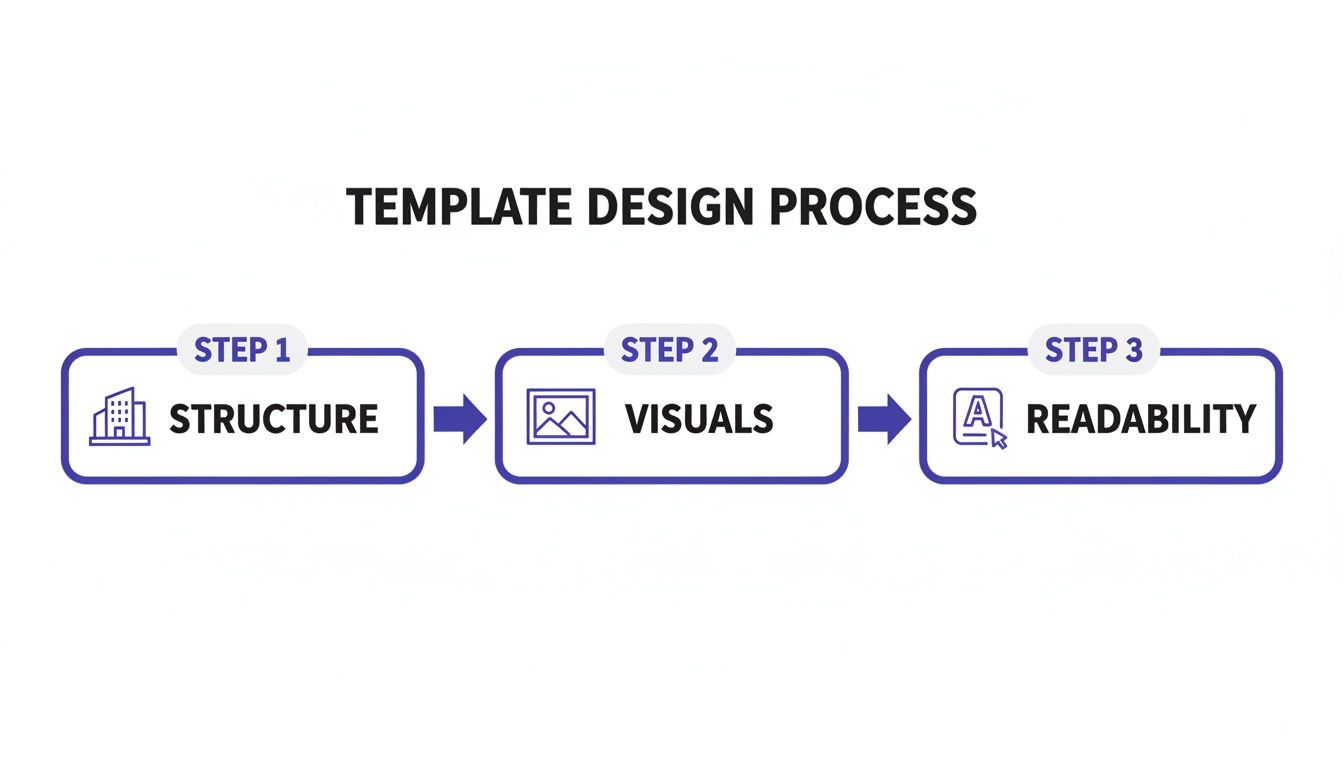
When these three elements work in harmony, you get a template that doesn’t just look good—it actually works.
Structuring for Clarity and Flow
Every great guide needs a logical framework. I like to think of it as telling a short story that takes the user from a problem to a solution. Always start by spelling out the objective. What, exactly, will the user accomplish by the end? This sets the stage and manages expectations from the get-go.
Next, break the entire process down into digestible steps. Avoid giant walls of text at all costs. Numbered lists and short paragraphs are your best friends here, creating a clear path that’s easy to follow. A quick summary at the end is also a nice touch, reinforcing what they just learned and confirming they did it right.
Pro-Tip: The best guides are written with empathy. Before you write a single step, put yourself in the user’s shoes and ask, “Where could I get stuck here?” By addressing those potential confusion points proactively, you create a much smoother experience.
Blending Media for Maximum Impact
People learn in different ways. Some are readers, while others are visual learners. A top-tier instruction guide template doesn’t force one or the other—it blends different types of media to cater to everyone.
For example, simple screenshots are absolute gold for pointing out specific buttons or parts of an interface. Don’t just drop the image in, though. Use annotations like arrows, boxes, or circles to guide the user’s eye exactly where it needs to go. It removes any guesswork and makes your instructions foolproof.
When Video is the Right Choice
Sometimes, a static image just won’t cut it, especially for a dynamic workflow with multiple moving parts. This is where embedding short video tutorials can be a complete game-changer. A well-made video can demonstrate a complex sequence far more effectively than a dozen screenshots ever could.
The challenge, of course, is that creating good video can be a huge bottleneck. Easy-to-use recording tools like Loom are great, but the raw footage is often 50-100% longer than necessary. On the flip side, professional video editing software such as Adobe Premiere Pro or Camtasia requires expert video editing knowledge.
This is exactly the problem Tutorial AI was built to solve. It uses AI to generate video tutorials based on screen recordings. This is perfect for creating demos, onboarding videos, explainer videos, feature release videos, knowledge base videos, and support article videos. Tutorial AI’s tools let you speak freely without any practice, and your video will still look professional, as if it was edited in Adobe Premiere Pro. It allows the subject matter expert to create on-brand videos extremely efficiently.
To get deeper into this, check out our guide on the best format for technical documentation. It’s packed with insights for making your knowledge base articles genuinely helpful.
Supercharging Your Guides with AI-Powered Video
A solid instruction guide template is a great starting point, but let’s be honest, static guides have their limits. These days, video isn’t just a nice-to-have; it’s often the most effective way to teach. And thanks to AI, creating high-quality tutorials is no longer a massive production. You can finally move beyond flat text and screenshots to create dynamic content that explains even the most complex steps in just a few minutes.
AI video tools are perfect for generating a wide range of video tutorials from a simple screen recording. Think about it: demos, onboarding videos, explainer videos, feature release videos, knowledge base videos, and support article videos can all be created this way.
Bridging the Gap Between Simple and Professional
Anyone who has ever tried to make a “quick” tutorial video knows the struggle. You grab a simple screen recorder like Loom for a fast capture, but the final video ends up being 50-100% longer than it needs to be. It’s full of awkward pauses, “ums” and “ahs,” and rambling explanations. Sure, it works in a pinch, but it doesn’t exactly scream professionalism.
The alternative? Heavy-duty video editing software like Camtasia or Adobe Premiere Pro. These are incredibly powerful, but they require expert video editing knowledge and a ton of time to learn. This creates a huge bottleneck. The people who actually know the software inside and out—your subject matter experts—are rarely professional video editors.
This is exactly the problem that modern AI tools are built to solve.
Tutorial AI’s tools let you speak freely without any practice, and your video will still look professional, as if it was edited in Adobe Premiere Pro. This eliminates the trade-off between speed and quality, allowing your subject matter experts to create on-brand videos extremely efficiently.
Empowering Experts to Create On-Brand Content
Picture this: your lead software engineer needs to explain a new feature. In the past, this might have meant days of scripting, recording take after take, and then waiting for a video team to edit it. Now, they can just record their screen once, explaining it as they go.
From there, the AI does all the tedious work:
- Trimming the Fat: It automatically snips out long silences, filler words (“uh,” “like,” “so”), and pointless mouse wiggles, turning a rambling 10-minute recording into a tight, 5-minute tutorial.
- Polishing the Audio: The tech can clean up background noise or even swap out the original audio with a perfect narration from an AI voice generator for videos. This is a game-changer for maintaining a consistent brand voice across all your training content.
- Adding Professional Touches: The AI is smart enough to add smooth zooms, highlights, and even on-brand graphics to focus the viewer’s attention exactly where it needs to be.
This completely changes the dynamic. The person with the most knowledge can now be the one who creates the content, producing high-quality, polished videos incredibly quickly. They get to focus on sharing what they know, and the final video is professional, concise, and ready for your knowledge base. It’s a much smarter way to build video directly into your instruction guide template workflow.
Making Your Guides Interactive and Measurable
A static instruction guide can only get you so far. If you really want to know if your instructions are hitting the mark, you have to move beyond flat documents and create dynamic, interactive experiences. This is how you stop guessing and start measuring what actually works.
The trick is to embed interactive elements directly into your guides. I’m talking about more than just text and images; think about incorporating simple checklists, quick quizzes, or even guided in-app walkthroughs that use modals and tooltips. These features turn passive reading into active learning, which makes a huge difference in how well people retain information and complete tasks.
For SaaS companies, this approach is a game-changer for product onboarding. In fact, we’ve seen guide completion rates jump by as much as 60% just by adding interactive elements like modals, tooltips, and progress bars. The analytics from these guides let you track key metrics like Total Seen, Step Completions, and overall Completion Rate, which can easily reach 70-80% when a guide is designed well. You can see some great examples of how these guides boost user engagement in action.
Key Metrics for Tracking Guide Effectiveness
Once your guides become interactive, you can start pulling in real data to see what’s resonating with your users. Knowing what to track is the key to making smart improvements.
You don’t need dozens of metrics; just a few core ones will tell you most of what you need to know.
Key Metrics for Measuring Guide Effectiveness
| Metric | What It Measures | Actionable Insight |
|---|---|---|
| Completion Rate | The percentage of users who start and finish the entire guide. | A low rate is a clear signal that the guide is too long, confusing, or doesn't feel valuable. |
| Step Completion | The success rate for each individual step within the guide. | If 90% of users finish step 3 but only 20% get past step 4, you've found your bottleneck. |
| Time on Task | How long users spend on a specific step or the entire guide. | Too little time might mean they're giving up, while too much time suggests a step is overly complex. |
By focusing on these metrics, you can quickly diagnose where your guides are failing and where they’re succeeding. This allows you to make targeted fixes instead of just guessing what’s wrong.
This image shows a perfect example of a progress tracker that keeps users engaged.
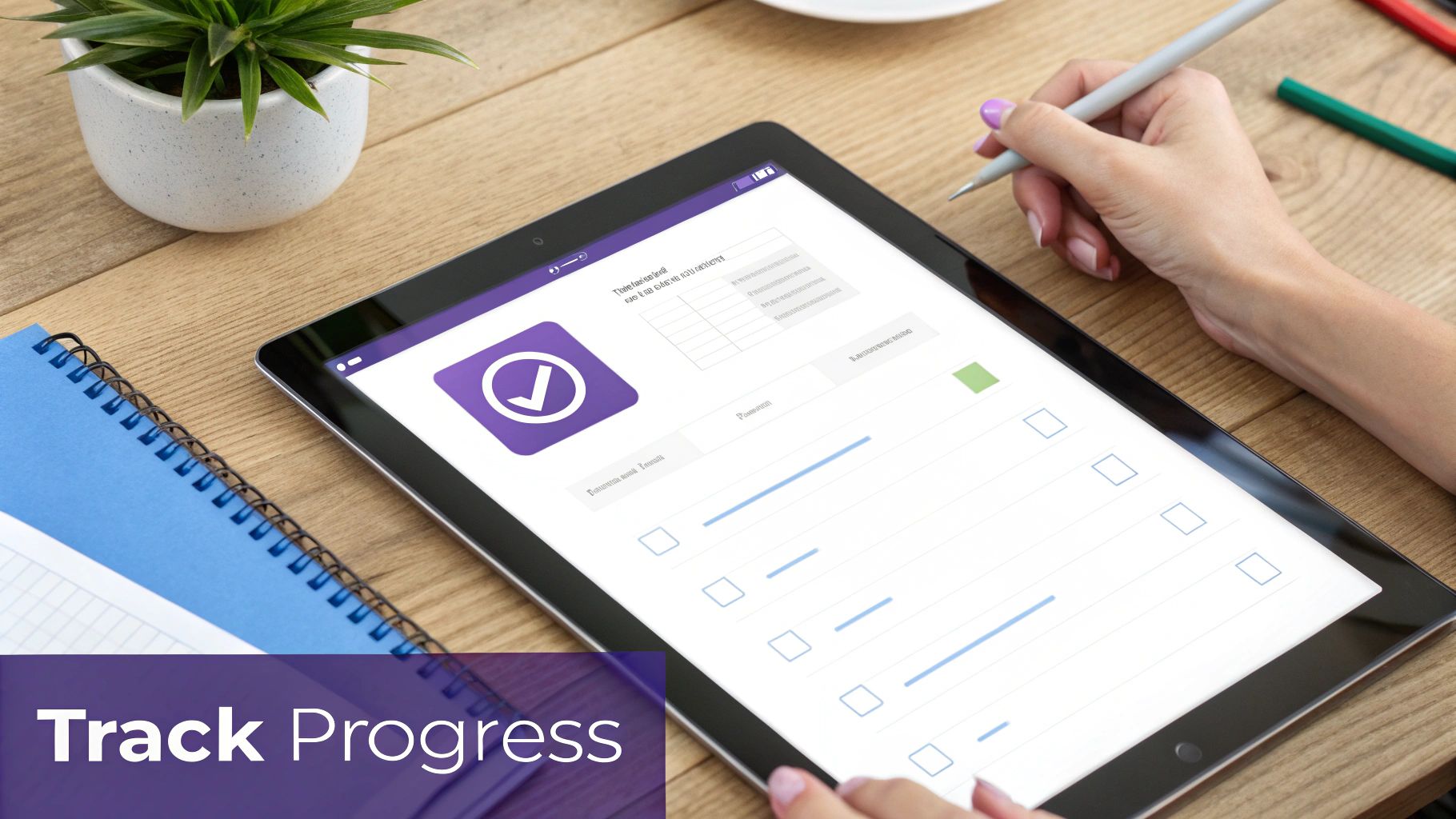
Something as simple as a visual checklist and a progress bar gives people a sense of accomplishment. It creates momentum and makes them far more likely to stick around and finish the whole thing.
Adopting a data-driven approach is what separates good guides from great ones. You stop guessing what users need and start making informed decisions based on their actual behavior. This feedback loop is essential for refining your instruction guide template over time. When you track these metrics, you can pinpoint friction, rewrite confusing instructions, and constantly improve your templates. It’s how you ensure your guides don’t just sit there—they deliver real, measurable results for your users and your business.
Common Questions About Instruction Guides
Even when you’ve got a fantastic instruction guide template ready to go, questions always come up. I’ve been creating and managing documentation for years, and these are some of the most common hurdles teams face. Let’s tackle them head-on so you can get things right from the start.
What Is the Most Important Element of an Instruction Guide Template?
Hands down, it’s clarity. The absolute most critical element is your ability to break down a complex process into simple, easy-to-follow steps. Think clear headings, short paragraphs, and plenty of visuals.
If someone gets lost or confused while following your guide, it doesn’t matter how slick the design is—it has failed. Your number one job is to make the information easy to understand and act on. Everything else is secondary.
How Often Should I Update My Instruction Guides?
You have to treat your guides like living documents, not something you create once and forget about. As a baseline, I recommend a formal review every quarter. However, the real rule is to update them the moment a process, software feature, or policy changes.
The best documentation I’ve ever seen comes from teams that build a culture of constant feedback. A great practice is to assign ownership of specific guides to subject matter experts who are closest to the process and can keep them accurate. Remember, outdated information is often worse than no information at all. This proactive approach stops confusion in its tracks and ensures your team is always working with the most current information.
Can I Use the Same Template for Internal and External Guides?
You can definitely start with the same foundational template, but you absolutely need to customize the content for each audience. It’s all about context.
Your internal guides, meant for your colleagues, can get away with company jargon and assume a certain baseline of knowledge. For customer-facing guides, you have to strip all that out. They need to be incredibly simple, avoid internal slang, and focus on one thing: helping the customer solve their problem. Creating two distinct versions from your master template will always give you better results.
What Are the Best Free Tools for Creating a Template?
For straightforward, text-heavy guides, you really can’t go wrong with the classics: Google Docs or Microsoft Word. They both have solid, free templates that are a breeze to customize.
If you need something with more visual punch, a tool like Canva has excellent free options with professional-looking layouts. And for those step-by-step software guides, a tool like Scribe is a game-changer; its free plan can capture your workflow and build the guide for you. The “best” tool really just depends on what you’re trying to document.
Stop wasting time on tedious video editing. With Tutorial AI, your subject matter experts can record their screen and let our AI create a polished, professional tutorial in minutes. Transform your knowledge base and training programs today. Get started for free at Tutorial.AI.