Let’s get right to it. At its heart, visual learning is simply learning by seeing. It’s the brain’s natural preference for processing information through images, diagrams, charts, and especially videos to grasp and hold onto new ideas.
Think about the last time you had to assemble furniture. Did you reach for the thick, text-heavy manual first, or did you pull up a quick video tutorial on your phone? That intuitive choice is visual learning in action.
What Is Visual Learning and Why Does It Matter?
Visual learning isn’t just about a preference for pretty pictures; it’s a powerful learning style rooted in how our minds work. It’s an approach that uses visual aids—like flowcharts, infographics, and step-by-step videos—to turn complex information into something we can easily digest and remember.
Our brains are wired for visual processing. This is why a simple flowchart can instantly clarify a confusing workflow, or a two-minute explainer video can teach a new software feature far more effectively than a dense support article. The core principle is straightforward: when we can see information, we understand it faster and remember it for longer.
The Science of Seeing and Remembering
The impact of visual learning isn’t just a hunch; it’s grounded in some fascinating cognitive science. Research has consistently shown that the human brain processes images at an incredible speed—up to 60,000 times faster than plain text. This isn’t just a fun fact; it means visual content communicates ideas almost instantly, reducing the mental effort needed to learn something new.
A compelling 2016 study in Cognitive Research: Principles and Implications looked at how university students learned complex science topics like black holes. The results were telling: students who drew their own diagrams—a hands-on visual learning technique—performed significantly better on later tests than those who just wrote summaries. This study gets to the core of why visuals are so effective. Engaging with information visually isn’t a passive act. It helps us build mental models, making abstract concepts feel tangible and easier to recall. By translating concepts into a visual format, learners can spot patterns and connections that would otherwise be lost in a wall of text.
For a deeper dive into the numbers, you can explore more visual learning statistics and studies. This cognitive edge is exactly why visual strategies have become so essential for effective corporate training, customer onboarding, and clear communication in any modern workplace.
To put it all together, here’s a quick overview of what makes visual learning tick.
Visual Learning at a Glance
This table breaks down the core characteristics of visual learning and the key benefits they bring to both the learner and the educator.
| Characteristic | Description | Key Benefit |
|---|---|---|
| Image-Centric | Relies on graphics, videos, charts, and diagrams to convey information. | Makes complex data and abstract concepts much easier to understand. |
| Spatial Understanding | Helps learners see the "big picture" and how individual parts relate to the whole. | Improves problem-solving by clarifying relationships and hierarchies. |
| Pattern Recognition | The brain's ability to quickly identify trends, similarities, and differences in visual data. | Speeds up comprehension and allows for quicker insights. |
| High-Speed Processing | Visuals are processed much faster by the brain compared to text or audio alone. | Reduces cognitive load and accelerates the learning curve. |
Ultimately, these elements work together to create a more intuitive and sticky learning experience, which is why it has become such a go-to method for training and support.
The Science Behind Why Our Brains Love Visuals
Ever wonder why a single, powerful image can explain a complex idea far better than a whole page of text? It’s not just a preference; it’s a fundamental part of how our brains are wired. We’re built to prioritize and process visual information, a concept researchers call the Picture Superiority Effect.
Simply put, we remember pictures much more accurately than we remember words. When we see a concept presented as an image, our brain often “dual-codes” it—storing it as both a picture and a verbal tag. This creates a much stronger mental hook, making the information far easier to recall later. This is exactly why a visually engaging product demo or a video in your knowledge base is so much more likely to stick with a customer.
The infographic below breaks down just how much faster and more effectively our brains handle visual input.
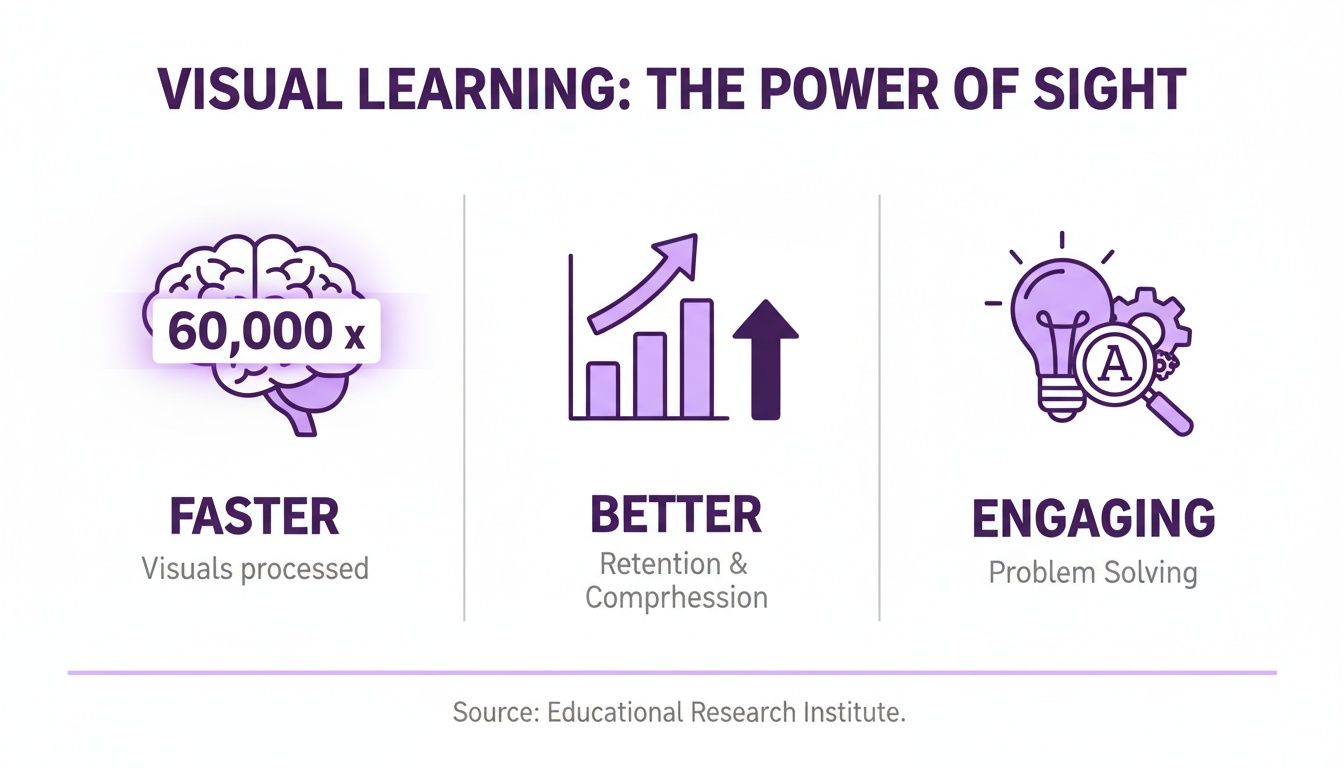
As you can see, visuals don’t just capture our attention; they’re processed at a speed that text can’t even begin to compete with. This cognitive shortcut is the secret sauce behind visual learning’s incredible impact.
Boosting Memory and Retention
The link between seeing and remembering is backed by some pretty stark numbers. Think about this: when people just hear information, they typically remember only about 10% of it three days later. But if you pair that information with a relevant picture? Recall skyrockets to 65%. This isn’t just a fun fact; it has massive real-world implications.
For corporate training, customer onboarding, or marketing, this means adding visuals is one of the most reliable ways to ensure your message is not just heard, but actually remembered and acted on. In fact, extensive research into visual communication has found that visuals can improve learning retention by up to an incredible 400%. That massive jump happens because our brains are naturally optimized to process visual input, making it a dependable way to transfer knowledge effectively. Discover more insights about these learning statistics and see the data for yourself.
Why Video Is a Visual Learning Superpower
Video takes the Picture Superiority Effect and puts it on steroids by combining images, motion, and sound into one multi-sensory package. This makes it an incredibly powerful format for all kinds of training and support content, from product demos and onboarding flows to detailed knowledge base articles. The only problem? Historically, creating great video has been a real headache.
- Easy but Unprofessional: Quick screen recordings from tools like Loom are fast, but they’re often 50-100% longer than they need to be, full of awkward pauses, “ums,” and mistakes.
- Professional but Difficult: On the other end, advanced software like Camtasia or Adobe Premiere Pro can create polished, professional videos, but they demand specialized editing skills and a huge time commitment.
This is the exact gap that tools like Tutorial AI are designed to fill. It specializes in generating polished video tutorials based on simple screen recordings. This is perfect for creating demos, onboarding videos, explainer videos, feature release videos, knowledge base videos, and support article videos. Tutorial AI’s tools let you speak freely without any practice, and your video will still look professional, as if it was edited in Adobe Premiere Pro. It allows the subject matter expert to create on-brand videos extremely efficiently, making high-impact visual learning truly accessible to anyone.
Making Complex Software and Processes Simple
This is where visual learning truly shines—when you need to untangle something complex. Theory is one thing, but the real magic happens when you use visuals to make intricate software or a convoluted process feel simple and intuitive.
It’s especially true in the world of tech. Think about it: a single, well-designed diagram can clarify a workflow that would take pages of dense text to explain.

Imagine trying to get a new hire up to speed on a sophisticated SaaS platform. If you hand them a text-heavy manual, you’re basically setting them up for confusion and frustration.
Now, picture giving them a step-by-step video tutorial instead. The video uses smart zooms to focus their attention and highlights to point out exactly where to click. It doesn’t just show them what to do; it helps them build a mental map of how the whole system works.
This approach helps people grasp the underlying logic, not just memorize a few features. That’s a massive win for any team, whether you’re in product marketing, sales enablement, or customer support.
Bridging the Gap Between Knowing and Doing
The power of explaining things visually isn’t just a gut feeling; there’s solid research behind it. Studies consistently show that visualizing complex systems helps people understand them far more deeply than just hearing or reading about them.
For example, when students were asked to explain concepts like how black holes work, the ones who drew diagrams significantly outperformed those who only wrote text summaries. The act of drawing helped them predict how the system would behave—a critical skill for anyone trying to master a piece of software. You can read the full research about these learning findings and check out the data for yourself.
This is exactly why video tutorials have become the go-to for software documentation and training. They’re perfect for things like:
- Onboarding Videos: Walking new users through their first few essential steps.
- Feature Release Videos: Showing existing customers what’s new and how to use it.
- Knowledge Base Videos: Giving quick, visual answers to common support questions.
- Explainer Videos: Breaking down what your product does in a way anyone can understand.
Overcoming the Video Creation Hurdle with AI
While the benefits are obvious, creating high-quality videos has always been a pain point. On one hand, you have easy-to-use recording tools like Loom. They’re quick, but the videos often end up being 50-100% longer than they need to be, full of awkward pauses, “ums,” and “ahs.”
On the other end of the spectrum, you have professional software like Adobe Premiere Pro, which requires a ton of editing know-how and a serious time commitment.
This is where Tutorial AI comes in. It lets a subject matter expert just hit record and talk through a process naturally, without needing a script or multiple takes. The AI then takes that raw footage and automatically turns it into a polished, professional video that looks like it came from a high-end editing suite.
It’s a game-changer, allowing your experts to create on-brand, effective tutorials with incredible efficiency. For anyone looking to improve their workflow, check out our guide on the best software to document processes. This kind of technology finally makes it possible for anyone to create high-impact visual content.
How AI Solves the Video Tutorial Problem
Video is the undisputed king of visual learning, but actually making good videos has always been a pain. For years, teams have been stuck between two bad options, creating a major bottleneck for anyone trying to produce helpful training or support content.
On one hand, you have the quick-and-dirty screen recording. Tools like Loom make it easy for anyone to hit “record,” but what you usually get is a long, meandering video that’s 50-100% longer than it needs to be. It’s full of “ums,” awkward pauses, and side tangents, forcing viewers to scrub through the timeline to find the one thing they actually need.
On the other hand, there’s professional video editing software. A skilled editor using Camtasia or Adobe Premiere Pro can create a masterpiece, but that requires deep technical know-how and a huge time commitment. That’s just not realistic for most subject matter experts who just want to share what they know without becoming video producers.
The Bridge Between Quick and Professional
This is exactly the problem that AI-powered platforms like Tutorial AI were built to solve. They completely remove the trade-off between speed and quality, finally letting subject matter experts—not video editors—create polished, studio-quality tutorials from a single, unscripted screen recording.
The whole process is designed around efficiency. An expert can simply record their screen, talk through the steps naturally, and not worry about a script or practicing beforehand. They can just focus on demonstrating their knowledge, confident that the AI will clean everything up afterward.
This simple shift changes the expert’s role entirely. They go from being a content creator drowning in technical details to a knowledge sharer working at the top of their game. The focus returns to what actually matters: the expertise itself. This technology empowers anyone to turn a casual screen capture into a professional asset, making it perfect for all kinds of visual learning materials.
- Demos and Explainer Videos: Show off your product’s value without waiting on the marketing team.
- Onboarding and Feature Updates: Get new users up to speed and keep existing customers in the loop with clear, easy-to-follow guides.
- Knowledge Base Videos: Answer customer questions visually, which can cut down on support tickets and make for happier users.
How AI Makes Video Creation Effortless
The real magic kicks in after the recording is done. Tutorial AI’s system gets to work analyzing the raw video and audio, automatically transforming the casual recording into a polished final cut. This means you can speak freely, without any prep, and still end up with a video that looks like it was meticulously edited in a professional tool.
The platform takes care of all the tedious stuff. It can generate a perfect script from what you said, letting you edit the words like a document. Better yet, it can add a flawless, professional AI voiceover for crystal-clear audio. You can see how using an AI voice generator for videos is a game-changer for creating clean and accessible narration.
This kind of automation allows any expert to create on-brand videos in a fraction of the time. Other tools like shortgenius are also finding new ways to use AI to simplify complex software tutorials and overcome old video creation hurdles. At the end of the day, this technology makes creating high-quality visual learning at scale a reality for any team.
Practical Strategies for Visual Learning at Work
Knowing that visual learning works is one thing. Actually putting it into practice in a busy workplace is a completely different ballgame. The real payoff comes when you use these principles to solve everyday business problems—turning theory into tangible results for your entire organization.
This is all about giving your teams the right tools and strategies to communicate more clearly. For your knowledge base team, that might mean embedding short, AI-generated videos into support articles to give customers instant answers and cut down on support tickets. For your sales team, it means whipping up product demos that grab attention and help close deals faster.
High-Impact Visuals for Every Team
Different departments can tap into visual strategies to hit their specific targets. The trick is matching the visual format to the goal, making sure the content connects with the audience and gets the job done.
- Learning and Development (L&D): You can build genuinely engaging internal training programs with interactive elements. For companies with a global footprint, AI narration can instantly translate tutorials into multiple languages, guaranteeing consistent training for every employee.
- Knowledge Base and Support: Try embedding short, focused video tutorials right inside your help articles. This gives users immediate, step-by-step solutions to common issues, which deflects support tickets and lets people help themselves.
- Sales Enablement: Create dynamic product demos that actually show off your key features and benefits. Instead of a long, boring walkthrough, use smart zooms to draw the eye to new UI elements during a feature launch.
The goal is to make visual content creation so straightforward that it becomes a natural part of every team’s workflow. This shifts the focus from the technical hurdles of content production to the strategic goal of clear communication. Even simple tools can make a huge impact in a training environment. For instance, using a digital online whiteboard for tutoring lets an instructor illustrate concepts on the fly, making the session far more interactive and visually engaging for everyone.
The AI Advantage in Content Creation
Let’s be honest, the old way of creating polished visual content is slow and expensive. Your subject matter expert has all the knowledge, but a professional video editor has the technical chops. That gap creates a massive bottleneck.
AI-powered tools completely flip that script. With a platform like Tutorial AI, the subject matter expert can do it all themselves. They can just record their screen and speak naturally, no script or practice runs needed. The AI then takes that raw recording and transforms it into a professional video that looks like it was painstakingly edited in Adobe Premiere Pro.
This approach gives your experts the power to create on-brand videos with incredible efficiency. It’s a fundamental part of modern training, and you can dig deeper by exploring these instructional design best practices.
The difference between the two workflows is stark. Take a look.
Traditional vs AI-Powered Visual Content Creation
| Aspect | Traditional Method (e.g., Adobe Premiere Pro) | AI-Powered Method (e.g., Tutorial AI) |
|---|---|---|
| Required Skills | Expert video editing knowledge, scriptwriting | Subject matter expertise only |
| Time to Create | Days or weeks, including multiple review cycles | Minutes or hours from a single recording |
| Scalability | Difficult and costly to produce content at scale | Easy to create consistent, on-brand videos quickly |
| Flexibility | Edits are complex and require re-exporting | Simple text-based editing; AI updates visuals |
This shift does more than just save a ton of time and money. It also ensures the final product is consistently high-quality and perfectly captures the expert’s original intent. No more “lost in translation” moments between the expert and the editor.
Still Have Questions About Visual Learning?
Whenever I talk with teams about shifting to a more visual approach, the same handful of questions always pop up. They’re great questions, because they get right to the heart of the practical challenges. Let’s walk through them so you can move forward with confidence and sidestep any roadblocks.
Where on Earth Do I Even Start?
This is the big one. The best advice I can give is to start small and aim for a quick win. Don’t try to boil the ocean.
Look at your existing knowledge base or support documentation and find your top 3-5 most-viewed articles—specifically the ones that walk users through a process with multiple steps. These are absolute goldmines for a visual upgrade.
Pick just one of them. Use a tool like Tutorial AI to create a short, professional-looking video tutorial for that single article. All it takes is having an expert record their screen while they explain the process out loud, just like they would for a colleague. No script needed. The AI will take that raw footage and turn it into a polished, on-brand video. Pop that new video at the top of the article, and then you can start to see how it affects the number of support tickets for that exact issue.
We Don’t Have a Video Editor. Now What?
This is the classic bottleneck that stops great ideas in their tracks. Your subject matter experts (SMEs) have all the knowledge, but they’re not video producers. They don’t have time to learn a complex tool like Adobe Premiere Pro.
The alternative—a quick, unedited screen recording from a tool like Loom—often creates a different problem. These videos are frequently 50-100% longer than they need to be, full of “ums,” “ahs,” and confusing mouse movements that just frustrate people.
This is exactly where AI-powered platforms come in. With a tool like Tutorial AI, your expert doesn’t need to know the first thing about editing. They just talk and click their way through a process on screen, and the tool automatically handles the heavy lifting:
- It generates a clean, concise script from their narration.
- It adds a flawless AI voiceover.
- It intelligently adds zooms, highlights, and blurs to focus the viewer’s attention.
- The final video looks like it came from a professional editing suite.
This completely changes the game. It empowers your experts to create everything from product demos and onboarding guides to feature announcements—all on-brand and incredibly fast, no video editor required.
How Do We Actually Measure the ROI?
Figuring out the return on investment for visual content is more straightforward than it seems. The trick is to stop thinking about vanity metrics and start connecting your videos to real business outcomes.
Don’t get hung up on view counts. The real story is in how those views change customer behavior and improve your team’s efficiency. You need to tie your efforts to results that your leadership team will immediately understand and value. Before you launch a new tutorial, get a baseline for your key metrics. Then, after it’s live, watch what happens to KPIs like these:
- Fewer Support Tickets: After adding a video to a help article, do you see a drop in tickets on that topic? A 20% reduction is a tangible cost saving you can take straight to your boss.
- Quicker Onboarding: How long does it take a new customer to get set up and find value? Visual guides can dramatically shorten that “time-to-value.”
- Better Feature Adoption: Did people actually start using that new feature you launched after you released a short explainer video?
- Higher Conversion Rates: Try A/B testing a product demo video on a landing page. Does it lead to more sign-ups or sales than a page with just static images?
When you focus on these kinds of metrics, you’re not just making videos—you’re building a business case and proving the financial impact of your visual learning strategy.
Ready to see this in action? You can turn raw screen recordings into professional, on-brand tutorials in just a few minutes. With Tutorial AI, your own experts can create amazing demos, knowledge base videos, and training content without any video editing skills. See for yourself how easy it is to make visual learning a reality for your team. Start creating with Tutorial AI today.