Many teams don’t have a follow-up problem. They have a follow up crm design problem.
A lot of sales advice still repeats the idea that more persistence is always better. That advice is outdated. The systems that perform well now are usually the ones that respond fast, route clean data correctly, personalize around real buyer signals, and stop before follow-up turns into noise.
A strong follow up crm doesn’t start with email templates. It starts with structure. You need clean records, clear trigger logic, usable messaging, and a way to train reps so the process survives past the first rollout.
Why Most CRM Follow-Up Fails (And How Yours Won’t)
The old line that “80% of sales require five follow-ups” keeps showing up in sales content, but it has no traceable origin. More important, recent data points in the opposite direction. A 2024 analysis of 16.5 million cold emails across 93 business domains found that the highest average reply rate, 8.4%, came from 1 initial email plus 1 follow-up, while performance declined with additional messages. It also found that sending 4+ emails more than tripled unsubscribe and spam complaint rates, with risk spiking after the third email, according to this follow-up statistics analysis.
That matters because many CRM setups are still built around brute-force cadence logic. Someone downloads a guide, gets dropped into a long sequence, and keeps getting touched even when the signal is weak. The workflow runs, but the system isn’t learning.
What actually breaks in the field
Teams often don’t fail because reps are lazy. They fail because the process is inconsistent.
One rep calls immediately. Another waits until tomorrow. Marketing uses one lifecycle definition, sales uses another, and RevOps inherits a mess of duplicate records, stale ownership rules, and tokenized emails that pull the wrong company name. The CRM still says “automated,” but the buyer experiences randomness.
Practical rule: Build your follow up crm to reduce judgment calls at the point of execution. Reps should decide how to handle nuance, not whether a lead gets a response at all.
A working system usually has these traits:
- Fast first action: the CRM triggers a response or task immediately when a meaningful event happens.
- Limited persistence: the sequence respects buyer intent instead of assuming silence means “keep going.”
- Clear ownership: one person owns the lead at each stage.
- Documented process: reps know exactly what to do when fields are missing, contacts are duplicated, or handoffs fail.
That last point is where many implementations fall apart. If you haven’t documented stage definitions, routing rules, and follow-up expectations, start with a proper operating process. A good reference for building that discipline is this guide on how to create standard operating procedures.
The Foundation Data Hygiene and System Setup
Before you automate anything, clean the system.
That sounds obvious, but it’s where most follow up crm projects commonly fail. Teams usually focus on sequence timing, templates, and task automation. Meanwhile, the CRM still contains duplicate accounts, missing phone numbers, inconsistent picklists, and fields that nobody trusts. Research on CRM utilization highlights that poor data management is the #1 barrier to effective CRM use, and that many leads are lost because inaccurate or incomplete data breaks workflows, as noted in this review of CRM utilization barriers.
Audit the records before you touch automation
Start with a basic audit across leads, contacts, accounts, and activities.
Look for the fields your follow-up workflows will depend on. That usually includes owner, lifecycle stage, source, company name, email, phone, form submission history, and any trigger fields tied to routing or scoring. If those fields are unreliable, your automation won’t be reliable either.
A practical audit checklist:
- Duplicates first: merge duplicate leads and contacts before you build trigger logic. Otherwise two sequences can fire against the same person.
- Picklist cleanup: standardize fields like industry, segment, lead source, and persona. “SaaS,” “saas,” and “Software” shouldn’t all mean the same thing.
- Required-field review: identify which missing values break routing, personalization, or reporting.
- Ownership check: make sure there’s a clear fallback when a record has no owner or an inactive owner.
- Activity integrity: confirm that form fills, calls, email events, and meeting outcomes are logging consistently.
If your team needs a practical outside reference, Salesmotion’s guide to CRM data cleaning strategies is useful because it focuses on maintenance habits, not just one-time cleanup.
Set governance before you scale
A clean CRM stays clean only if someone owns the rules.
That means deciding who can create fields, who approves lifecycle changes, how stage definitions are documented, and what happens when reps need exceptions. Without governance, your follow up crm will degrade slowly. Triggers stop matching reality, reports lose credibility, and teams start working around the system.
A broken follow-up workflow usually starts as a small data-entry shortcut that nobody corrected.
Create a lightweight governance model with:
- Field standards for naming, allowed values, and descriptions
- Stage definitions that sales, marketing, and RevOps all use the same way
- Exception handling for bad imports, bounced routing, and reactivated leads
- Recurring review so forms, scoring logic, and automation still match live GTM behavior
If you’re working in Salesforce and need to validate what’s really in the system before redesigning workflows, this walkthrough on exporting SFDC data is a practical starting point.
Designing Your Follow-Up Sequences and Cadence
Once the data is usable, build the follow-up logic around intent, not habit.
The best follow up crm systems don’t treat every lead the same. A demo request, a pricing-page visitor, and an ebook downloader shouldn’t enter the same path. Modern CRM setups connect buyer signals such as form fills and pricing page views to immediate, relevant actions, which closes the gap created by slow manual response, as described in this CRM best practices breakdown.
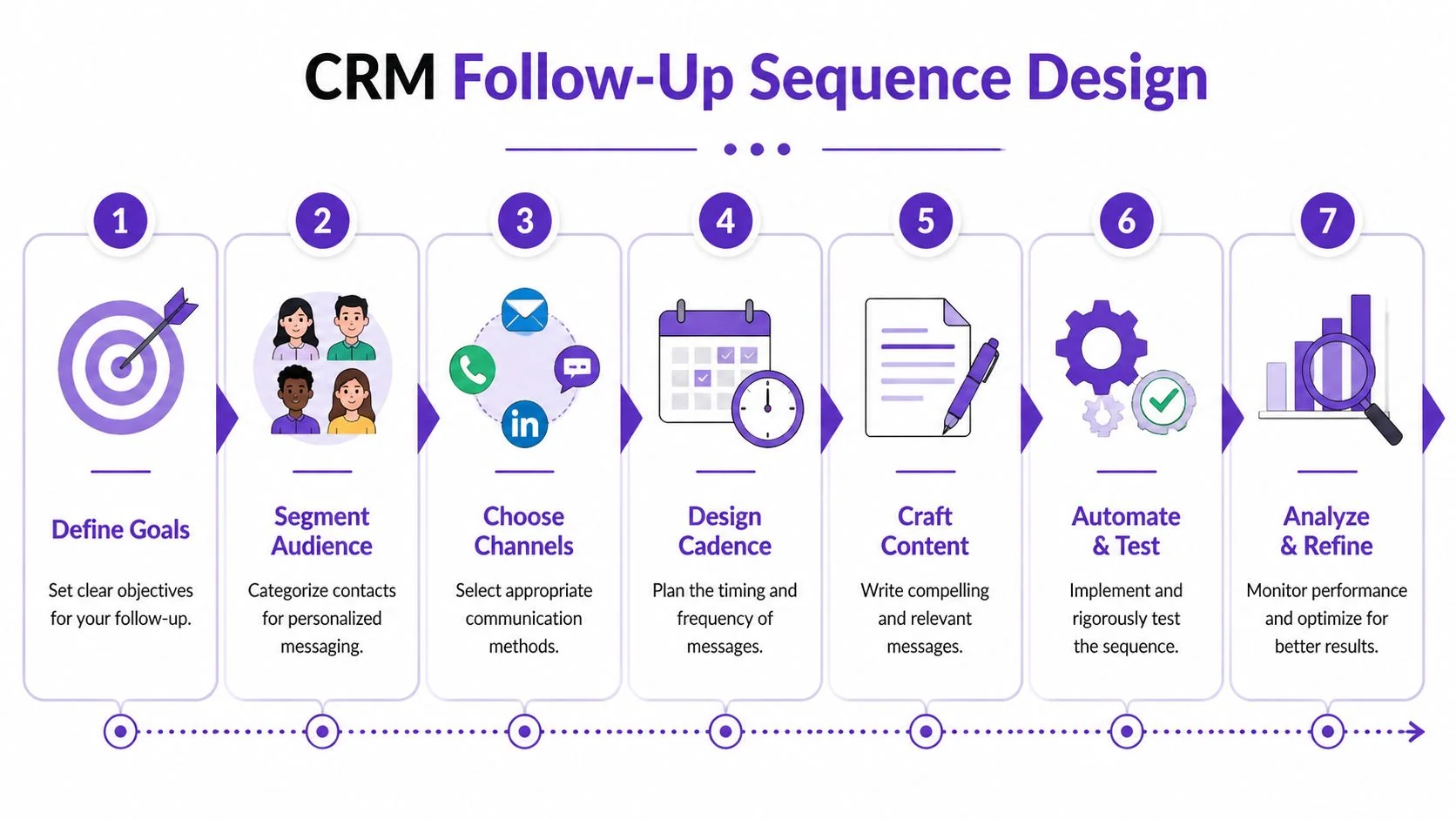
Start with the architecture, not the copy.
Two sequence types that actually work
Intent-triggered sequences should fire when the buyer does something meaningful. Think demo requests, contact sales forms, hand-raise replies, repeat visits to pricing, or high-value product usage in a trial. These need fast action and tighter rep ownership.
Time-based sequences are better for lower-intent records. Newsletter signups, gated content downloads, event scans, or broad nurture MQLs often belong here. The cadence can be slower, and the content should educate before it asks for time.
A common mistake is letting time-based workflows handle high-intent actions. That’s how a prospect requesting a demo gets an immediate “thanks for downloading” email and no call task until the next day.
For teams looking at broader workflow examples, Orbit AI’s article on effective lead follow-up automation is a helpful complement because it shows how to think about triggers and actions together.
Use channel changes intentionally
A sequence shouldn’t be “five emails in a row because that’s what the tool supports.”
Email works well for summaries, links, recap notes, and asynchronous asks. Phone tasks work when urgency or ambiguity is high. LinkedIn can help when the buyer is aware of you but not replying. Calendar links are useful only when interest is already established. The point is to match the channel to the job.
Here’s a simple example of how that looks in practice.
| Day | Action for Hot Lead (Demo Request) | Action for Warm Lead (Ebook Download) |
|---|---|---|
| 0 | Immediate confirmation email and owner assignment | Thank-you email with relevant resource |
| 0 | Rep call task created | Add to nurture with light personalization |
| 1 | Personal follow-up email referencing request context | Check engagement with first message |
| 2 | Second call attempt if no response | Send follow-up tied to topic downloaded |
| 4 | Short breakup-style check-in or scheduling prompt | Create rep task only if intent signals appear |
| 7 | Exit to nurture or recycle based on engagement | Continue slower educational cadence |
The point isn’t to copy that table exactly. The point is to separate high-intent response motion from low-intent nurture motion.
Test the workflow like a product release
Most follow up crm issues are implementation errors, not strategy errors.
Before launch, test every branch:
- Form path testing: does the right owner get assigned?
- Delay testing: do weekends, time zones, and business hours create gaps?
- Token testing: do emails render correctly when values are blank?
- Exit criteria: does the sequence stop when a meeting books or a rep gets a reply?
- Re-entry rules: can a recycled lead re-enter under the right conditions without chaos?
This short demo is useful if you want to see sequence thinking in action before mapping your own workflows.
Don’t judge a cadence by whether it “looks complete.” Judge it by whether each touch has a reason to exist.
Writing Follow-Up Messages That Get Replies
A good message does one job. It doesn’t try to close, educate, reassure, and qualify all at once.
Many follow up crm builds often lose their edge. The automation works, but the messages sound like placeholders. Reps know they should personalize, so they add a first name token and keep the rest generic. Buyers notice immediately.
Research on lead response speed shows why template quality matters. Teams are 21x more likely to qualify a lead when responding within 5 minutes versus 30 minutes, yet the average business response time remains around 42 hours, according to these lead response statistics. Fast response only helps if the message is ready to send and worth reading.
Four message types you actually need
Many teams only need a small library of strong follow-up templates.
- The immediate acknowledgment Use this for demo requests, contact forms, and hand raises. Confirm the action, name the next step, and reduce uncertainty.Example:
Hi Sara, saw your request come through. I’m reviewing the details you shared about onboarding volume and will send a few times shortly. If there’s a specific workflow you want covered, reply here and I’ll tailor the session.
- The value-add follow-up This should move the conversation forward with something relevant. A short implementation note, a setup checklist, or a product comparison can work. Don’t send “just checking in.”
- The clarification nudge Use this when a buyer engaged but didn’t commit. Your goal is to remove friction, not create pressure.
- The clean closeout End stalled sequences with a respectful note that makes it easy to reply, pause, or exit.
Personalization that goes beyond tokens
The best personalization often comes from context fields and activity data, not from writing tricks.
Reference the page they requested, the topic they downloaded, the feature they asked about, or the problem they described on the call. If your CRM stores call summaries or notes, use those details. That creates specificity without making the message longer.
A few practical rules:
- Keep one CTA: ask for one next action only.
- Write for skimming: short paragraphs, direct ask, no filler.
- Use subject lines like labels: clear beats clever. If you want a style check, MailGenius has a useful guide on email subject line capitalization that helps teams standardize without overthinking it.
- Build fallback text: if a token or custom field is blank, the email should still read naturally.
Field note: the strongest follow-up templates sound like something a good rep would write quickly, not like something a committee polished for a week.
Tracking KPIs and Optimizing Your Follow-Up Process
A follow up crm isn’t finished when the workflow goes live. That’s when the actual work starts.
Many teams can tell you how many touches they send. Fewer can tell you which touchpoint influenced a booked meeting, qualified opportunity, or closed deal. That’s the measurement gap that keeps weak sequences alive. Teams often run multi-channel follow-up across email, phone, and social but lack the framework to measure which combination drives conversions, as noted in this analysis of CRM automated follow-ups.
Track sequence performance by stage, not just overall
Overall reply rate can hide a bad workflow.
Break reporting into sequence stages and channel actions. You want to know whether the first email is carrying the whole sequence, whether call tasks change outcomes, and whether certain paths underperform for specific segments. Keep the scoreboard tight:
- Reply rate by touch
- Meeting booked rate by sequence
- Lead-to-opportunity rate by source and sequence
- No-response exit rate
- Time-to-first-human-response
- Pipeline influence by campaign path
Build attribution that your team will actually use
Don’t start with a perfect attribution model. Start with one your sales team and RevOps team will trust.
Use campaign IDs, consistent UTM tagging, and sequence naming conventions that make reporting readable inside HubSpot or Salesforce. If a rep can’t tell which workflow a lead came through, the reporting won’t survive the first review meeting.
A practical optimization loop looks like this:
- Pick one variable to test such as subject line, first CTA, or delay between touches
- Segment results by lead source or intent level
- Review with frontline reps because CRM data rarely captures every objection pattern
- Retire weak paths quickly instead of keeping them because “someone might reply eventually”
Good follow-up operations don’t optimize for activity. They optimize for useful conversations.
Scaling Your Process with Video Training and Onboarding
Even a well-built follow up crm breaks if reps don’t use it the same way.
That’s the hidden constraint in most implementations. RevOps designs the workflow, sales leadership signs off, and then the team gets a text document, a one-time enablement call, and maybe a few screenshots in a knowledge base. After that, every rep improvises. Data quality slips, stage usage drifts, and automation starts firing off incomplete records.

Show the workflow where the work happens
The fastest way to standardize behavior is to record the actual process inside the CRM.
That includes how to create a lead correctly, how to update lifecycle stages, how to log call outcomes, when to override automation, and what to do when a record is missing key fields. Screen-based process videos work better than static SOPs for this because reps can see exactly where a field lives and what “done correctly” looks like.
This matters beyond sales onboarding. The same method works for:
- Demo walkthroughs for presales teams
- Knowledge base videos that explain support handoff rules
- Feature release videos that show new fields or automations
- Onboarding videos for new SDRs and account executives
- Support article videos for internal process updates
Why recording quality affects adoption
Most quick screen recordings are too long and too rough. In practice, a simple Loom recording is often 50-100% longer than necessary, because the speaker rambles, restarts, and leaves dead air in place. On the other end, tools like Camtasia or Adobe Premiere Pro can produce polished training content, but they require real editing skill and too much production time for day-to-day operational changes.
That’s why teams need a middle path. A subject matter expert should be able to open the CRM, speak naturally without rehearsing, and still produce a polished training asset. The best workflow is one where that same raw recording can become an explainer video, an onboarding asset, or internal documentation without sending it to a video editor.
If you’re building a repeatable training program around CRM process changes, this guide to corporate training video production is a useful reference point for how to formalize that effort.
The process isn’t scaled when the automation is live. It’s scaled when a new rep can follow it correctly without asking three people for help.
If you want to turn CRM process walkthroughs into polished training assets without heavy editing, Tutorial AI is built for exactly that. It lets subject matter experts record demos, onboarding videos, explainer videos, feature release videos, knowledge base videos, and support article videos from real screen recordings, then transforms the raw capture into a professional, on-brand result. Instead of publishing long, lightly edited recordings or relying on expert-only tools like Adobe Premiere Pro, your team can speak freely, skip rehearsal, and still produce clear training content that supports adoption, data hygiene, and consistent follow-up execution at scale.