
Project teams don't struggle with project management because they lack effort. They struggle because projects are messy by nature. Priorities shift, stakeholders go quiet, requirements stay fuzzy longer than anyone admits, and teams keep moving anyway.
That’s why the headline number matters. Seventy percent of projects fail to deliver on their promised outcomes, and only 2.5% of companies successfully complete 100% of their projects, according to project management statistics compiled from Deloitte, McKinsey, PMI, and PwC findings. Those figures are stark, but they also make one point very clear. If your projects have felt harder than they should, that isn’t unusual. It’s normal.
The useful response isn’t resignation. It’s discipline. The challenges of project management become far more manageable when you treat them as recurring failure patterns instead of one-off surprises. Teams that document decisions, define scope early, and preserve shared context usually recover faster when things wobble. That matters even more in remote and hybrid environments where knowledge disappears into chat threads and private meetings unless someone captures it deliberately. A strong grasp of institutional knowledge often separates teams that repeat mistakes from teams that build momentum.
Why So Many Projects Fail and What You Can Do
Seventy percent of projects miss their intended outcomes. That number matters because failure usually looks ordinary while it is happening.
Projects slip through a series of small breakdowns that nobody treats as serious enough to stop the work. A requirement stays vague for two weeks. A stakeholder gives approval in a chat thread but means something narrower than the team heard. A deadline gets committed before dependencies are clear. In remote and hybrid teams, those gaps widen faster because so much context lives in meetings, direct messages, and half-remembered conversations.
I see the same pattern repeatedly. The project plan exists, the team is capable, and the work still drifts because shared understanding is weaker than everyone assumes. That is why strong delivery depends less on heroic effort and more on how well the team captures decisions, confirms assumptions, and keeps context visible across time zones and tools.
Start with failure patterns, not blame
A postmortem is useful only if it identifies the operating failure, not the person closest to it.
Three patterns show up often:
- False clarity at kickoff: People agree to the same words, but not to the same meaning. "Done," "phase one," and "high priority" can each hide three different interpretations.
- Unofficial changes entering the workstream: A request mentioned in Slack or a side call gets treated as approved scope because nobody records the decision path.
- Progress reporting that masks risk: Updates focus on activity completed, while unresolved dependencies, rework, and stakeholder confusion stay out of sight.
Remote teams feel this first in handoffs. One person leaves a meeting with a clear picture. The next person gets a summary stripped of nuance. By the third handoff, the team is building against a version of the plan that no longer matches what sponsors expect. Institutional memory works like a project's shared map. Without it, people keep walking confidently in different directions. Teams that actively preserve institutional knowledge across projects and handoffs recover faster because they can trace how a decision was made, not just what someone remembers.
Practical rule: If a project stays on track only because one person keeps chasing updates, clarifying decisions, and correcting misunderstandings, the process is fragile.
What actually helps
The fix is rarely more meetings. The fix is better signal.
Start with a few habits that reduce ambiguity before it turns into rework:
- Define success in operational terms. State what will ship, who owns each workflow, what acceptance looks like, and what is explicitly out of scope.
- Capture decisions while they are fresh. A short written record beats a confident memory every time.
- Treat discussion, approval, and change control as separate moments. Conversation creates options. Approval commits time and budget.
- Review risk before status. Ask what changed, what is blocked, and which assumptions no longer hold.
For distributed teams, recorded walkthroughs can do something status notes often cannot. They preserve tone, context, and sequence. A two-minute AI-generated video summary of a decision, process change, or feature requirement can align stakeholders faster than another page in a document, especially when people are joining asynchronously. That is one reason tools like Tutorial AI can be unexpectedly useful in project delivery. They turn fragile verbal context into repeatable explanations the team can revisit, share, and build from.
Good project management is not paperwork for its own sake. It is a control system. The goal is to keep decisions visible, scope traceable, and knowledge portable so the project can absorb change without losing direction.
Tackling Human-Centric Challenges in Your Team
Poor communication is directly responsible for 30% of all project failures, and 52% of projects face hybrid stakeholder issues in remote or hybrid settings, according to project management research on communication breakdowns. Those two numbers explain why many projects feel confusing even when the plan looks fine on paper.

The common advice is to “communicate more.” That’s incomplete. Teams don't usually fail because nobody spoke. They fail because the wrong people got the wrong level of detail in the wrong format at the wrong time. In remote and hybrid teams, that gets worse because silence is easy to misread. A stakeholder who says nothing may be aligned, overloaded, or disengaged. Those are very different situations.
What poor communication looks like in practice
You can usually spot communication trouble before the schedule slips. The signals are familiar:
- Meetings end with energy but no decision trail: People leave feeling productive, then reopen the same issue next week.
- Updates are long but shallow: Status reports list tasks completed but don't say what changed, what’s blocked, or what needs approval.
- Stakeholders react late: They don't engage during discovery, then object when work is already built.
- Teams rely on private context: A product lead knows why the priority changed, but engineering and support only see the downstream chaos.
A lot of leads assume this is a personality problem. Usually it’s a design problem. The communication system asks people to pull context from too many places. They won’t do that consistently, especially when they’re busy.
Build communication by audience, not by habit
Strong project communication is selective. Executives need decisions, risks, and trade-offs. Delivery teams need acceptance criteria, dependencies, and definitions of done. Support and enablement teams need the why behind the release, not just the date.
A simple communication design often works better than a complicated one:
| Audience | What they need | Best format |
|---|---|---|
| Executive sponsor | Risk, decisions, business impact | Brief weekly summary |
| Core project team | Tasks, blockers, dependencies | Working board plus short standup |
| Cross-functional stakeholders | What changed and when | Written update with links |
| New contributors | Background and rationale | Recorded walkthrough or concise brief |
That’s where many teams benefit from formalizing their internal communication best practices instead of letting each manager improvise.
A project can survive disagreement. It usually can’t survive hidden disagreement.
Stakeholder disengagement is often a format problem
Remote stakeholders disengage when participation is expensive. If the only way to stay informed is to attend a live call in a crowded week, many people will fall behind. Then they re-enter late and challenge decisions that the team thinks were already settled.
A better approach is to lower the cost of staying aligned:
- Use asynchronous updates for non-urgent context: Not every issue deserves a meeting.
- Record decision rationale: “Approved” is weaker than “approved because these trade-offs beat the alternatives.”
- Ask for explicit sign-off: Silence should not count as agreement on risky items.
- Tailor the message: The legal reviewer, implementation manager, and product marketer don’t need the same explanation.
Team morale follows clarity
Morale problems are often management problems wearing an emotional disguise. Teams get frustrated when priorities churn, decisions reverse, and success criteria move around. They can handle hard work. They struggle with pointless rework.
If you want better morale, give people cleaner inputs:
- clear scope
- visible ownership
- realistic sequencing
- decision logs that survive meetings
That sounds basic. It is basic. It’s also where a large share of project difficulty lives.
Mastering Project Scope and Clear Requirements
Scope creep is where many otherwise promising projects start to lose shape. Seventy-one percent of projects fail on time, budget, or satisfaction due to scope shifts, and proactive mitigation in agile teams can reduce this impact by 40%, according to research on common project management challenges and scope control. That same source also notes a projected rise in AI-induced scope creep, including a 25% scope overrun in SaaS demo projects by 2025.
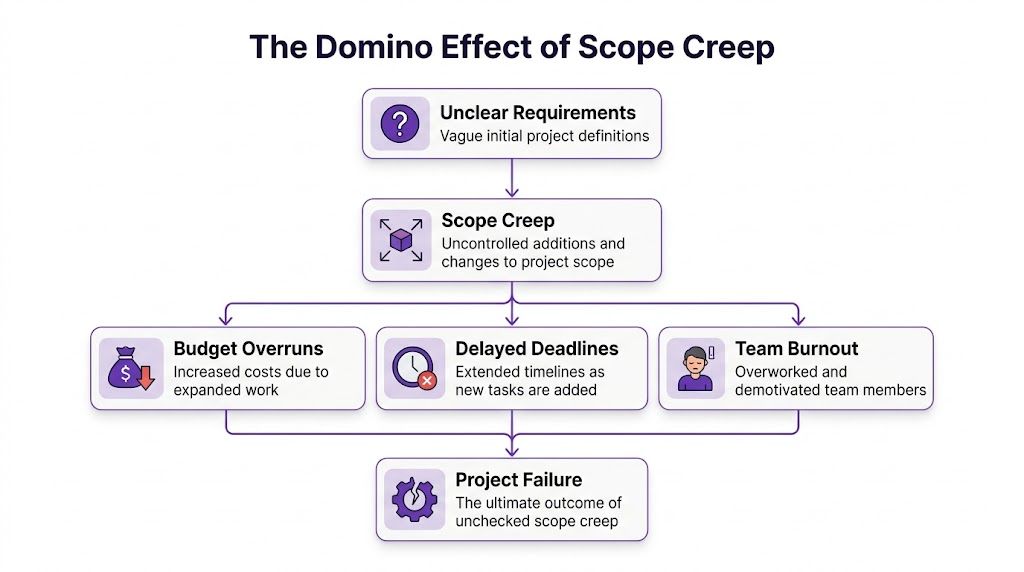
Scope creep gets described too casually. Teams talk about it as if it means “the client asked for more stuff.” That’s only part of the story. Real scope creep happens when change enters the project without being translated into cost, time, sequencing, and ownership. The change itself may be reasonable. The failure is skipping the decision process.
Healthy evolution versus damaging scope creep
Projects do need to evolve. Markets change. Feedback reveals blind spots. Technical constraints surface after discovery. None of that is automatically a problem.
Use this distinction:
- Healthy evolution has a visible owner, a documented trade-off, and a decision on what moves, expands, or gets dropped.
- Damaging scope creep sneaks in as “small asks,” vague polish requests, or loosely framed ideas that nobody prices properly.
A product manager says, “Can we also support one more workflow?” A sales leader asks for “just a short custom demo version.” A founder wants “a slightly cleaner onboarding path.” Each request sounds manageable on its own. Together, they overload the system.
Requirements fail when teams confuse familiarity with clarity
Teams often think they’re aligned because everyone understands the product domain. That’s dangerous. Shared vocabulary can hide different expectations.
Write requirements so an outsider could follow them. If a requirement depends on tribal knowledge, it isn’t ready. I prefer requirements that answer four simple questions:
- What problem are we solving?
- Who is affected?
- What must the solution do?
- How will we know it’s acceptable?
User stories help, but they aren't enough on their own. “As a user, I want X” can still leave major ambiguity. Pair stories with examples, edge cases, and acceptance criteria. If the project is larger, build a work breakdown structure before debating timeline. Sequencing vague work is how teams create false confidence.
A practical change control process
Teams don’t need a heavyweight approval machine. They need a lightweight process that forces clarity before work expands.
Step 1: Capture every request in one place
No scope request should live only in chat, email, or a meeting note. Put it in a visible queue with the requestor, reason, expected value, and urgency.
Step 2: Estimate the impact
Ask three things before saying yes:
- What new work does this create?
- What does it delay or displace?
- Who has to approve the trade-off?
If nobody can answer those questions, the request isn’t ready.
Step 3: Decide explicitly
Every scope request should end with one of four outcomes:
| Challenge | Root Cause | Mitigation Tactic |
|---|---|---|
| Scope creep | Informal change requests | Central change log with approval steps |
| Unclear requirements | Assumptions hidden in conversation | Acceptance criteria and examples |
| Stakeholder confusion | Different expectations by function | Decision summaries in plain language |
| Rework | Missing review points | Early demos and staged sign-offs |
| AI-induced drift | Fast iteration without governance | Versioned prompts, review gates, locked baselines |
Step 4: Update the plan immediately
If the scope changes, the plan changes. That means backlog, owner list, dependencies, timelines, and stakeholder expectations. Teams often do the first half and skip the second.
Field note: A project isn't protected by having a scope document. It's protected by using that document when pressure rises.
MoSCoW works because it forces trade-offs
I still like MoSCoW prioritization for messy projects because it creates sharp conversations early:
- Must-have: Without this, the release fails.
- Should-have: Important, but not release-critical.
- Could-have: Valuable if capacity allows.
- Won’t-have for now: Deliberately excluded.
The last category matters most. If teams never state what’s out, they haven’t really defined what’s in.
AI changes the speed of scope drift
AI tools create a newer version of an old problem. When generating scripts, demos, onboarding content, or product walkthroughs, teams can now create more variations faster. That feels productive, but fast iteration often invites uncontrolled expansion. New versions appear before anyone agrees on the baseline. Extra edits pile up because making one more pass seems cheap.
This is where governance matters. If you use AI in content-heavy or software tutorial projects, set rules around:
- who can trigger a new version
- what counts as an approved revision
- when a script or workflow is locked
- how comments become actual changes
Without that, speed becomes noise.
Keep scope visible to the whole team
Scope control fails when only the project manager sees the full picture. Designers, engineers, support leads, and trainers should all know what is in, what is pending, and what was rejected. Visibility reduces accidental work.
The best teams make scope feel tangible. They use annotated user flows, structured tickets in Jira, concise briefs in Notion, or demo checklists that show exactly what the release includes. When scope is concrete, the team can defend it without becoming defensive.
Navigating Resource Constraints and Unrealistic Deadlines
Teams rarely fail because they have too few resources in theory. They fail because leaders commit those resources twice, spread specialists too thin, or accept deadlines before anyone maps the work.

Resource pressure usually arrives disguised as optimism. A stakeholder says the task is small because the visible output looks small. A short feature, a quick onboarding flow, a single integration, a “simple” enablement asset. But project work includes review cycles, dependency coordination, QA, training impact, and handoffs. The visible deliverable is only the tip.
Deadlines break when sequencing is ignored
An unrealistic deadline often comes from one missing question: what has to happen first? Teams estimate effort but ignore order. That’s how they end up with a launch date that assumes parallel work where dependencies force serial work.
When a date is fixed, I push the conversation into choices:
- Reduce scope
- Add capacity
- Lower polish
- Accept more risk
- Move the date
Those are the true levers. Everything else is motivational language.
Allocate people like a portfolio, not a wish list
Shared specialists are usually the bottleneck. The one engineer who understands the integration. The one designer who owns the system. The one enablement lead who has to support every launch. If five projects all assume access to that person, one project plan may look fine while the portfolio is impossible.
A few habits help:
- Name constrained roles early: Don’t wait for resourcing conflict to appear mid-project.
- Protect focus time: Fragmented calendars kill throughput.
- Track hidden work: Support, reviews, approvals, and stakeholder questions consume real capacity.
- Re-estimate after scope changes: Old estimates become fiction fast.
Push back with trade-offs, not frustration
Leads lose credibility when they answer deadline pressure with “that’s impossible.” A better response is operational and calm: “We can hit that date if we remove these items, reduce testing depth, or reassign this dependency.”
The most useful project manager in a tense meeting is the one who can translate pressure into choices.
That’s how you manage scarce time and people. Not by pretending constraints don’t exist, but by making the consequences visible before the team pays for them.
How Tutorial AI Solves Communication Breakdowns
Communication problems are often documentation problems in disguise. Teams think they need more meetings when what they need is a clearer artifact that survives the meeting. In remote and hybrid work, written notes help, but they often miss tone, product flow, and visual context.

That’s where video becomes practical, not cosmetic. A concise walkthrough can align product, support, sales enablement, training, and leadership much faster than a long status document. It shows the screen, explains the why, and preserves the exact flow people need to understand. Teams that are trying to improve manager effectiveness also benefit from outside frameworks such as these communication assessment tools, which help identify where messages break down before those gaps become delivery issues.
Why raw recordings and traditional editing both create friction
Project teams know they should record more context. Then they hit a familiar trade-off.
A simple screen recorder such as Loom is easy to start with, but the result is often far longer than necessary. When a subject matter expert talks through a process naturally, the recording usually includes restarts, filler phrases, detours, and extra clicks. In practice, that kind of easy recording is often 50-100% longer than necessary. People stop watching long before the key point arrives.
Traditional editing tools such as Camtasia or Adobe Premiere Pro solve the polish problem, but they create a new one. They demand editing skill, timeline work, and production time that most project teams and functional experts don’t have. Your best product marketer, onboarding lead, or support specialist usually isn't a video editor.
Where AI video creation changes the equation
The practical value is simple. A subject matter expert can record a screen, talk freely without rehearsal, and still end up with a professional result. That closes a painful gap between “quick but messy” and “polished but slow.”
For project work, that has several direct uses:
- Stakeholder alignment: Record a short walkthrough of a proposed flow, release candidate, or decision trade-off.
- Onboarding videos: Give new team members context without repeating the same live explanation.
- Explainer videos: Clarify process changes across departments.
- Feature release videos: Show what changed, who it affects, and what support teams should expect.
- Knowledge base and support article videos: Turn written instructions into visual guidance that’s easier to follow.
The key point isn’t just speed. It’s reducing ambiguity. A screen-recorded explanation captures sequence, terminology, and expected behavior in a way text often doesn't.
Better artifacts reduce meeting load
A good project artifact should do three jobs. It should explain the current state, preserve a decision trail, and help someone new catch up without needing a private briefing. Video can do that well when it’s concise and easy to update.
Here’s a closer look at the workflow in practice.
This matters most in projects where multiple functions need the same understanding in different contexts. A support team needs to see the user journey. A sales team needs the business value. A training team needs the sequence and edge cases. One clear visual walkthrough can anchor all three conversations.
Manager’s shortcut: If the same explanation has to be repeated three times, turn it into a reusable asset.
The best use case is knowledge transfer at speed
The hardest project communication problem isn't announcing something. It’s helping other people absorb it accurately. That’s why video works especially well for demos, onboarding videos, feature release videos, explainer videos, and internal knowledge transfer.
When those assets are easy to create and update, the team stops treating documentation as a final chore. It becomes part of delivery. That shift is one of the cleaner ways to reduce misalignment in modern project work.
Building a Proactive Project Management Framework
A proactive framework gives the team a repeatable way to surface risk, record decisions, and keep context visible before confusion turns into delay. In remote and hybrid teams, that matters even more because missed context rarely shows up all at once. It leaks out through conflicting assumptions, stale docs, and handoffs that depend on whoever happened to be in the meeting.
Good project management works like traffic control. The goal is not to stop movement. The goal is to keep work flowing in the right lane, at the right speed, with clear signals when something changes.
Build a lightweight operating system
You do not need a heavy PMO model to get control. You need a system people will still follow during a difficult week. In practice, five pieces usually carry most of the load:
A single project brief
One page that defines the outcome, scope, owners, assumptions, constraints, and what is explicitly out of scope.A visible work system
Jira, Asana, ClickUp, Monday.com, or any board the team updates.A risk log
Short, current, and reviewed on a schedule.A change log
Every material scope decision captured with rationale, owner, and delivery impact.A communication rhythm
Team syncs, sponsor updates, and async summaries that document decisions instead of relying on memory.
For distributed teams, I would add one more layer. Keep a small set of visual artifacts for work that crosses functions or time zones. A short walkthrough, recorded status explanation, or process demo often prevents the kind of drift that written notes miss. People read text differently. They usually interpret a screen flow or narrated sequence the same way.
Watch for signals before milestones slip
Late projects usually send warning signs early. Teams just ignore them because the dashboard still looks green.
The useful indicators are operational:
- Approval latency: decisions waiting with stakeholders for days
- Rework volume: completed work sent back because the requirement was interpreted differently
- Blocked tasks: dependencies piling up in one role or team
- Context gaps: repeated questions about items that were supposedly already explained
- Documentation decay: specs, tickets, and release notes no longer matching the current plan
That last point causes more damage in hybrid teams than many leads expect. If the current version of the truth lives in chat, side conversations, and one person's head, the project is already carrying risk.
Match the framework to the delivery style
Some teams need sequential planning. Others work in sprints. Many operate in a hybrid model because procurement, compliance, engineering, and training all move at different speeds.
Consistency matters more than purity. If you use iterative delivery, your team still needs a clear intake path, scope controls, review points, and release criteria. If you need a refresher on how iterative work should function in practice, this guide to Agile methodology is a useful reference.
I have seen teams fail with both waterfall and agile methods for the same reason. They picked a method, but never defined how decisions would be documented or how stakeholders would stay aligned between meetings.
Turn recurring work into reusable assets
Projects become easier when recurring work stops being reinvented. Approval flows, launch checklists, onboarding steps, release communications, and training prep should become repeatable operating patterns.
Document those workflows as standard operating procedures for recurring project tasks. A good SOP cuts debate that should have been settled weeks ago.
In remote teams, SOPs work best when they are paired with short visual explainers. That is where tools like Tutorial AI earn their place. Instead of writing a long update that five stakeholder groups interpret five different ways, a project lead can create a concise walkthrough that shows the current state, explains what changed, and preserves the reasoning behind the decision. That improves alignment without adding another standing meeting.
Keep the framework small enough to survive pressure
The framework has to hold up when the project gets busy. If a template, meeting, or tool does not support a real decision, remove it. If a document exists only to satisfy process, it will go stale first.
Use enough structure to protect delivery, not so much structure that the team spends its energy maintaining the system.
The best framework is the one your team can keep current while doing the work. In hybrid environments, that usually means fewer documents, better artifacts, and a stronger habit of recording decisions in formats people can absorb and reuse.
Conclusion Navigating Complexity with Confidence
The challenges of project management don’t disappear with experience. Experienced teams just recognize them sooner. They know that communication subtly breaks down, scope expands one “small” request at a time, and resource plans collapse when assumptions stay invisible.
That’s why better project outcomes come from proactivity, not intensity. A calmer project is usually a better-run project. Clear requirements reduce rework. Documented decisions reduce confusion. Structured change control protects delivery. Realistic capacity planning protects both quality and morale.
The other important shift is this. Not every communication problem needs another meeting. In remote and hybrid teams, shared understanding often improves when teams create stronger artifacts instead of more live conversation. A clear visual explanation, a concise project brief, a decision log, and a repeatable operating rhythm can remove a surprising amount of friction.
If you lead projects, don’t aim for perfect certainty. Aim for visible trade-offs, fast clarification, and clean handoffs. That’s what gives teams confidence when priorities change. It’s also what helps stakeholders trust the process even when the work gets complicated.
Projects will always involve uncertainty. That part doesn't change. What does change is your ability to manage it deliberately. When you build systems for communication, scope control, and resource realism, complexity stops feeling chaotic. It starts feeling manageable.
If your team needs a faster way to create demos, onboarding videos, explainer videos, feature release videos, knowledge base videos, and support article videos, Tutorial AI is worth a look. It fills the gap between rough screen recordings and expert-only editing tools. You can record your screen and speak naturally without heavy prep, then turn that raw capture into a polished, on-brand video that looks professionally edited. That makes it much easier for subject matter experts to document workflows, align stakeholders, and transfer knowledge without becoming video production specialists.



