At its core, video transcription is the process of turning spoken words from a video into a written text document. It’s like creating a detailed script after the recording is done, capturing every word, pause, and nuance.
This single step does something powerful: it transforms your video from a self-contained, opaque media file into a transparent, versatile asset that search engines and people can easily understand.
What Is Video Transcription Really?
Think of it this way: without a transcript, the valuable information spoken in your video is locked away, invisible to search engines and out of reach for people who can’t listen to the audio. Transcription is the key that unlocks all that value.
It’s more than just getting words on a page. A good transcript acts as a bridge, connecting the engaging, visual world of video with the structured, searchable world of text. Suddenly, your video is no longer a black box. It becomes a goldmine of content that can dramatically improve your SEO, open your message to a wider audience, and give you a ton of material to work with.
For instance, you can take one video transcript and spin it into all sorts of new content:
- A comprehensive blog post: Go deeper into the topics you discussed without having to write from a blank page.
- A week’s worth of social media posts: Pull out punchy quotes, surprising stats, and key takeaways for quick, engaging updates.
- An email newsletter: Give your subscribers a summary of the video’s most valuable points.
- Searchable training guides: Turn how-to videos into step-by-step documentation your team can reference anytime.
Why It Matters More Than You Think
Sure, transcripts are crucial for accessibility, making content available to people with hearing impairments. But their impact goes far, far beyond that.
A fascinating UK government study revealed that 25% of viewers read a transcript without ever hitting play on the video. People are busy, and scanning text is often much faster than watching a 10-minute video. They use the transcript to quickly judge if the content is relevant or to find the exact piece of information they need.
In essence, a transcript isn’t just an accessibility add-on; it’s a standalone piece of content that caters to different user preferences and behaviors. It respects your audience’s time by giving them another way to consume your information. To really get a handle on how this works, it’s worth understanding video transcription AI and the technology that makes converting speech to text so effective. As you’ll see, what seems like a simple tool can fundamentally change your entire content strategy.
Choosing Your Transcription Method
So, you need to turn your video’s audio into text. You’ve essentially got two main paths to choose from: the careful, detailed work of a human, or the blistering speed of a machine. Each has its own strengths, and the best choice really boils down to what you need for your project—accuracy, speed, or budget.
The Human Touch: Manual Transcription
Think of manual transcription as the artisanal, handcrafted approach. A trained professional sits down, listens intently to your video, and types out every single word. This method is king when it comes to understanding nuance.
A human can easily distinguish between different speakers, make sense of thick accents, or filter out distracting background noise. If you need near-perfect accuracy for something like a legal deposition, a focus group, or a high-production video, this is still the gold standard.
The Rise Of Automated Speed
Then you have automated transcription, which uses artificial intelligence to do the heavy lifting. This method is incredibly fast—we’re talking a finished transcript in minutes, not hours—and it costs a fraction of the manual alternative.
For anyone pumping out a lot of content, like a weekly podcast or a library of training videos, AI is a game-changer. It’s a practical, scalable way to get the job done.
This flowchart breaks down how a simple video file gets turned into a powerful text asset, ultimately making your content more discoverable and accessible.
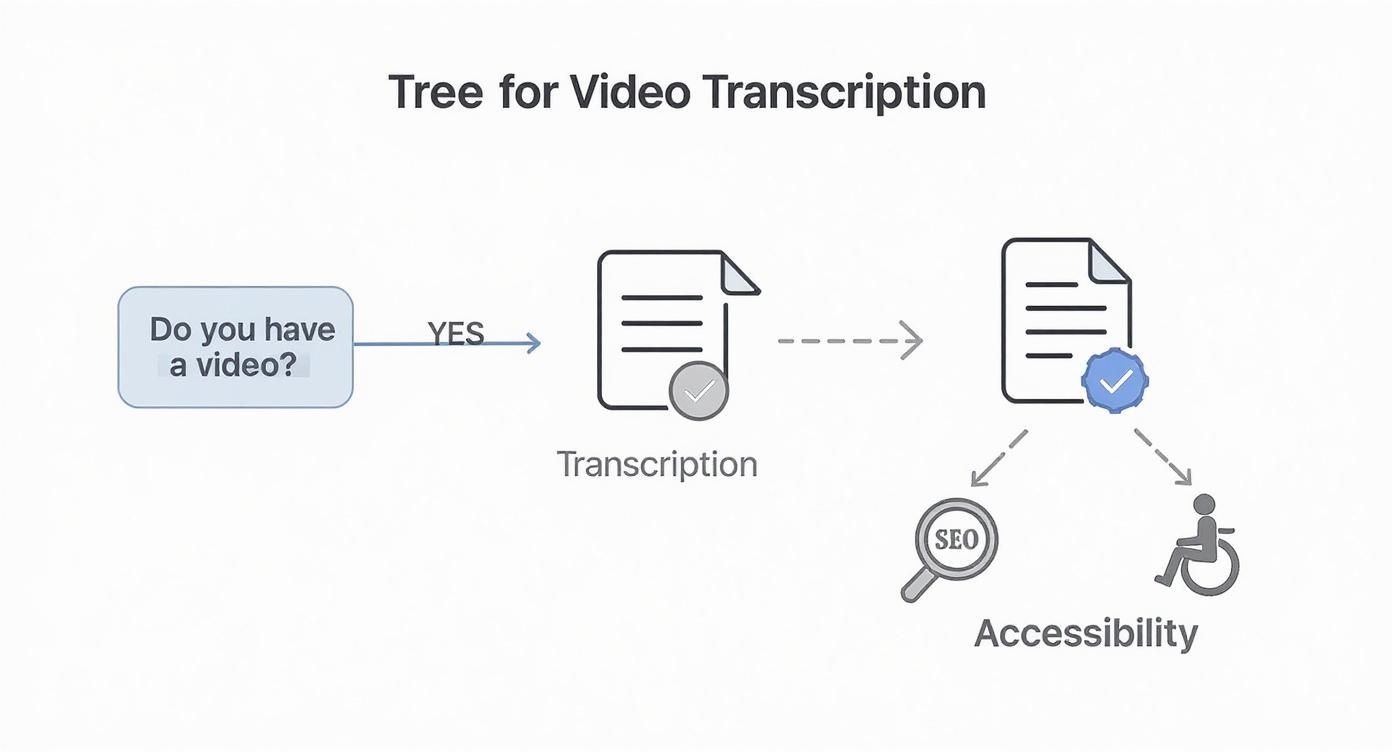
As you can see, transcription isn’t just about creating a document; it’s about unlocking real benefits like better SEO and a more inclusive experience for your audience.
Finding The Best Of Both Worlds: The Hybrid Approach
There’s also a third way that offers a nice middle ground: the hybrid approach. It starts with a quick, AI-generated transcript, which is then handed off to a human editor for a final review and polish.
This combination gives you a high-quality result much faster and more affordably than a purely manual job.
The hybrid method is often the sweet spot for content creators. You get the efficiency of a machine for the first pass and the critical eye of a human for the final quality check. The demand for these services is massive. The U.S. transcription market was valued at USD 30.42 billion and is still climbing, which shows that both human and AI solutions have a strong place. Even as AI gets smarter, that human touch is still essential for high-stakes projects.
To help you decide which path is right for you, here’s a quick breakdown of how the three methods stack up against each other.
Comparing Transcription Methods
| Feature | Manual Transcription | Automated (AI) Transcription | Hybrid Transcription |
|---|---|---|---|
| Accuracy | Highest (99%+) | Good to Very Good (85-98%) | Very High (99%+) |
| Speed | Slowest (hours to days) | Fastest (minutes) | Moderate (faster than manual) |
| Cost | Highest | Lowest | Mid-range |
| Best For | Legal, medical, premium content | High-volume, internal notes, first drafts | Marketing videos, webinars, public-facing content |
| Nuance | Excellent at handling accents & noise | Struggles with complex audio | Excellent with human review |
Ultimately, choosing your transcription method comes down to a trade-off between cost, quality, and speed. A key part of this decision is understanding the pricing, and this guide on Transcription Services Cost: An AI vs. Human Pricing Guide is a great resource for weighing your options.
Whether you need flawless precision, a lightning-fast turnaround, or a smart blend of both, there’s a transcription method that will fit right into your workflow.
Transcription vs. Captions vs. Subtitles: What’s the Difference?
It’s easy to get these terms mixed up, and people often use them interchangeably. But make no mistake—transcripts, captions, and subtitles are three completely different tools, each with a specific job. Getting them right is key to making your content more accessible, reaching a wider audience, and even boosting your SEO.
Think of it this way: your video is the main event, and these are the different ways you can present its audio content.
Let’s start with the foundation: the transcript. This is simply a text version of everything said in your video. It’s not timed to the video itself; it’s just a document. This text-based file is a goldmine for SEO because search engines can read it, and it makes repurposing your content into blog posts, articles, or social media updates a breeze.
Captions and Subtitles: The On-Screen Twins
Unlike a transcript, captions and subtitles appear directly on the screen, synced with the video’s audio. They look similar, but they’re designed for two very different audiences.
Captions are all about accessibility. They’re created for viewers who can’t hear the audio, so they need to convey the entire soundscape of the video. This includes not just the spoken words, but also other crucial audio cues that add meaning.
- Dialogue: “Be careful, don’t open that.”
- Sound Effects: [creepy music intensifies]
- Atmosphere: [door slams shut]
Without these extra details, someone who is deaf or hard of hearing would miss out on the full emotional impact and context of the scene.
Subtitles, on the other hand, are built for translation. They assume the viewer can hear everything just fine—they just don’t understand the language being spoken. Because the viewer can hear the background noises, sound effects, and music, subtitles only need to translate the dialogue.
Here’s a simple analogy: A transcript is the raw manuscript of a book. Captions are like an audiobook narrator describing both the words and key actions. Subtitles are the translated edition of that book for a foreign market.
How to Choose What You Need
Knowing the difference isn’t just academic; it directly impacts how well your message connects with your audience. For example, a whopping 85% of social media videos are watched with the sound off. That makes captions absolutely essential for grabbing attention, not just for meeting accessibility standards.
Here’s a quick guide to help you decide:
- Need to boost SEO or turn your video into a blog post? You need a transcript.
- Want to ensure viewers who are deaf or hard of hearing get the full experience? You need captions.
- Looking to expand your reach to international audiences who speak other languages? You need subtitles.
By understanding what video transcription really is and how it relates to its on-screen cousins, you can make sure your content is clear, effective, and inclusive for every single person who presses play.
Putting Your Transcripts to Work
A video transcript isn’t just a simple text file—it’s a versatile asset you can put to work across your entire organization. Instead of thinking of it as an accessory, see it as a key that unlocks the value trapped inside your video content. It lets you multiply your video’s impact with very little extra effort, and the applications are incredibly broad, touching everything from marketing to internal training.
This growing usefulness is why the global market for online audio and video transcription is booming. Valued at around USD 3.5 billion, it’s projected to grow at a rate of 14.5% annually through 2033, fueled by demand from all kinds of industries.
https://www.youtube.com/embed/3NNWqJdTTHA
Transforming Content Creation and Marketing
For marketers, a transcript is the ultimate content repurposing tool. A single one-hour webinar can be spun into a huge amount of new material, stretching its life and reach far beyond the original live event.
- Blog Posts and Articles: A transcript is basically a perfect first draft for an in-depth article. It’s already got the speaker’s natural voice and all the key points laid out.
- Social Media Snippets: Pulling out compelling quotes, stats, or key takeaways is a breeze. You can quickly turn these into engaging posts for LinkedIn, X, and Facebook.
- Email Newsletters: Summarize the video’s main message for your subscribers, driving them back to the original content or related blog posts.
- Lead Magnets: Condense the transcript into a downloadable PDF guide or a handy checklist. It’s a valuable resource you can offer in exchange for an email address.
This whole approach saves an incredible amount of time. Instead of staring at a blank page, your team has a rich, pre-vetted source of material ready to be tweaked for different channels.
Enhancing Training and Education
In corporate training and educational settings, transcripts make learning more effective and accessible. For example, building great tutorials often begins with a detailed process captured via screen recording for training, and the transcript then becomes an essential study aid.
When you transcribe lectures or training modules, you create searchable study guides. This allows learners to quickly find and review specific concepts without having to scrub through hours of video. It’s a self-paced model that respects people’s time and really helps with retaining information.
By providing a text version of video lessons, you empower your team to learn in the way that works best for them—whether by watching, reading, or both. This flexibility is crucial for effective adult learning and development programs.
Unlocking Insights from Research
Video transcription is also a game-changer for qualitative research. Think about user interviews, focus groups, or customer feedback sessions. Transcribing those recordings creates a searchable database of pure insight.
Researchers can instantly search the text for keywords, spot recurring themes, and pull direct quotes to back up their findings. This systematic approach turns hours of unstructured conversation into actionable data, uncovering customer pain points and new product ideas that might have otherwise been missed.
Integrating Transcription Into Your Workflow
For anyone creating videos today, transcription is more than just a final step for accessibility—it’s the secret to a faster, smarter production cycle. The old way of doing things, endlessly scrubbing through a video timeline to find and snip out mistakes, is clunky and slow. There’s a much better way: editing your video like you’d edit a document.
Think about it. You start by getting an instant transcript of your raw video footage. Instead of fighting with audio waveforms to cut out a filler word or an awkward pause, you just find it in the text and hit delete. It’s that simple. You can rearrange sentences, tighten up your phrasing, and perfect your message right there in the script.
This text-first approach completely changes the game for how quickly you can produce content. Once your script is polished, you can use AI tools to generate a brand new, clean narration from that edited text. No more re-shoots or painful audio fixes. What used to be a post-production headache is now a simple, script-driven task.
The Power of Text-Based Video Editing
When you work this way, the transcript becomes the blueprint for your entire video. It’s not an afterthought; it’s the foundational first step that shapes the structure and flow before you even touch the more complex editing tools.
Here’s what this modern workflow looks like in practice:
- Record Your Video: Just capture your screen and voiceover. Don’t stress about getting every word perfect.
- Generate a Transcript: Run it through an AI-powered tool to get an instant text version of everything you said.
- Edit the Script: Now, just read. Delete all the “ums” and “ahs,” fix clumsy sentences, and get your message just right by editing the text.
- Regenerate the Audio: With a single click, create a new, studio-quality voiceover from your corrected script. The best part? The video timeline automatically syncs to match the new audio.
The image below gives you a peek at how a platform like Tutorial AI builds this text-based editing right into the creator’s workspace.
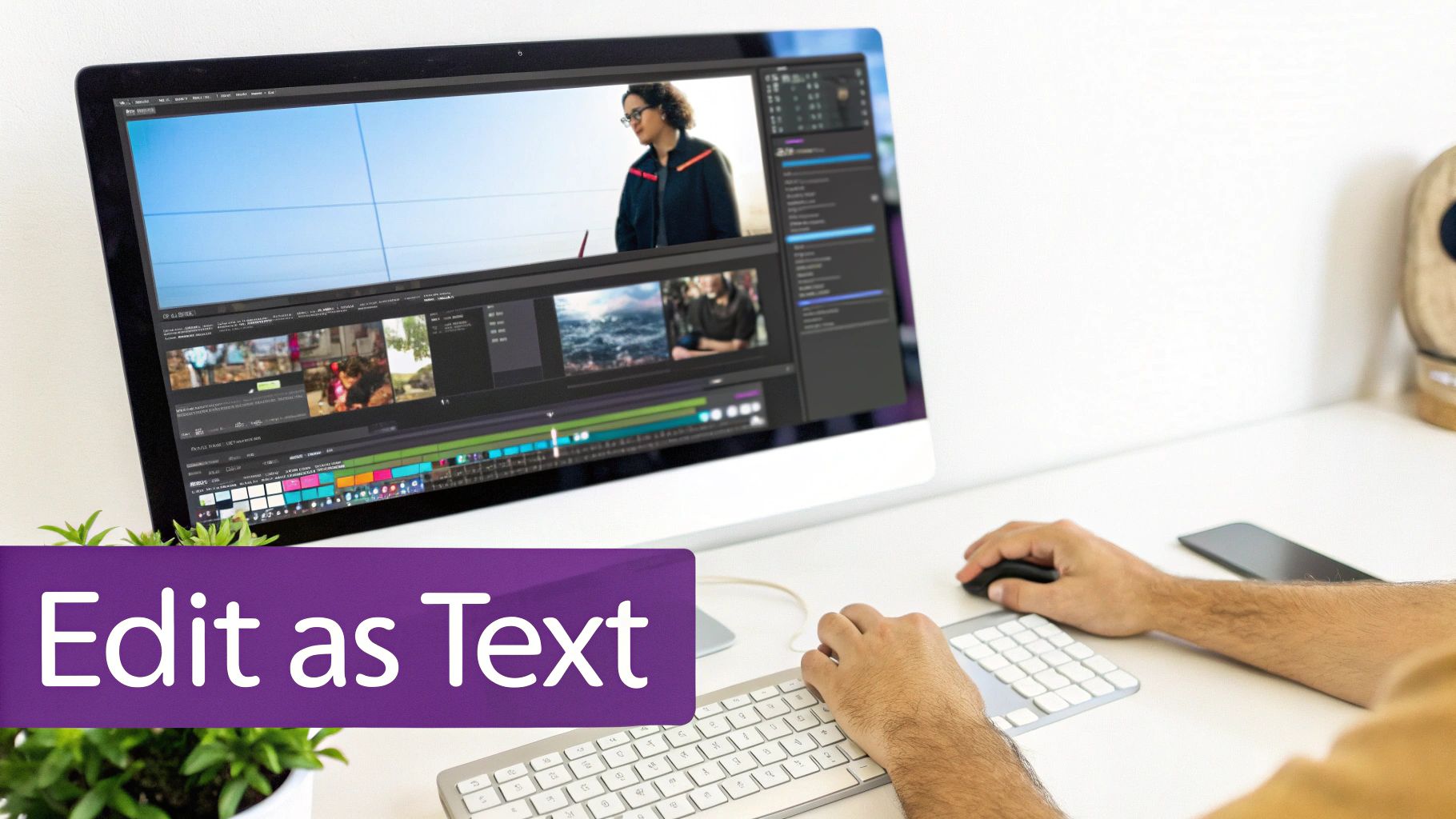
You can see the script on the left directly controls the video timeline on the right. This makes the whole editing process feel incredibly intuitive and fast.
Making Your Workflow Smarter
This isn’t just about saving time; it’s about making your content far more flexible. Since everything is built on a clean text script, you can easily translate it, generate perfectly timed captions, or repurpose the text for a blog post or a knowledge base article. When you have the right tools, you quickly discover how powerful AI transcription can make this entire process feel seamless from start to finish.
By pulling transcription to the very beginning of your creative process, you stop seeing it as a simple accessibility add-on and start treating it like the powerful production tool it truly is. This shift lets you create better content in a fraction of the time.
Getting to a High-Quality Transcript
Let’s be honest, not all transcripts are created equal. There’s a world of difference between a helpful, accurate transcript and a frustrating, garbled one. In the professional world, the gold standard is an accuracy rate of 99% or higher.
Hitting that 99% mark isn’t about some magic button you press at the end. It’s a process, and it actually starts before you even think about transcription.
It all boils down to your source audio. Recording clear, crisp sound is the single most important thing you can do to get a great transcript, whether you’re using an AI tool or a human transcriber. This means grabbing a decent microphone, finding a quiet spot to record, and making sure speakers talk clearly. Think of it this way: a clean audio file is the foundation, and you can’t build a solid house on a shaky foundation.
Making Sure Your Transcript is Accurate and Usable
Even with pristine audio, automated services can stumble. They might misspell company names, butcher industry-specific jargon, or get confused about who’s speaking. This is where a human touch—a quality assurance (QA) step—is absolutely essential.
A person can spot these subtle errors in a heartbeat, making sure the final text is not just accurate, but actually makes sense and is easy to read. This is a big reason why so many creators now prefer to edit video transcripts like a document, giving them total control over the finished product.
The need for this level of precision is growing fast. The global market for video conferencing transcription was valued at around USD 0.806 billion and is projected to hit USD 1.18 billion by 2033. This isn’t just a niche trend; it shows how vital accurate transcripts have become for clear communication and accessibility. You can dig into more of the data on this at Business Research Insights.
A transcript with 95% accuracy might sound pretty good on paper. But think about what it really means: that’s five errors for every 100 words. In a 10-minute video, you could be looking at dozens of mistakes, which can completely undermine the credibility of your content.
Picking the Right File Format for the Job
Finally, a “quality” transcript is also one that’s in a useful format. The right file type makes sure your text is ready to go for whatever you have planned.
- .TXT (Plain Text): This is your no-frills option. You get a simple block of text, perfect for pasting into a document or using as the raw material for a blog post.
- .SRT (SubRip Subtitle): This is the go-to format for captions. It breaks the text into chunks and gives each one a precise start and end time. Pretty much every video player out there supports it.
- .VTT (WebVTT): Think of this as the modern version of .SRT. It was built for the web and lets you do more with styling, like changing text colors or positioning captions on the screen.
Common Questions About Video Transcription
Even after getting the basics down, a few questions always seem to pop up when people start using video transcription. Let’s clear up some of the most common ones so you can put this powerful tool to work.
How Long Does It Take to Transcribe a Video?
This really comes down to whether you’re using a machine or a human. Automated transcription is incredibly fast. Most services can turn around a transcript in just a few minutes, which is a massive time-saver for most projects.
Manual transcription, on the other hand, is a much more involved process. A seasoned professional usually needs about 3-4 hours to transcribe one hour of audio, and that’s if the sound quality is good. If you throw in poor audio, heavy accents, or a lot of technical jargon, that time can easily double.
Can Video Transcription Actually Help My SEO?
You bet it can. Think of it this way: search engines like Google are amazing at reading text, but they can’t actually watch your video to figure out what it’s about. By adding a transcript to the page, you’re giving them a word-for-word script packed with relevant keywords.
This simple step makes your video content visible to search engines, allowing it to show up in search results for all sorts of related queries. It’s one of the easiest and most effective ways to pull in more organic traffic.
What’s the Difference Between Verbatim and Non-Verbatim Transcription?
This is a key distinction that really affects how your final transcript looks and reads. It’s all about how much detail you want to capture.
- Verbatim transcription is the whole shebang. It captures every single sound—every “um,” “uh,” cough, stutter, and repeated phrase. It’s an exact, literal record of the audio, which is essential for things like legal depositions where every utterance counts.
- Non-verbatim transcription (often called a “clean read”) polishes things up. The transcriber removes all the filler words, false starts, and stutters to create a clean, easy-to-read document. This is what you’ll want for turning a video into a blog post, creating training materials, or any other purpose where readability is key.
Go from a rough screen recording to a perfect tutorial in minutes. With Tutorial AI, you can get an automatic transcript, edit the text like a doc, and instantly generate a flawless AI voiceover to match.